Turn on suggestions
Auto-suggest helps you quickly narrow down your search results by suggesting possible matches as you type.
Showing results for
- Community Home
- Get Support
- My Account
Options
- Subscribe to RSS Feed
- Mark Topic as New
- Mark Topic as Read
- Float this Topic for Current User
- Subscribe
- Mute
- Printer Friendly Page
My Account

Options
- Mark as New
- Subscribe
- Mute
- Subscribe to RSS Feed
- Permalink
- Report Inappropriate Content
02-26-2024 11:53 AM
I’m trying to change my phone number. It tells me to go to My account, and find Phone section. I can’t seem to get off the cover page.
Labels:
- Labels:
-
My Account
5 REPLIES 5

Options
- Mark as New
- Subscribe
- Mute
- Subscribe to RSS Feed
- Permalink
- Report Inappropriate Content
02-26-2024 12:44 PM
Sounds like you are on the PM app. My friend indicated that the app is not user friendly.
Just click on + in circle bottom left>Profile>My Phone Number and click on the pencil icon to change.

Options
- Mark as New
- Subscribe
- Mute
- Subscribe to RSS Feed
- Permalink
- Report Inappropriate Content
02-26-2024 12:37 PM - edited 02-26-2024 12:37 PM
@50 If you don't see the slide out menu on the left shown in the pictures, look for a v next to the shopping card icon near the top right and tap that. It used to be that on a browser there was a > at the bottom left to slide out the navigation menu but that changed a week or so ago, on my browser at least.
Options
- Mark as New
- Subscribe
- Mute
- Subscribe to RSS Feed
- Permalink
- Report Inappropriate Content
02-26-2024 11:57 AM


Options
- Mark as New
- Subscribe
- Mute
- Subscribe to RSS Feed
- Permalink
- Report Inappropriate Content
02-26-2024 11:56 AM - edited 02-26-2024 11:56 AM
Login to My Account, click Profile, and you can update the phone number by clicking on the pencil to the right of the phone number there
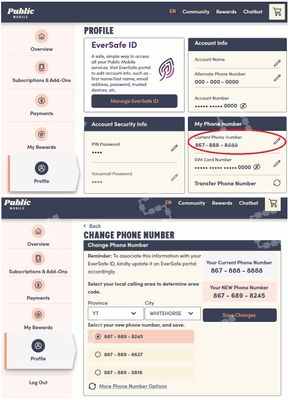
if you are unable to see the Profile page, use this direct link on a browser to get to phone number changing page:
https://myaccount.publicmobile.ca/en/account/profile/update/phone-number
If you are using the app or browser on the phone, you can click ⊕ or ⧁ at the bottom left to bring up the menu and go to Profile that way
Options
- Mark as New
- Subscribe
- Mute
- Subscribe to RSS Feed
- Permalink
- Report Inappropriate Content
02-26-2024 11:54 AM
HI @50
click Profile and you will see the phone number there, click the pencil besides that and you can update your phone number

Related Content
- how do i close my account? in Get Support
- How to see a new message from a Customer Support Agent about my ticket in Get Support
- Refund request for SIM card in Get Support
- The email associated with my account no longer exists and I cannot log in in Get Support
- phone does not work....account renewal expired a day early... need access to phone to pay bill.... h in Get Support
