Turn on suggestions
Auto-suggest helps you quickly narrow down your search results by suggesting possible matches as you type.
Showing results for
- Community Home
- Get Support
- Re: Auto renew
Options
- Subscribe to RSS Feed
- Mark Topic as New
- Mark Topic as Read
- Float this Topic for Current User
- Subscribe
- Mute
- Printer Friendly Page
Auto renew

Options
- Mark as New
- Subscribe
- Mute
- Subscribe to RSS Feed
- Permalink
- Report Inappropriate Content
07-10-2022
05:21 PM
- last edited on
07-10-2022
06:17 PM
by
Dunkman

6 REPLIES 6

Options
- Mark as New
- Subscribe
- Mute
- Subscribe to RSS Feed
- Permalink
- Report Inappropriate Content
07-10-2022 08:17 PM
Same thing happened to me today. Thank you for the suggestion that worked!

Options
- Mark as New
- Subscribe
- Mute
- Subscribe to RSS Feed
- Permalink
- Report Inappropriate Content
07-10-2022 07:44 PM
Login to account and double check on the bottom left under AutoPay section, it should say "You are currently registered for dynamic AutoPay".
If not, you will need to turn on AutoPay in Make a Payment section.

Options
- Mark as New
- Subscribe
- Mute
- Subscribe to RSS Feed
- Permalink
- Report Inappropriate Content
07-10-2022 07:22 PM
Are you sure autopay did not work? Do you have any service?
In rare occasions autopay can fail. Then you have to manually pay and service should reactivate automatically (in most cases).

Options
- Mark as New
- Subscribe
- Mute
- Subscribe to RSS Feed
- Permalink
- Report Inappropriate Content
07-10-2022 07:14 PM
Is July 10 your renewal date in your My Account?

Options
- Mark as New
- Subscribe
- Mute
- Subscribe to RSS Feed
- Permalink
- Report Inappropriate Content
07-10-2022 06:32 PM
On rare occasions, Autopay has been know to fail. Make sure your on-file credit card is up to date.
Many seasoned PM users will manually pay for their renewal, several days before renewal is due. That seems to make renewal process happy and still get Autopay Reward or Points Back.

Options
- Mark as New
- Subscribe
- Mute
- Subscribe to RSS Feed
- Permalink
- Report Inappropriate Content
07-10-2022 05:26 PM - edited 07-10-2022 05:26 PM
@DellyAnderson_8 Autopay fails sometimes. It could be an issue with the credit card, but more likely a problem on the PM Side.
You have no service now?
Make a manual payment via My Account in the Payment page. But use the option "Other (Enter the desired payment amount)" option and manually enter the plan amoun.t Do not use Amount due as it usually give trouble
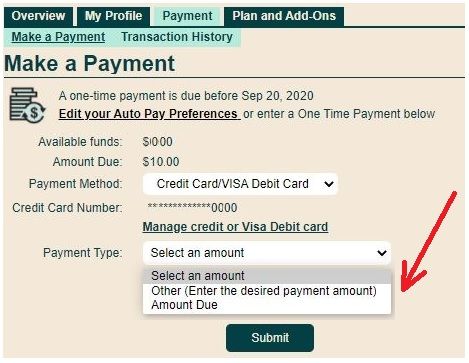
Once paid, click the button "reactivate current plan" if it is there
Then logoff and reboot your phone

Related Content
- phone does not work....account renewal expired a day early... need access to phone to pay bill.... h in Get Support
- payment of bill in Get Support
- Cannot sign into chat to get any help in Get Support
- I have 75 GB of data however suddenly I lost internet. in Get Support
- Payment problems in Get Support
