Turn on suggestions
Auto-suggest helps you quickly narrow down your search results by suggesting possible matches as you type.
Showing results for
- Community Home
- Get Support
- Data and texting not working
Options
- Subscribe to RSS Feed
- Mark Topic as New
- Mark Topic as Read
- Float this Topic for Current User
- Subscribe
- Mute
- Printer Friendly Page
Data and texting not working

Options
- Mark as New
- Subscribe
- Mute
- Subscribe to RSS Feed
- Permalink
- Report Inappropriate Content
08-10-2024 09:30 PM
Just set up new account, new # (I do still have old # on my phone also but I have settings set to the new # until I can get my old # ported over), data and texting not working. Calls work fine.
Labels:
- Labels:
-
Joining Public
-
Service
19 REPLIES 19

Options
- Mark as New
- Subscribe
- Mute
- Subscribe to RSS Feed
- Permalink
- Report Inappropriate Content
08-11-2024 06:22 AM
Both eSIM. This is why I hate eSIMs. Less problems setting up with a regular SIM card.
eSIM is easy as sim card. Many "hate" it because of the scare and don't have enough understanding of new technology. Also advantage to esim is that it is free replacement
Another way to get your issue resolved to to get a free esim replacement. Seen this solved many cases like this immediately
To rebuy new eSIM for FREE, first, download the app on your phone. Click Account from the bottom, then click Purchase SIM Card and select eSIM.
Once it confirms your phone is eSIM compatible, click Pay $ and Install (the system will check and apply a $5 credit to bring the total price back to $0 at checkout), and follow the prompt to complete and purchase and install eSIM on your device
(in rare case that PM charges you for the replacement esim, you can submit a ticket with PM support and ask them for reimbursement)
https://www.publicmobile.ca/en/on/get-help/articles/get-a-sim-card
Existing eSIM users at Public Mobile who need a replacement can do so at no extra cost. When you request a new eSIM through the usual process, we automatically identify you as an existing eSIM user and waive the replacement fee. See below for steps on how to get your new eSIM.

Options
- Mark as New
- Subscribe
- Mute
- Subscribe to RSS Feed
- Permalink
- Report Inappropriate Content
08-10-2024 10:35 PM
Try this. If the Rogers is a SIM card, take it out. Restart the phone. See if Public Mobile shows up.
Options
- Mark as New
- Subscribe
- Mute
- Subscribe to RSS Feed
- Permalink
- Report Inappropriate Content
08-10-2024 10:34 PM
Both eSIM. This is why I hate eSIMs. Less problems setting up with a regular SIM card. But that's just me. Everyone tends to have their own opinions on them.
My brain can't think past 10pm so... my ideas our useless right about now. CS Agents won't be available till tomorrow morning and this website is going down in 1 hour for maintenance so.. best advice for now is to reach out to a CS Agent for help. Sorry I couldn't help further.
To submit a ticket with CS Agent using this link
https://productioncommunity.publicmobile.ca/t5/notes/composepage/note-to-user-id/22437
Options
- Mark as New
- Subscribe
- Mute
- Subscribe to RSS Feed
- Permalink
- Report Inappropriate Content
08-10-2024 10:32 PM
I think we should assume eSIM is active because my phone services are working and since it won’t let me install, it’s probably because it already is. However In cellular settings, PM isn’t an option when I shut off auto. Only Roger’s shows, which is my old carrier.
Options
- Mark as New
- Subscribe
- Mute
- Subscribe to RSS Feed
- Permalink
- Report Inappropriate Content
08-10-2024 10:31 PM
I find it strange that I’m in Canada and my son is in USA. I set up both our phones with PM. mine last night and his today. I ported my # over. He got new #. Both are having exact same problem!
Options
- Mark as New
- Subscribe
- Mute
- Subscribe to RSS Feed
- Permalink
- Report Inappropriate Content
08-10-2024 10:26 PM - edited 08-10-2024 10:26 PM
@softech wrote:To me, the unable to activate esim error is because the PM esim is already installed, so scan of the QR code again at this time would give such an error, which is expected and can be ignored
if the PM esim is making calls and data is working , it is not an esim setup problem
@softech wrote:
@Krissabell
try the PM sim card on another iPhone if possible. That could force a sim reprovision and could resolve the issue. If still does not work (or you don't have another phone to text), ask support to reprovision your account and see if it helps
Right. But how is she supposed to try her eSIM in another phone as you suggested??
Options
- Mark as New
- Subscribe
- Mute
- Subscribe to RSS Feed
- Permalink
- Report Inappropriate Content
08-10-2024 10:24 PM - edited 08-10-2024 10:25 PM
To me, the unable to activate esim error is because the PM esim is already installed, so scan of the QR code again at this time would give such an error, which is expected and can be ignored
if the PM esim is making calls and data is working , it is not an esim setup problem
Options
- Mark as New
- Subscribe
- Mute
- Subscribe to RSS Feed
- Permalink
- Report Inappropriate Content
08-10-2024 10:22 PM
@Krissabell wrote:

So this is odd. Calls work fine but unable to activate eSIM? Then it sounds like you're using your old SIM still. eSIMs are just so much of a pain that it's not even worth it sometimes. If it's saying Try Again, perhaps you need to hook your phone up to a strong WiFi to "try again".

Options
- Mark as New
- Subscribe
- Mute
- Subscribe to RSS Feed
- Permalink
- Report Inappropriate Content
08-10-2024 10:21 PM
try the PM sim card on another iPhone if possible. That could force a sim reprovision and could resolve the issue. If still does not work (or you don't have another phone to text), ask support to reprovision your account and see if it helps
Please open ticket with PM support:
1. Open ticket via Chatbot (need access to My Account): At https://widget.telus.tiia.ai/publicmobile/publicmobile.html
Start by typing "Submit a ticket", then click "Contact Us", then "Other", then "Log In", finally click "Click here to submit a ticket ↗"
2. If you have trouble with Chatbot or you don't have access to My Account: Private message CS Agent at:
https://productioncommunity.publicmobile.ca/t5/notes/composepage/note-to-user-id/22437
**Monitor your Community inbox (envelope icon on the top right) after ticket submitted, CS Agent will reply to you there
Start by typing "Submit a ticket", then click "Contact Us", then "Other", then "Log In", finally click "Click here to submit a ticket ↗"
2. If you have trouble with Chatbot or you don't have access to My Account: Private message CS Agent at:
https://productioncommunity.publicmobile.ca/t5/notes/composepage/note-to-user-id/22437
**Monitor your Community inbox (envelope icon on the top right) after ticket submitted, CS Agent will reply to you there
Options
- Mark as New
- Subscribe
- Mute
- Subscribe to RSS Feed
- Permalink
- Report Inappropriate Content
08-10-2024 10:17 PM
Yes all of that was already on.
Options
- Mark as New
- Subscribe
- Mute
- Subscribe to RSS Feed
- Permalink
- Report Inappropriate Content
08-10-2024 10:08 PM - edited 08-10-2024 10:09 PM
can't text anyone not iPhone..you have to enable the send as SMS option on iMessage
open the settings and then, move to the “Messages” section. Here, make sure that Send as SMS as well as MMS Messaging are both enabled
Options
- Mark as New
- Subscribe
- Mute
- Subscribe to RSS Feed
- Permalink
- Report Inappropriate Content
08-10-2024 10:05 PM
Options
- Mark as New
- Subscribe
- Mute
- Subscribe to RSS Feed
- Permalink
- Report Inappropriate Content
08-10-2024 10:04 PM
So it was on automatic. Data is working but can’t text anyone that doesn’t have iPhone. When I shut automatic off, public isn’t an option. Just my old carrier.
Options
- Mark as New
- Subscribe
- Mute
- Subscribe to RSS Feed
- Permalink
- Report Inappropriate Content
08-10-2024 09:42 PM
@Krissabell wrote:Yes did a reboot. We did the eSIM. Also I set up 2 new lines and both have same problem. Both iPhone 14
I'm thinking... go into settings then cellular... confirm Cellular Data is turned on. Also... go to Network selection and turn off automatic and choose Public Mobile and reboot. IF that doesn't work, then do a network reset and reboot as this may help reset the network between your phone and Public Mobile.
Options
- Mark as New
- Subscribe
- Mute
- Subscribe to RSS Feed
- Permalink
- Report Inappropriate Content
08-10-2024 09:41 PM - edited 08-10-2024 09:43 PM
i think it is set like that already, but make sure the PM esim is enabled with the option "Turn on this line" and the Public Mobile esim is set to Primary
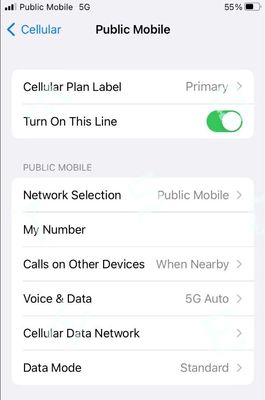
Check if you have other non-PM esim, delete them. If you have another physical sim (maybe the old carrier), remove it
and make sure you update the APN :
- APN: SP.MB.COM
most important, update your Carrier Profile and make sure iOS is the latest version
Options
- Mark as New
- Subscribe
- Mute
- Subscribe to RSS Feed
- Permalink
- Report Inappropriate Content
08-10-2024 09:39 PM
Yes inbound and outbound calls work. Yes did a reboot. We did the eSIM. Also I set up 2 new lines and both have same problem. Both iPhone 14
Options
- Mark as New
- Subscribe
- Mute
- Subscribe to RSS Feed
- Permalink
- Report Inappropriate Content
08-10-2024 09:39 PM
Yes did a reboot. We did the eSIM. Also I set up 2 new lines and both have same problem. Both iPhone 14

Options
- Mark as New
- Subscribe
- Mute
- Subscribe to RSS Feed
- Permalink
- Report Inappropriate Content
08-10-2024 09:37 PM
HI @Krissabell
both inbound and outbound calls work?
try reboot your phone, then Reset All Networks
and if data and text still does not work, tell us what phone do you have, you might need to update your APN
https://www.publicmobile.ca/en/on/get-help/articles/set-up-data-on-an-iphone
https://www.publicmobile.ca/en/on/get-help/articles/set-up-data-on-an-android-phone
Options
- Mark as New
- Subscribe
- Mute
- Subscribe to RSS Feed
- Permalink
- Report Inappropriate Content
08-10-2024 09:32 PM
Hey @Krissabell
Have you tried to reboot? What about trying your SIM card in a different phone? What about resetting your network settings??

