Turn on suggestions
Auto-suggest helps you quickly narrow down your search results by suggesting possible matches as you type.
Showing results for
- Community Home
- Get Support
- Re: new visa number
Options
- Subscribe to RSS Feed
- Mark Topic as New
- Mark Topic as Read
- Float this Topic for Current User
- Subscribe
- Mute
- Printer Friendly Page

Options
- Mark as New
- Subscribe
- Mute
- Subscribe to RSS Feed
- Permalink
- Report Inappropriate Content
01-24-2022 10:03 AM
3 REPLIES 3


Options
- Mark as New
- Subscribe
- Mute
- Subscribe to RSS Feed
- Permalink
- Report Inappropriate Content
01-24-2022 10:21 AM - edited 02-07-2022 03:34 PM
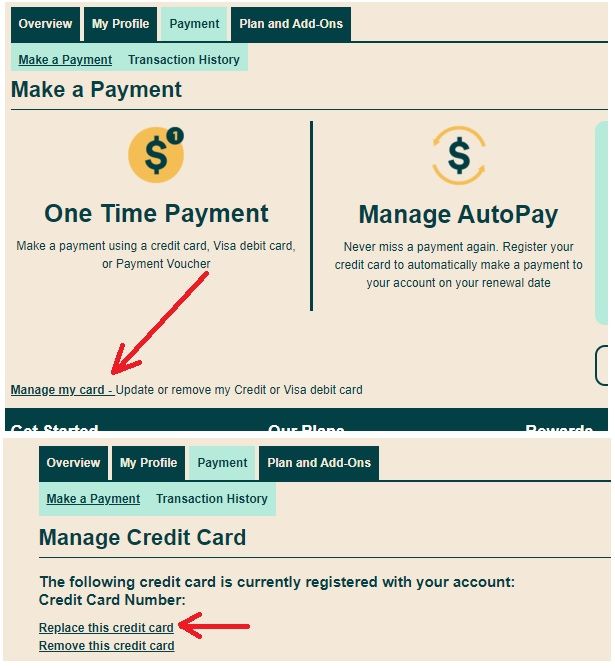
@champignon If you want to update your credit card number on file, login to My Account, click on the Payment Tab, then click Manage my card at the bottom and the click Replace this credit card.

Options
- Mark as New
- Subscribe
- Mute
- Subscribe to RSS Feed
- Permalink
- Report Inappropriate Content
01-24-2022 10:19 AM
@champignon Sounds like you want to update your credit card. Log into your account. Click payment then bottom left you will see "Manage My Card"

Options
- Mark as New
- Subscribe
- Mute
- Subscribe to RSS Feed
- Permalink
- Report Inappropriate Content
01-24-2022 10:10 AM
Any specific questions?
Here is the help article on changing your credit card in your self service account:
https://www.publicmobile.ca/en/on/get-help/articles/update-or-remove-your-payment-card
Just make sure that the billing address exactly matches your credit card billing address.

Related Content
- What can I do? Number transfer in Get Support
- Number transfer in Get Support
- i need to change my 2 factor authentication from phone number to email in Get Support
- It's been 14 hrs and my number from rogers has still not been ported, I can just can't receive calls in Get Support
- Porting Issue in Get Support

