Turn on suggestions
Auto-suggest helps you quickly narrow down your search results by suggesting possible matches as you type.
Showing results for
- Community Home
- Get Support
- Re: iPad
Options
- Subscribe to RSS Feed
- Mark Topic as New
- Mark Topic as Read
- Float this Topic for Current User
- Subscribe
- Mute
- Printer Friendly Page

Options
- Mark as New
- Subscribe
- Mute
- Subscribe to RSS Feed
- Permalink
- Report Inappropriate Content
02-13-2024
05:50 PM
- last edited on
02-13-2024
06:48 PM
by
computergeek541

Hi there.
I have a Public Mobile plan for my iPad, so I have data and do not need to rely on wifi. While my SIM card has a cell number assigned to it, I can't text or make phone calls on the iPad. (I also have a separate plan for my iPhone)
As a result, I am unable to log into my account ever since they introduced the safety feature where you need to input the code they text you. It won't let me choose the option to have the code emailed to me.
I want to check how much data I am using and switch to a different plan (I am still on 3G).
Any ideas how to get in or contact Public Mobile?
Thanks in advance.
Andreas.
Solved! Go to Solution.
Labels:
- Labels:
-
Phones
11 REPLIES 11

Options
- Mark as New
- Subscribe
- Mute
- Subscribe to RSS Feed
- Permalink
- Report Inappropriate Content
02-18-2024 10:36 AM
Thanks for the update. This will help other customers in the future with tablets. So, it does not look like tablets can receive/send SMS texts or phone calls then asmentioned earlier. Just data only which is fine in your case. With iPads, you can still use iMessage and FaceTime.
It is kinda true that PM does not offer true tablet data only plans.
Good to know that you can remove the phone number from Eversafe and then just get email 2FA authorizations.

Options
- Mark as New
- Subscribe
- Mute
- Subscribe to RSS Feed
- Permalink
- Report Inappropriate Content
02-16-2024 07:13 PM - edited 02-16-2024 07:15 PM
Let’s say you have a “no sim” iPad .
You can set up the iPad to send and receive texts using the iPhone.
iPhone and iPad need to be in same area….not sure if needs to be on same wifi, but I think so.
iPad will send receive texts from any type of phone and if android you have to use the phone number not an email address. But you cannot send an attachment by text when sending to a non Apple product. For this acceptation you need to use the iPhone. .
If you always have iPad and iPhone near….then personally I would use phone as a hotspot and not bother with a sim in the iPad.

Options
- Mark as New
- Subscribe
- Mute
- Subscribe to RSS Feed
- Permalink
- Report Inappropriate Content
02-16-2024 06:34 PM
That's fantastic news 👏 glad to hear it
Options
- Mark as New
- Subscribe
- Mute
- Subscribe to RSS Feed
- Permalink
- Report Inappropriate Content
02-16-2024 05:18 PM
I have success to report!
Thank you to @Dunkman , @Sansan , @hTideGnow , and @computergeek541
As I had mentioned, I sent a message to Support on Tuesday and they responded right away. I was only able to follow through with it this afternoon (Friday). Following Mary's suggestion, I did the following:
I took out my Pm SIM cards from the iPad and the iPhone and then put the Pm SIM card from the iPad into the iPhone. I then used my computer (I could have done this on the iPhone as well, I suppose) to log into my Pm iPad account. The system sent the verification code to the cell number affiliated with my iPad SIM and because it was in my iPhone, I could receive the code and enter it and get into my account! Yay!
I then went in my Profile and clicked on Manage EverSafe ID. I removed the cell number associated with my iPad SIM card. It would not let me add my iPhone cell number as it told me that an EverSafe ID was already associated with that number (of course, it is my Pm iPhone account). So, I left it blank.
After logging out of the account on my computer, I switched the two SIM cards back into the original devices and then proceeded to log into my Public mobile iPad account on the iPad. Since I had removed the cell number associated with the iPad SIM card, it sent me an email with the verification code to the email account associated with my iPad Pm account. My iPhone cell number is now listed as an alternative phone number in the iPad account.
I then changed my plan to the 60GB 5G for $40 from the original one I had when switching from Koodo to Pm almost 1 1/2 years ago - it was a 20GB 4G plan for $45. So, I am quite please for a number of reasons.
I hope this will help some folks do the same thing and save some money.
Thanks so much to everybody who replied to my question and I hope I did not forget to thank anybody above.
I wanted to add one more thing: as a few folks mentioned, Pm does not support tablets. So, in 2022, I had to get a SIM card from Koodo and a tablet plan first. Once properly set up, I ordered a Pm SIM card and then proceeded as if I was a new Pm cell phone customer. And yes, I had to pay a pro-rated Koodo bill for a few days and still have the Koodo SIM resting in a drawer. At the time, the Koodo tablet plan was $50 a month and I have long recovered the extra $$ I had to spend on the resting Koodo SIM card.
Cheers everbody!
Andreas.
Options
- Mark as New
- Subscribe
- Mute
- Subscribe to RSS Feed
- Permalink
- Report Inappropriate Content
02-13-2024 06:11 PM
I'm fine not sending texts or making phone calls with the iPad. I just want to get into my account. If I can't get in, how am I going to change the plan I have?
Options
- Mark as New
- Subscribe
- Mute
- Subscribe to RSS Feed
- Permalink
- Report Inappropriate Content
02-13-2024 06:08 PM
Tried and it does not work. It only gives me option to get the code via voicemail.
And the cell service is working great for it; I just want to upgrade to 5G and get into my account.
I opted again the hotspotting from iPhone as it drains the phone's battery.

Options
- Mark as New
- Subscribe
- Mute
- Subscribe to RSS Feed
- Permalink
- Report Inappropriate Content
02-13-2024 06:07 PM
hi @AndreasTom iPad cannot make and receive calls. It can work with your iPhone to get that done but not making calls itself
check this
https://support.apple.com/en-ca/guide/ipad/ipadf97892b2/ipados
Options
- Mark as New
- Subscribe
- Mute
- Subscribe to RSS Feed
- Permalink
- Report Inappropriate Content
02-13-2024 06:01 PM
Ok great. Unfortunately each account act independently here and needs own email address.
Options
- Mark as New
- Subscribe
- Mute
- Subscribe to RSS Feed
- Permalink
- Report Inappropriate Content
02-13-2024 06:01 PM - edited 02-13-2024 06:07 PM
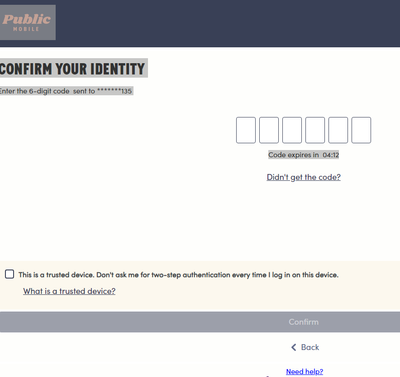
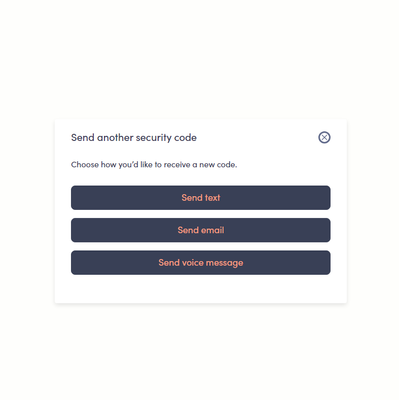
You should be able to receive a 2FA code via email instead. When you first sign in, Public mobile will send you the text code. Choose did not receive code. Resend again. It then should give you the option to send via email.
Have you thought of using your phone as a Hotspot for your iPad instead? That is another option.
Options
- Mark as New
- Subscribe
- Mute
- Subscribe to RSS Feed
- Permalink
- Report Inappropriate Content
02-13-2024 05:58 PM
Thanks. I sent them a message.
It actually works great. Have been using it this way for about a year now. But not being able to log into account is not good. Also rather inconvenient is that I needed to use an email doifferent from the one I am using for my iPhone plan.
Cheers!
Options
- Mark as New
- Subscribe
- Mute
- Subscribe to RSS Feed
- Permalink
- Report Inappropriate Content
02-13-2024 05:52 PM
Pm does not support IPad. You can only use the Hotspot to it.
To contact PM, see link below.
https://productioncommunity.publicmobile.ca/t5/notes/composepage/note-to-user-id/22437

Related Content
- eSIM Paid Multiple Times but Still “No Service” on iPad Pro 13-inch M5 – Tickets Keep Closing Withou in Get Support
- Cellular iPad in Get Support
- eSIM for iPad? in Get Support
- Re: No Cellular Options in Get Support
- My number is not activated , I can't reach public mobile and I need a full refund in Get Support
