Turn on suggestions
Auto-suggest helps you quickly narrow down your search results by suggesting possible matches as you type.
Showing results for
- Community Home
- Get Support
- Need Assistance with Mobile App Code
Options
- Subscribe to RSS Feed
- Mark Topic as New
- Mark Topic as Read
- Float this Topic for Current User
- Subscribe
- Mute
- Printer Friendly Page

Options
- Mark as New
- Subscribe
- Mute
- Subscribe to RSS Feed
- Permalink
- Report Inappropriate Content
06-10-2023
10:32 AM
- last edited on
06-11-2023
11:08 AM
by
Dunkman

Hello.
A few weeks ago I ported in a number from a different source. Everything is working great and the number works. However, I've downloaded the new app to the phone and when it does the 2 auth key, it wants to send the 6 digit code to my old number. How does one get this fixed? Can't use the app until it sends to my new number.
Solved! Go to Solution.
Labels:
- Labels:
-
My Account
3 REPLIES 3
Options
- Mark as New
- Subscribe
- Mute
- Subscribe to RSS Feed
- Permalink
- Report Inappropriate Content
06-10-2023 10:41 AM
@softech FTW! Thanks brother! You're the best!!!

Options
- Mark as New
- Subscribe
- Mute
- Subscribe to RSS Feed
- Permalink
- Report Inappropriate Content
06-10-2023 10:36 AM
Have incoming calls been working great? That is, did you confirm the transfer text when you ported?
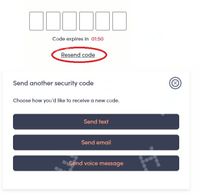
Can you click Resend code and get some other options for the code?
By the way, the website account access also works. Still need a code but it also works.

Options
- Mark as New
- Subscribe
- Mute
- Subscribe to RSS Feed
- Permalink
- Report Inappropriate Content
06-10-2023 10:36 AM
first, get the 2FA code via email. Click Resend Code and then Send email
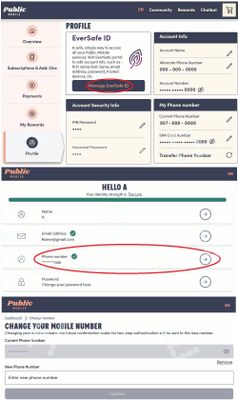
once you are logged into. you can change the phone number to receive the 2FA code (this number has No relationship with your phone number with PM, can be different if you like.) Go to Profile page, click Manage EverSafe ID and then update the phone number

Related Content
- Stuck in eSIM Loop: "Something went wrong" Error & "Continue with eSIM" Button Grayed Out in Get Support
- Can't close my account in Get Support
- Verification code sent to wrong number. in Get Support
- Urgent: Lost access to my Public Mobile number and cannot receive 2FA in Get Support
- Number transfer from old phone to new in Get Support
