Turn on suggestions
Auto-suggest helps you quickly narrow down your search results by suggesting possible matches as you type.
Showing results for
- Community Home
- Get Support
- Made the mistake of trying to use Public for ipad ...
Options
- Subscribe to RSS Feed
- Mark Topic as New
- Mark Topic as Read
- Float this Topic for Current User
- Subscribe
- Mute
- Printer Friendly Page
Made the mistake of trying to use Public for ipad data

Options
- Mark as New
- Subscribe
- Mute
- Subscribe to RSS Feed
- Permalink
- Report Inappropriate Content
08-05-2025 03:34 PM
I made the unfortunate mistake of trying to use Public Mobile for Ipad data and ended up in a customer service hell loop. The only way out I found was requesting to cancel my service all together and eating this month's costs.
The details, for what ever they are worth:
-Put in my ipad number ot check compatibility, yup compatible
-Purchased eSIM, scanned it in.
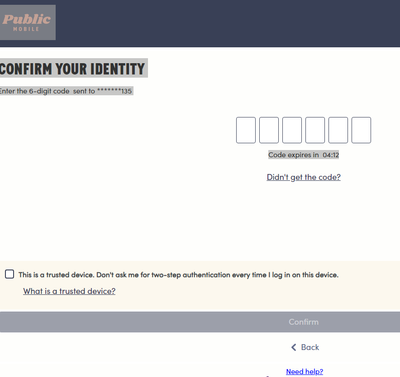
-Tried to login to account, email confirmed, number.... well you can't receive text messages on an ipad
-Contacted customer service - hell loop - I will say, I respect the service rep matching my rudeness with rudeness in return. I am sure their job sucks, I feel bad for losing my temper with a snappy comment, and I appreciate being told off a little (though, they still couldn't help me when I re-explained the issue).
-Took eSIM off ipad, tried to put it on my phone so I could at least get into the account. Can't do that without a new code, which you can only get from within your account.
-Contacted customer service - hell loop
-Tried all the weird fixes suggested on community forum
-More hell loop
-Asked customer service to cancel account so I won't get dinged with another autopay next month
-Relief
Overall, WOULD NOT RECOMMEND
Labels:
- Labels:
-
My Account
-
Payment
-
Service
3 REPLIES 3

Options
- Mark as New
- Subscribe
- Mute
- Subscribe to RSS Feed
- Permalink
- Report Inappropriate Content
08-05-2025 04:23 PM
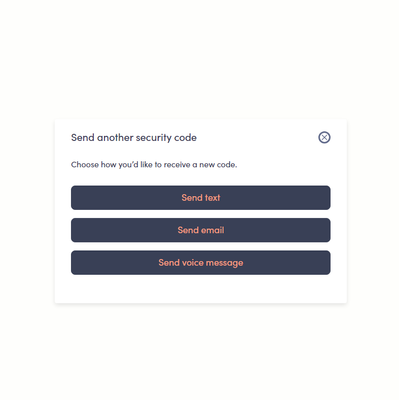
yes, the email option is only there after a first time verification completed
you should have setup the esim on a phone first, then setup on the iPad
i am pretty sure if you are PM, they will ask you to set it back as a physical sim first using a phone. Go through the first time login verification and then you can setup esim again on iPad
but check with PM first. Since you cannot properly login, you won't be able to open the preferred Chatbot ticket. So, you will need to message them here:
https://productioncommunity.publicmobile.ca/t5/notes/composepage/note-to-user-id/22437
CS_Agent will reply to your community inbox between 9AM-10PM EST (Mon-Sun), check here:
https://productioncommunity.publicmobile.ca/t5/notes/privatenotespage
Options
- Mark as New
- Subscribe
- Mute
- Subscribe to RSS Feed
- Permalink
- Report Inappropriate Content
08-05-2025 04:19 PM
Thanks, I did try that. After confirming my e-mail, and a different number, it still wanted to see a code sent to the new eSIM number. At this point there was no "Didn't get code" option. I tried entering the wrong number, requesting new numbers, and some other tricks suggested on the forum but those didnt work either. Honestly, its just been easier to cancel and start over with a different company.


Options
- Mark as New
- Subscribe
- Mute
- Subscribe to RSS Feed
- Permalink
- Report Inappropriate Content
08-05-2025 03:52 PM
Sorry to hear about your troubles. Public mobile does not officially offer data only plans for devices like iPads. Some customers have been able to troubleshoot and get it working for their devices.
You could download the PM app on your phone. Login into your self service account. If you can't receive 2FA text, sometimes it will offer 2FA email instead. Click on "didn't receive code" link.
If you can access your self service account, you can change everSafe login information to include your cell number for 2FA authorization text instead of iPad's phone number.
It is trickier and might not work in all cases.


