Turn on suggestions
Auto-suggest helps you quickly narrow down your search results by suggesting possible matches as you type.
Showing results for
- Community Home
- Get Support
- Re: How to change the credit card for automatic pa...
Options
- Subscribe to RSS Feed
- Mark Topic as New
- Mark Topic as Read
- Float this Topic for Current User
- Subscribe
- Mute
- Printer Friendly Page

Options
- Mark as New
- Subscribe
- Mute
- Subscribe to RSS Feed
- Permalink
- Report Inappropriate Content
07-22-2022 12:55 PM
How do I change the credit card on file in my account to update automatic payments with Public Mobile?
Is there a phone number I can call to do this at Public Mobile?
thanks
Jeff
Solved! Go to Solution.
Labels:
- Labels:
-
Payment
7 REPLIES 7


Options
- Mark as New
- Subscribe
- Mute
- Subscribe to RSS Feed
- Permalink
- Report Inappropriate Content
07-31-2022 01:39 PM
@Frey2007 try this on your wife account. No more resetting the password. Just use Incognito mode or InPrivate mode of the browser and try again. If still fails, try to use a completely different browser (Edge/Chrome/Firefox) once more
If none works, open ticket with PM Support:
1. For faster response (2-48 hours), use this direct link: https://publicmobile.ca/chatbot.
**Start with typing "Forgot Login Information", click "Contact Us", click "Click here to submit a ticket".
2. Or Private message to the CS Agent: https://productioncommunity.publicmobile.ca/t5/notes/composepage/note-to-user-id/22437
**Monitor your Community inbox (envelope icon on the top right) after the ticket is opened. CS Agent will reply you there
Options
- Mark as New
- Subscribe
- Mute
- Subscribe to RSS Feed
- Permalink
- Report Inappropriate Content
07-31-2022 01:37 PM
Thanks I was able to get it to work for myself on my phone. However, my wife’s phone won’t allow her to sign into her account at all to do this.
She reset her password for her account, it showed it worked but when we tried to go back into her account to access it to update her payment info. We can’t open/get into her account? Any suggestions?
thanks
Jeff

Options
- Mark as New
- Subscribe
- Mute
- Subscribe to RSS Feed
- Permalink
- Report Inappropriate Content
07-22-2022 02:07 PM
use browser from computer, clear cache and cookies and use one page inPrivate mode,
Payments,and Manage Payment Method, Update Card Information, save payment information.
Options
- Mark as New
- Subscribe
- Mute
- Subscribe to RSS Feed
- Permalink
- Report Inappropriate Content
07-22-2022 01:42 PM - edited 10-20-2022 04:16 PM
Login to My Account, click on Payments page, then click on Manage Payment Method
Now, click on Update Card Information
You can then enter the info for the new card there
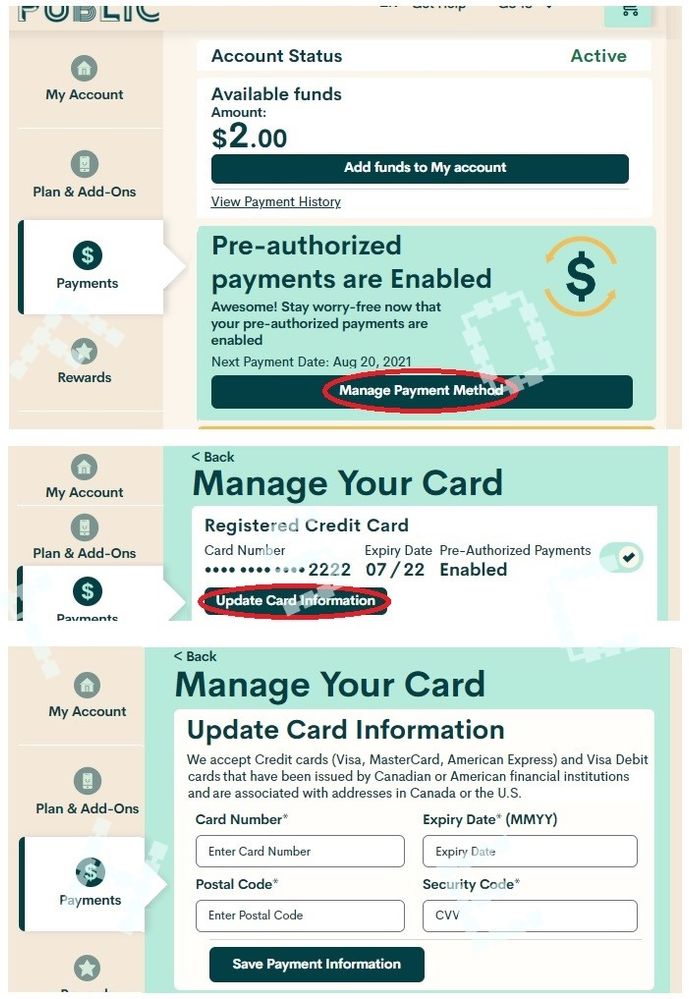
In case you do not see all these, try to use another browser, try using Incognito mode. Lastly try using a desktop/laptop computer. The site could act weird if you access it on mobile
Update: Change screenshot size

Options
- Mark as New
- Subscribe
- Mute
- Subscribe to RSS Feed
- Permalink
- Report Inappropriate Content
07-22-2022 01:41 PM
Desktop: on the left side.
Mobile: up top says My Account and tap the down arrow and tap Payments
Options
- Mark as New
- Subscribe
- Mute
- Subscribe to RSS Feed
- Permalink
- Report Inappropriate Content
07-22-2022 01:36 PM
Where do I find that tab in the accounts section. I looked but do not see it.

Options
- Mark as New
- Subscribe
- Mute
- Subscribe to RSS Feed
- Permalink
- Report Inappropriate Content
07-22-2022 01:10 PM
Log in to your account and then: