Turn on suggestions
Auto-suggest helps you quickly narrow down your search results by suggesting possible matches as you type.
Showing results for
- Community Home
- Get Support
- Esim not working, cannot login without text/voice ...
Options
- Subscribe to RSS Feed
- Mark Topic as New
- Mark Topic as Read
- Float this Topic for Current User
- Subscribe
- Mute
- Printer Friendly Page
Esim not working, cannot login without text/voice message verification

Options
- Mark as New
- Subscribe
- Mute
- Subscribe to RSS Feed
- Permalink
- Report Inappropriate Content
07-25-2025 10:06 PM
I subscribed a new account, and public mobile esim doesnt seem to be installed properly. I tried logging into my account but it won't let me (requires verification via email - which i did, and verification via text or voice message - which i cannot receive as my phone's esim isnt working).
I have an ICCID that I can provide as well from the esim showing up on my phone under public mobile, but i do not seen to have any service. Due to issues with regular sim slot, i have a strong preference to use esim. Is there a fix for this? I did not receive a QR to install esim on the activation email either.
I tried messaging CS_Agent directly, who claims my phone number and email is active (even though i don't even have access to my own account nor phone number), and "an alternative was provided" to go get a physical sim card instead. Frustrating that each response takes 10-20 minutes and no guidance is being given to actually reset or connect the esim.
Labels:
- Labels:
-
Joining Public
-
My Account
-
Service
2 REPLIES 2


Options
- Mark as New
- Subscribe
- Mute
- Subscribe to RSS Feed
- Permalink
- Report Inappropriate Content
07-25-2025 10:27 PM
Did you get to the eSIM installation step? Either the app will ask for your permission to do it for you, or you can get the QR code to install yourself.
If you missed the step to install by the app, there is a QR code in your Welcome email. Open it from a computer, or another device, then use your phone to scan it to install the eSIM profile on your phone.
Once you installed the eSIM profile, (or If you got passed that step eSIM installation step), try to reboot your phone once.
If it still does not connect and if you have another active sim on the phone, disable those non PM sim (eSIM/Physical sim) using the SIM Manager on the phone or simply remove the physical sim.
And make sure the one associated with PM sim and your phone number is enabled.
(On iPhone: Settings->Cellular , make sure the PM eSIM is set as Primary on "Cellular Plan Label" and "Turn on This Line" is toggled on)

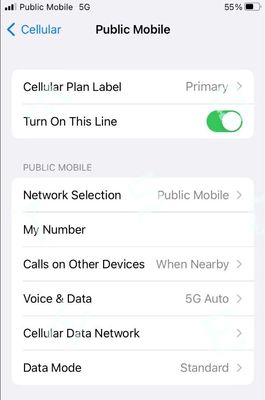
Then click Reset All Networks on your phone and it will work. (Please note that Reset all Networks will also erase your saved Wifi and Bluetooth connections, but you just need to add them back after). Also, it is possible you have to reset it multiple times for it to work.
if it still does not work, Please open ticket with PM support by private message:
https://productioncommunity.publicmobile.ca/t5/notes/composepage/note-to-user-id/22437
**Monitor your Community inbox (envelope icon on the top right) after ticket submitted, CS Agent will reply to you there
**Monitor your Community inbox (envelope icon on the top right) after ticket submitted, CS Agent will reply to you there

Options
- Mark as New
- Subscribe
- Mute
- Subscribe to RSS Feed
- Permalink
- Report Inappropriate Content
07-25-2025 10:09 PM
@ShainF Since you already submitted a
ticket keep an eye on your community inbox for their reply , or you can use this link to the community in box
https://productioncommunity.publicmobile.ca/t5/notes/privatenotespage

Related Content
- Outgoing calls blocked (Error 7B1) after plan change in Get Support
- New activation (port from SaskTel) – no incoming SMS, can't log in for 2FA in Get Support
- Public Mobile really needs to fix international roaming in Get Support
- Porting from virgin to pm in Get Support
- Doubled Charging My Account in Get Support
