Turn on suggestions
Auto-suggest helps you quickly narrow down your search results by suggesting possible matches as you type.
Showing results for
- Community Home
- Get Support
- Re: Changing numbers
Options
- Subscribe to RSS Feed
- Mark Topic as New
- Mark Topic as Read
- Float this Topic for Current User
- Subscribe
- Mute
- Printer Friendly Page
Changing numbers

Options
- Mark as New
- Subscribe
- Mute
- Subscribe to RSS Feed
- Permalink
- Report Inappropriate Content
05-10-2025
11:36 PM
- last edited on
05-11-2025
08:11 AM
by
computergeek541

Hello. I just changed my public mobile number for a new one. Worked instantly but going into settings my old number is still there so signing in to sites with authentication passwords via text are going to the old discontinued number. I've sent a ticket in but yet to hear back. I'm thinking Sim reset?
Labels:
- Labels:
-
Service
10 REPLIES 10
Options
- Mark as New
- Subscribe
- Mute
- Subscribe to RSS Feed
- Permalink
- Report Inappropriate Content
05-11-2025 12:02 AM
I did a reset already. I think pm needs to Do it. Thx for the help
Options
- Mark as New
- Subscribe
- Mute
- Subscribe to RSS Feed
- Permalink
- Report Inappropriate Content
05-10-2025 11:59 PM
@Westcoast123 if it is what showing on your device, you will need to click Reset Network Settings to update it
Or if that does not work, please tell us what model of phone is that
If iPhone, go to Settings and delete the phone number, reboot phone and go back and put in the correct phone number

Options
- Mark as New
- Subscribe
- Mute
- Subscribe to RSS Feed
- Permalink
- Report Inappropriate Content
05-10-2025 11:58 PM - edited 05-11-2025 12:00 AM
For your phone itself, it's (depending on the device) probably a SIM reset on PM's end or resetting network settings. Your phone gets the number from the SIM.
Options
- Mark as New
- Subscribe
- Mute
- Subscribe to RSS Feed
- Permalink
- Report Inappropriate Content
05-10-2025 11:57 PM
I can sign in with zero issues now thx to your help. It's just my actual phone settings with model name and make and imei etc that's showing my old number. I use that page when I need to remember my number is all
Options
- Mark as New
- Subscribe
- Mute
- Subscribe to RSS Feed
- Permalink
- Report Inappropriate Content
05-10-2025 11:57 PM - edited 05-10-2025 11:57 PM
You're thinking of the PM 2FA, I was thinking of sites like Amazon or Google. That's probably where the confusion was. The poster marked this as resolved though

Options
- Mark as New
- Subscribe
- Mute
- Subscribe to RSS Feed
- Permalink
- Report Inappropriate Content
05-10-2025 11:54 PM - edited 05-10-2025 11:57 PM
@Techfish I think you misunderstood my reply
Yes, I understand OP already changed his number and the 2FA still sending to the old number
@Westcoast123 and @Techfish , PM has trouble updating the 2FA to the new number (that's why PM 2FA still sending to your old phone number). So, you have to follow my steps to first login My account using email to receive 2FA to login My Account, then update the phone number manually at the EverSafe setup to the new number you chosen
Options
- Mark as New
- Subscribe
- Mute
- Subscribe to RSS Feed
- Permalink
- Report Inappropriate Content
05-10-2025 11:53 PM
Yes. Thank you that was part 1 needed. That was easy. Now as far as my actual phone setting go on my android I go to about phone and my old number is still there.
Options
- Mark as New
- Subscribe
- Mute
- Subscribe to RSS Feed
- Permalink
- Report Inappropriate Content
05-10-2025 11:46 PM
I think you misunderstood the post. The poster wrote that they already changed their account phone number through PM, but has trouble with sites with SMS 2FA going to their old phone number.
Options
- Mark as New
- Subscribe
- Mute
- Subscribe to RSS Feed
- Permalink
- Report Inappropriate Content
05-10-2025 11:44 PM - edited 05-10-2025 11:45 PM
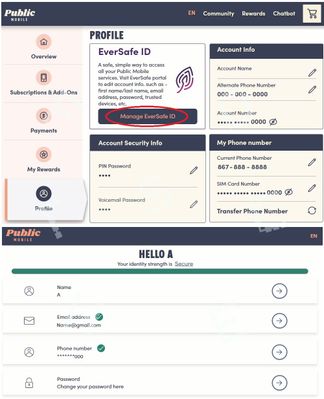
Login first using email to get the 2FA code
On the screen it is expecting you to enter the code, click Didn't get the code? or Resend code and then choose Send email
After you logged in, go to Profile page, click Manage EverSafe ID and manually update the phone number there
Options
- Mark as New
- Subscribe
- Mute
- Subscribe to RSS Feed
- Permalink
- Report Inappropriate Content
05-10-2025 11:41 PM - edited 05-10-2025 11:47 PM
You need to change your phone number on the sites individually. Public can't do it for you.
When you change your phone number, it changes it for your PM account/plan but does not change for the websites.

