Turn on suggestions
Auto-suggest helps you quickly narrow down your search results by suggesting possible matches as you type.
Showing results for
- Community Home
- Get Support
- iPad no iphone
Options
- Subscribe to RSS Feed
- Mark Topic as New
- Mark Topic as Read
- Float this Topic for Current User
- Subscribe
- Mute
- Printer Friendly Page
iPad no iphone

Options
- Mark as New
- Subscribe
- Mute
- Subscribe to RSS Feed
- Permalink
- Report Inappropriate Content
03-16-2025 11:16 AM
How do I get my verification code when I can’t receive a text message on my iPad with no iPhone the eSIM is working but I can’t receive the text message to go any further.
Labels:
- Labels:
-
My Account
8 REPLIES 8

Options
- Mark as New
- Subscribe
- Mute
- Subscribe to RSS Feed
- Permalink
- Report Inappropriate Content
03-16-2025 12:21 PM
@Jacobmontgomery wrote:So I logged out and back in it sends code to my bell phone than on next screen ask to confirm identity than it sends code to the number provided by public mobile that’s the problem I can’t get it and there is no option for me to get it emailed
I've already sent you the link to reach a CS Agent to ask them to set your mail option up. They can resolve this. Message them and it will be resolved.
Options
- Mark as New
- Subscribe
- Mute
- Subscribe to RSS Feed
- Permalink
- Report Inappropriate Content
03-16-2025 12:15 PM
So I logged out and back in it sends code to my bell phone than on next screen ask to confirm identity than it sends code to the number provided by public mobile that’s the problem I can’t get it and there is no option for me to get it emailed


Options
- Mark as New
- Subscribe
- Mute
- Subscribe to RSS Feed
- Permalink
- Report Inappropriate Content
03-16-2025 11:48 AM
Here is another work around:
https://productioncommunity.publicmobile.ca/t5/Get-Support/iPad-eSIM/m-p/1235927
You could also set up the eSIM on a phone first (instead of physical SIM card). Then follow the instructions in the above link.
Options
- Mark as New
- Subscribe
- Mute
- Subscribe to RSS Feed
- Permalink
- Report Inappropriate Content
03-16-2025 11:46 AM
It’s a e sim
Options
- Mark as New
- Subscribe
- Mute
- Subscribe to RSS Feed
- Permalink
- Report Inappropriate Content
03-16-2025 11:44 AM
@Jacobmontgomery wrote:It just keeps coming up resend code doesn’t say didn’t receive
Hey @Jacobmontgomery
The work around is to place the SIM card in a phone, download the app and sign up. It looks like you already signed up so stick the SIM card in a phone of some kind, get the code sent to it and then move the SIM card over to the iPad. If that doesn't work, as a CS Agent to send you the code.
Please use the chatbot to open a ticket: https://widget.telus.tiia.ai/publicmobile/publicmobile.html?lang=en
If you receive an error message that you are unable to open a ticket, send a private message to a CS_Agent: https://productioncommunity.publicmobile.ca/t5/notes/composepage/note-to-user-id/22437 .
A Customer Service Agent will reply to your community inbox here:
https://productioncommunity.publicmobile.ca/t5/notes/privatenotespage
Options
- Mark as New
- Subscribe
- Mute
- Subscribe to RSS Feed
- Permalink
- Report Inappropriate Content
03-16-2025 11:41 AM
It just keeps coming up resend code doesn’t say didn’t receive
Options
- Mark as New
- Subscribe
- Mute
- Subscribe to RSS Feed
- Permalink
- Report Inappropriate Content
03-16-2025 11:21 AM
Public mobile does not have a dedicated iPad plan. Customers need to do workarounds to get the service working with Public mobile. If physical SIM card, customers in the past would move the SIM card to a phone to receive the text message. eSIM becomes trickier.
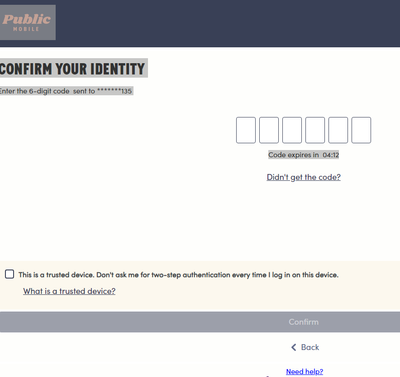
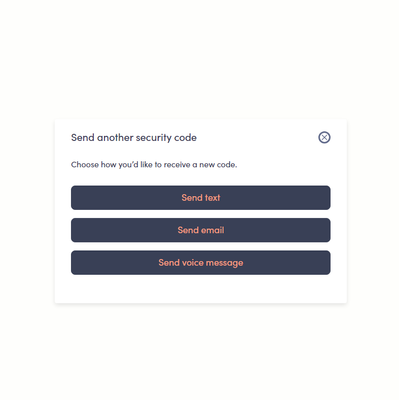
Some customers are able to get 2FA email address to work. Do you see the "didn't receive the code" link? Click on that link and should offer the option for 2FA email.

Options
- Mark as New
- Subscribe
- Mute
- Subscribe to RSS Feed
- Permalink
- Report Inappropriate Content
03-16-2025 11:20 AM - edited 03-16-2025 11:21 AM
If you did not receive or cannot receive your 2FA code by SMS - Click on: ‘Didn’t get a code’ and you will get more options. Chose email.


