Turn on suggestions
Auto-suggest helps you quickly narrow down your search results by suggesting possible matches as you type.
Showing results for
- Community Home
- Get Support
- Re: Wrong number
Options
- Subscribe to RSS Feed
- Mark Topic as New
- Mark Topic as Read
- Float this Topic for Current User
- Subscribe
- Mute
- Printer Friendly Page
Wrong number

Options
- Mark as New
- Subscribe
- Mute
- Subscribe to RSS Feed
- Permalink
- Report Inappropriate Content
05-28-2025
08:01 PM
- last edited on
05-29-2025
12:13 AM
by
computergeek541

3 REPLIES 3
Moved:

Options
- Mark as New
- Subscribe
- Mute
- Subscribe to RSS Feed
- Permalink
- Report Inappropriate Content
05-28-2025 08:13 PM

Options
- Mark as New
- Subscribe
- Mute
- Subscribe to RSS Feed
- Permalink
- Report Inappropriate Content
05-28-2025 08:03 PM
see if you can login My Account and ask the code to send to your email instead. On the screen it is expecting you to enter the code, click Didn't get the code? or Resend code and then choose Send email
If that works, then go to Profile page, click Manage EverSafe ID and update the phone number there
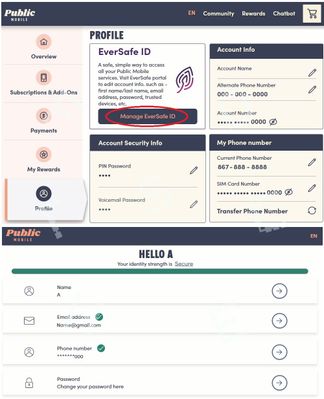
if you cannot get the code via email, then you have to engage PM support for help. Private message CS Agent at:
https://productioncommunity.publicmobile.ca/t5/notes/composepage/note-to-user-id/22437
**Monitor your Community inbox (envelope icon on the top right) after ticket submitted, CS Agent will reply to you there

Options
- Mark as New
- Subscribe
- Mute
- Subscribe to RSS Feed
- Permalink
- Report Inappropriate Content
05-28-2025 08:02 PM
@Heatherkashino wrote:How do I change the phone number that receives verification code
Hello @Heatherkashino
Log into your account and use this link.
https://eversafe.id.telus.com/user/selfservemenu
There you can change name, email address and phone number needed for EverSafe.

