Turn on suggestions
Auto-suggest helps you quickly narrow down your search results by suggesting possible matches as you type.
Showing results for
- Community Home
- Get Support
- Wife lost sim card in europe
Options
- Subscribe to RSS Feed
- Mark Topic as New
- Mark Topic as Read
- Float this Topic for Current User
- Subscribe
- Mute
- Printer Friendly Page

Options
- Mark as New
- Subscribe
- Mute
- Subscribe to RSS Feed
- Permalink
- Report Inappropriate Content
05-23-2025 09:39 AM
Hi it's been a while, chatbot as always not helpful and it also doesn't let recognize that I am logged in. Anyways Just wondering the current process for sim changes for lost sims,
Wife is comings back in a week traveling in Europe landing in Vancouver then ferry to Victoria, trying to see if I can get her set up ahead of time with a new esim before she leaves Europe.
Or set her up with a new sim card for when she gets home. I have a pm sim already.
I saw the change sim in self serve, but is there a second authorization that needs to happen?
Do I need an agent involved?
Or any recommendations for a cheap esim she can use for A day
Solved! Go to Solution.
Labels:
- Labels:
-
Service
6 REPLIES 6
Options
- Mark as New
- Subscribe
- Mute
- Subscribe to RSS Feed
- Permalink
- Report Inappropriate Content
05-23-2025 05:21 PM
Thanks all for the replies. Great to hear that no agent needs to be involved, I think I was confusing porting and sim change. I think she should be able to manage it all from the app.


Options
- Mark as New
- Subscribe
- Mute
- Subscribe to RSS Feed
- Permalink
- Report Inappropriate Content
05-23-2025 10:30 AM
Welcome back. No agent needs to be involved. She just needs to access her self service account ideally via the PM app if she wants to change from physical SIM card (lost card) to eSIM SIM. Need to purchase eSIM card. It would be free purchase if she previously purchased the eSIM.
If she wants eSIM, she would need to login into her account via the PM app on her phone. Since she can't receive 2FA text, she should be given the option to get 2FA email instead. Does she see "Didn't get thecode" link? Click on that link. Then should be given option for 2FA email code. Enter that code. Then you should be able to purchase another eSIM from the app. If she never purchase an eSIM before from that account, she would need to pay $5. Then the PM eSIM would install on the phone.
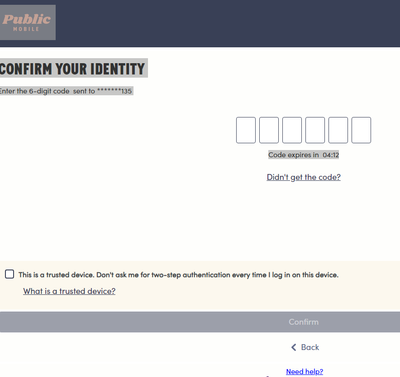
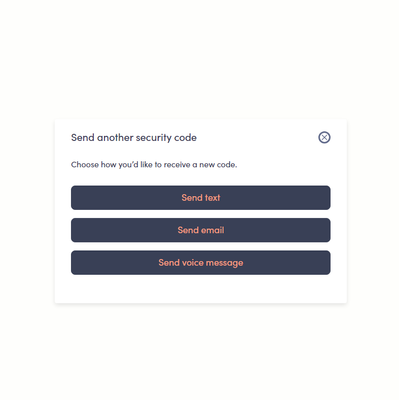
Does she feel comfortable doing the above steps? Otherwise, you will need to wait until she arrives back.
As for cheap eSIM, check out mobimatter.com. Cheaper than airlo. Used it several times for travels to Australia and Asia.

Options
- Mark as New
- Subscribe
- Mute
- Subscribe to RSS Feed
- Permalink
- Report Inappropriate Content
05-23-2025 10:25 AM
hi @mimmo
yes, if her phone supports esim, just download PM app on her phone. Log in using email to receive 2FA (click didn't receive code or resend code)
go to Account page, click Purchase sim card and select esim and buy
Options
- Mark as New
- Subscribe
- Mute
- Subscribe to RSS Feed
- Permalink
- Report Inappropriate Content
05-23-2025 10:11 AM - edited 05-23-2025 10:14 AM
You can pickup a SIM at your Telus/Koodo store for $10 or at Amazon for $5 since there is a possible postal strike.
You can make the changes on her account on the Account tab>Change Your SIM Card.

Meanwhile, you can use a VoIP app like WhatsApp or TextNow when connected to wifi or hotspot your phone for a day.
BTW, great to see you back on the PM Community Forum.

Options
- Mark as New
- Subscribe
- Mute
- Subscribe to RSS Feed
- Permalink
- Report Inappropriate Content
05-23-2025 10:09 AM - edited 05-23-2025 10:09 AM
once she gets home, you can download the Public Mobile app to her cellphone. Log in to her account > Account tab > scroll down to see Change Your SIM card..then update with the sim that you have. Putting that sim in her cell and should be good to go. You'll also need to Resume service if her service is Suspended due to non-pay.

Options
- Mark as New
- Subscribe
- Mute
- Subscribe to RSS Feed
- Permalink
- Report Inappropriate Content
05-23-2025 10:01 AM
Hi there,
To activate a new eSIM, you need to log in to your online account from the phone where you’ll be using the eSIM and purchase a new one.
Visit the 'Subscription & Add-ons' page in My Account
Select the option to purchase a new eSIM
Complete the payment, and a new eSIM will be issued to you.
If you choose to activate a physical SIM card, you need to purchase a Public Mobile SIM card, and you’ll be able to activate it through your online account.


