Turn on suggestions
Auto-suggest helps you quickly narrow down your search results by suggesting possible matches as you type.
Showing results for
- Community Home
- Get Support
- Re: Need to transfer my n7mber
Options
- Subscribe to RSS Feed
- Mark Topic as New
- Mark Topic as Read
- Float this Topic for Current User
- Subscribe
- Mute
- Printer Friendly Page
Need to transfer my n7mber

Options
- Mark as New
- Subscribe
- Mute
- Subscribe to RSS Feed
- Permalink
- Report Inappropriate Content
02-26-2023
06:11 PM
- last edited on
02-26-2023
06:54 PM
by
computergeek541

39 REPLIES 39
Options
- Mark as New
- Subscribe
- Mute
- Subscribe to RSS Feed
- Permalink
- Report Inappropriate Content
02-26-2023 06:20 PM
How do I get to that site
Options
- Mark as New
- Subscribe
- Mute
- Subscribe to RSS Feed
- Permalink
- Report Inappropriate Content
02-26-2023 06:18 PM
I don't understand

Options
- Mark as New
- Subscribe
- Mute
- Subscribe to RSS Feed
- Permalink
- Report Inappropriate Content
02-26-2023 06:17 PM - edited 02-26-2023 06:18 PM
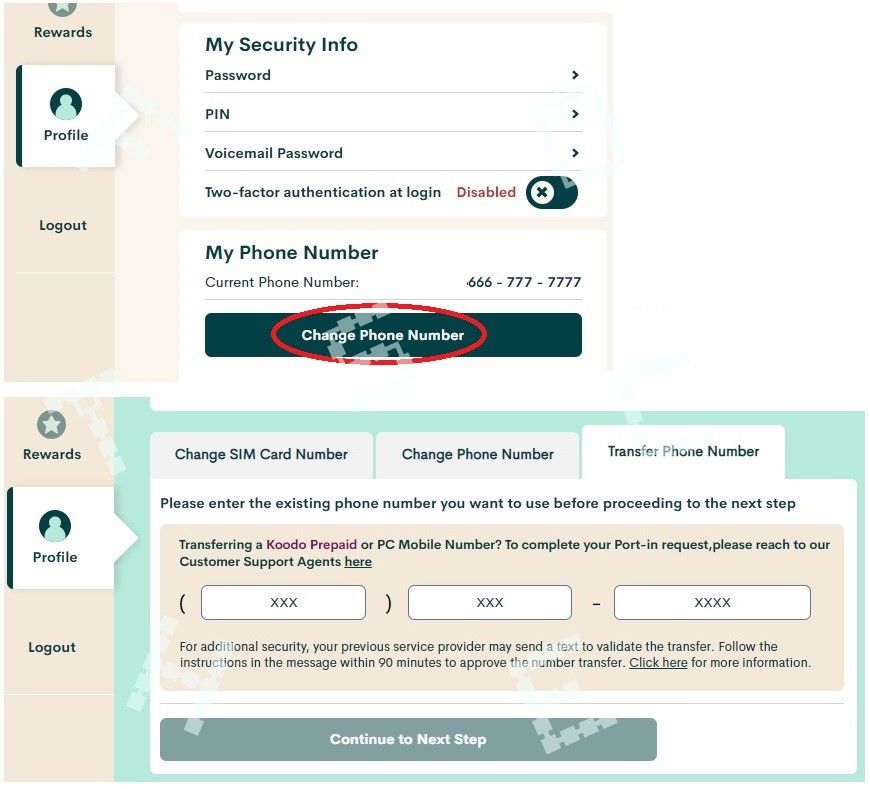
@Taugmail you can do it yourself via My Account Profile page.. Please peovid account number as the portimg info

Options
- Mark as New
- Subscribe
- Mute
- Subscribe to RSS Feed
- Permalink
- Report Inappropriate Content
02-26-2023 06:16 PM
hi @Taugmail login to My account, go to Profile, clock Change phone number and select Transfer number
make sure the account on the old carrier is active, and enter the account number
Options
- Mark as New
- Subscribe
- Mute
- Subscribe to RSS Feed
- Permalink
- Report Inappropriate Content
02-26-2023 06:15 PM - edited 02-26-2023 06:16 PM
@Taugmail So you have active PM sim card with temp number ? If so you can sign into self serve
and port it from profile tab
My account
Legend and features
Change plan / update cc /auto pay

Account #/ change # port /swap SIM
Options
- Mark as New
- Subscribe
- Mute
- Subscribe to RSS Feed
- Permalink
- Report Inappropriate Content
02-26-2023 06:15 PM
Who will guide me doing this. I already paid
Options
- Mark as New
- Subscribe
- Mute
- Subscribe to RSS Feed
- Permalink
- Report Inappropriate Content
02-26-2023 06:13 PM
I have a temp phone. I need to finish my set up with my phone number
Options
- Mark as New
- Subscribe
- Mute
- Subscribe to RSS Feed
- Permalink
- Report Inappropriate Content
02-26-2023 06:12 PM
Hi @Taugmail transfer in or out?
if transfer out, make sure your PM account is active, and start the transfer request from the new provider
if transfer in, you can do that during activation
Options
- Mark as New
- Subscribe
- Mute
- Subscribe to RSS Feed
- Permalink
- Report Inappropriate Content
02-26-2023 06:12 PM
@Taugmail To where
Additional info on porting
When transferring (porting) your number to any new carrier it’s important to remember to leave the old providers SIM card in the phone until you receive the confirmation text from old carrier @that point you have 90 mins to reply YES to the confirmation text … also when going thru this process the new provider will want you old providers account number and will ask for IMEI number disregard this (IMEI) number as it has a tendency to just cos porting hiccups .. so if your ready to port to pm and already activated a SIM card you can go to your self serve serve profile tab and change /transfer (port) number this can also be done on activation but it’s advised to pick a temp number first then port

- « Previous
-
- 1
- 2
- Next »

