Turn on suggestions
Auto-suggest helps you quickly narrow down your search results by suggesting possible matches as you type.
Showing results for
- Community Home
- Get Support
- Need help switching eSIM and plan to my public mob...
Options
- Subscribe to RSS Feed
- Mark Topic as New
- Mark Topic as Read
- Float this Topic for Current User
- Subscribe
- Mute
- Printer Friendly Page
Need help switching eSIM and plan to my public mobile number

Options
- Mark as New
- Subscribe
- Mute
- Subscribe to RSS Feed
- Permalink
- Report Inappropriate Content
07-19-2025 04:55 PM
my phone broke, so I got a new iPhone well new to me iPhone I couldn’t figure out how to switch the Sims so I ended up making a new account and now have a plan for $56 including tax and it wanted me to pick a new phone number. I just want my other public mobile phone number on it so I can use my new phone. I don’t know how to do that. I haven’t been able to activate it. I’ve been going in circles and I still can’t use my phone
Labels:
- Labels:
-
My Account
-
Plans
-
Service
8 REPLIES 8

Options
- Mark as New
- Subscribe
- Mute
- Subscribe to RSS Feed
- Permalink
- Report Inappropriate Content
07-19-2025 11:18 PM
did you actually check if the Public Mobile sim already there? check Sim card Manager or Settings->Cellular screen. Enable it if it is there
But if it is not there, there is really nothing much we can do. Please ask PM to help. Please open ticket with them as advised above
Options
- Mark as New
- Subscribe
- Mute
- Subscribe to RSS Feed
- Permalink
- Report Inappropriate Content
07-19-2025 11:15 PM
It keeps telling me to activate it. It keeps saying activate failed and I never did get a QR code for my eSIM
Moved:


Options
- Mark as New
- Subscribe
- Mute
- Subscribe to RSS Feed
- Permalink
- Report Inappropriate Content
07-19-2025 11:14 PM

Options
- Mark as New
- Subscribe
- Mute
- Subscribe to RSS Feed
- Permalink
- Report Inappropriate Content
07-19-2025 09:04 PM
@Maryksword1 wrote:I cannot use my email. I need my phone number to get into my email and I need my email to get into my phone number so I’m screwed that way
Then you will need to contact CSA as described earlier:
Send a private message to CSA through the following link :
https://productioncommunity.publicmobile.ca/t5/notes/composepage/note-to-user-id/22437
Moved:
Options
- Mark as New
- Subscribe
- Mute
- Subscribe to RSS Feed
- Permalink
- Report Inappropriate Content
07-19-2025 08:45 PM
Options
- Mark as New
- Subscribe
- Mute
- Subscribe to RSS Feed
- Permalink
- Report Inappropriate Content
07-19-2025 08:37 PM
@Maryksword1 wrote:I cannot use my email either because I cannot get into my account without using my phone number
You can access your self service account via app by receiving the 2FA email code. When you try to login to app, do you see "didn't receive code". Click on that link and it should give option to 2FA code.
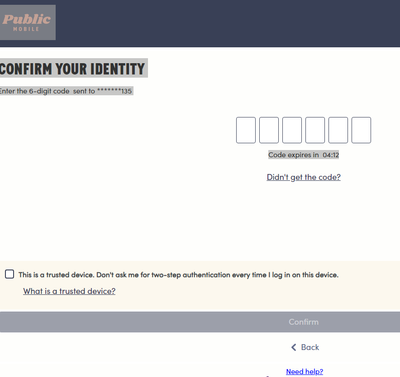
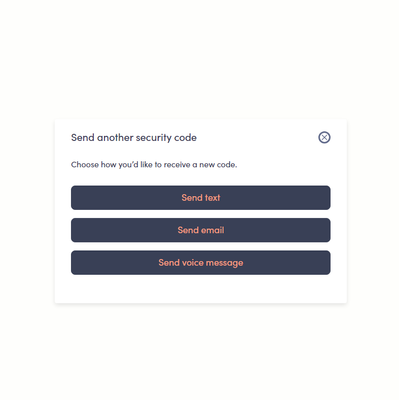
If not possible, then send private message to customer service agent and expect 1-2 wait time for response. Need to confirm ownership of the account, etc.
Options
- Mark as New
- Subscribe
- Mute
- Subscribe to RSS Feed
- Permalink
- Report Inappropriate Content
07-19-2025 08:00 PM
I cannot use my email either because I cannot get into my account without using my phone number
Options
- Mark as New
- Subscribe
- Mute
- Subscribe to RSS Feed
- Permalink
- Report Inappropriate Content
07-19-2025 05:53 PM
PM does not switch numbers between accounts!!.
you shouldn't setup this new account with another plan, But no worries, PM can sort this out. Please open ticket with PM using your current account
Simply open ticket with PM using the Orange Chatbot icon on the lower right. (For 2FA code when login, use email to receive code instead of SMS if you cannot receive the text on the phone.) When open Chatbot ticket, Type the question Submit ticket and select Contact Us to get to ticket open screen
But if you have trouble using Chatbot to open ticket, then message PM using this link:
https://productioncommunity.publicmobile.ca/t5/notes/composepage/note-to-user-id/22437
PM will reply to your community inbox, between 9AM-10PM EST (Mon-Sun), check here:
https://productioncommunity.publicmobile.ca/t5/notes/privatenotespage

Related Content

