Turn on suggestions
Auto-suggest helps you quickly narrow down your search results by suggesting possible matches as you type.
Showing results for
- Community Home
- Get Support
- My cards won't charge
Options
- Subscribe to RSS Feed
- Mark Topic as New
- Mark Topic as Read
- Float this Topic for Current User
- Subscribe
- Mute
- Printer Friendly Page
My cards won't charge

Options
- Mark as New
- Subscribe
- Mute
- Subscribe to RSS Feed
- Permalink
- Report Inappropriate Content
06-01-2022 02:30 PM
All of a sudden it's saying my card has been declined which isn't true. I've talked to my bank, there are funds available and there are no issues on my banks end. I've been using this card for months. I even tried another card, which again, has no issues, and it declined that one too. Gosh I love how cheap this service is but it's honestly not worth the constant headache. There is always something wrong with my account and zero help to get it sorted. So frustrating!
Labels:
- Labels:
-
Payment
2 REPLIES 2

Options
- Mark as New
- Subscribe
- Mute
- Subscribe to RSS Feed
- Permalink
- Report Inappropriate Content
06-01-2022 02:36 PM - edited 06-01-2022 02:37 PM
@Hayleighbailey If you need to pay urgently you could purchase a voucher from a retailer like Canadian Tire, London Drugs or SDM or Shell gas station and load the funds by dialing 611 on your phone. That gives you some time to sort out the issue with your payment card.
Make sure to clear your browser cache/cookies and use incognito/privacy mode when logging into your account to make any changes/updates. Sometimes using a different browser works.


Options
- Mark as New
- Subscribe
- Mute
- Subscribe to RSS Feed
- Permalink
- Report Inappropriate Content
06-01-2022 02:32 PM - edited 06-01-2022 02:33 PM
@Hayleighbailey It likely an issue on PM side
so, your 2nd card was successfully added onto PM system? If so, try to pay using the option "Other (Enter the desired payment amount)" and then manually enter the plan amount (avoid using "Amount Due" as it tends to give more problem)
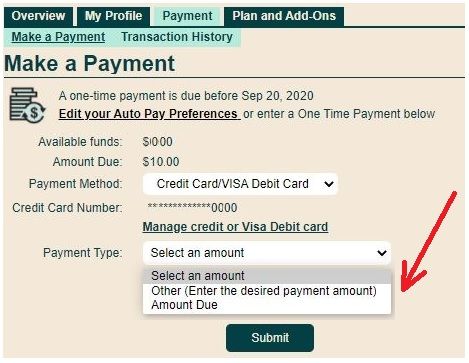
If issues persists, open ticket with PM Support and they will sort this out for you:
1. If you have access to My account: At https://publicmobile.ca/chatbot.
Start by typing "Submit a ticket", then click "Contact Us", Then click "Other", then click "Click here to submit a ticket ↗"
2. If you don't have access to My Account or have trouble with Chatbot: Private message CS Agent at:
https://productioncommunity.publicmobile.ca/t5/notes/composepage/note-to-user-id/22437
**Monitor your Community inbox (envelope icon on the top right) after the ticket is opened. CS Agent will reply you there


