Turn on suggestions
Auto-suggest helps you quickly narrow down your search results by suggesting possible matches as you type.
Showing results for
- Community Home
- Get Support
- Re: Lost Phone
Options
- Subscribe to RSS Feed
- Mark Topic as New
- Mark Topic as Read
- Float this Topic for Current User
- Subscribe
- Mute
- Printer Friendly Page
Lost Phone

Options
- Mark as New
- Subscribe
- Mute
- Subscribe to RSS Feed
- Permalink
- Report Inappropriate Content
12-21-2023
01:46 PM
- last edited on
12-21-2023
04:45 PM
by
computergeek541

Good Afternoon, I have recently lost my phone and wanted to keep my old number is there a way to get a replacement SIM if so what are my steps? Thank you
Labels:
- Labels:
-
My Account
-
Phones
5 REPLIES 5
Moved:

Options
- Mark as New
- Subscribe
- Mute
- Subscribe to RSS Feed
- Permalink
- Report Inappropriate Content
12-21-2023 02:19 PM
Moved:
Options
- Mark as New
- Subscribe
- Mute
- Subscribe to RSS Feed
- Permalink
- Report Inappropriate Content
12-21-2023 01:55 PM

Options
- Mark as New
- Subscribe
- Mute
- Subscribe to RSS Feed
- Permalink
- Report Inappropriate Content
12-21-2023 01:51 PM
Ho @stephaniedo
Sorry to hear that you lost your phone. If you are unable to login because your phone was stolen, on the usual public mobile screen that you are expecting to enter the code, click on "Didn't get the code" or "Resend code". Then you would choose, that you want the code to be sent my Email.
You should be able to long in that way. After you logged in, you should consider suspending your subscription.
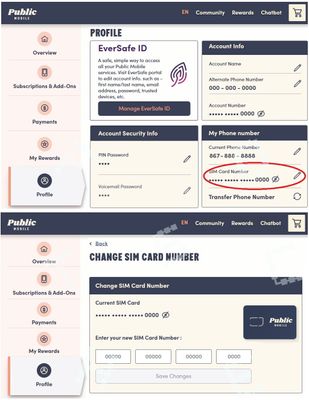
You will need a new device at some point and a new SIM. Once you get your new phone and SIM, log back into your account and go to your profile menu. There will be a a section called "My Phone Number". Within that section you will see the SIM Card number that was associated with the stolen phone. You will need to edit that by clicking on the edit icon in the box. A new section will option up when you can add your new SIM number.
https://myaccount.publicmobile.ca/en/account/profile/change-sim-number
You can get a new SIM the following ways:
- You can order a Physical SIM directly from the Public Mobile website! You can have the card delivered straight to your address!
- You can order a Physical SIM directly from Amazon! Shipping time tends to be quicker with Amazon.
- You can order an eSIM (electronic SIM) directly from the Public Mobile App and start using it right away.
- You can pick up a physical SIM card from a nearby store. To find out which stores near you sell physical SIM cards, you can go to https://www.publicmobile.ca/en/qc/pick-up-SIM and enter our postal code. The site will then suggest you stores closest to you that sell SIM cards.
Hope you have a good day!

Options
- Mark as New
- Subscribe
- Mute
- Subscribe to RSS Feed
- Permalink
- Report Inappropriate Content
12-21-2023 01:48 PM
Order a new sim card but not to "activate" the sim, instead, you want to tie your sim card to your existing account
If you have not done so, you might want to first supsend your service first until you got a replacement sim card:
Login to My Account, go to Profile page, click Report Lost/Stolen Phone and click Put my service on hold
(or use this direct link: https://myaccount.publicmobile.ca/en/account/profile/lost-or-stolen-phone)
If you are unable to login as you don't have a phone to receive the 2FA code: On the screen it is expecting you to enter the code, click Didn't get the code? or Resend code and then choose Send email
Then get a Public Mobile sim card from
- Amazon.ca: https://www.amazon.ca/gp/product/B06X9ZGDWG/ (Best and Quickest option, Free Prime next day shipping)
or https://www.amazon.ca/dp/B07R6P5KBB/ - local Telus/Koodo/Mobile Klinik stores: https://www.publicmobile.ca/en/pick-up-SIM (call ahead to confirm availability )
- PM online: https://www.publicmobile.ca/sim-card (Delivery could take anywhere from 5 days to 3 weeks)
Once you got the sim card, go to My Account from ONLY a desktop or laptop computer to request Change Sim card (please note that due to some glitches, accessing change sim care from mobile phone or tablet won't work)
(If you are unable to login as you don't have a phone to receive the 2FA code: On the screen it is expecting you to enter the code, click Didn't get the code? or Resend code and then choose Send email)
After you logged in, unsuspend first if you have suspended your service earlier.
Then go to Profile page, click on the Pencil besides the sim card number, follow the steps to enter the new sim card number and complete the change sim card request
(or direct link: https://myaccount.publicmobile.ca/en/account/profile/change-sim-number )
After the sim card is updated, wait 5 mins, then reboot your phone and it should be good
Not sure if you lost the phone, if so, use the FindMy service to locate the phone and try a remote wipe
Apple: https://www.apple.com/ca/icloud/find-my/
(how to use: https://www.pcmag.com/how-to/find-a-lost-iphone)
Google: https://myaccount.google.com/find-your-phone
Samsung: https://findmymobile.samsung.com/
(how to use: https://www.pcmag.com/how-to/how-to-find-a-lost-android-phone)

Options
- Mark as New
- Subscribe
- Mute
- Subscribe to RSS Feed
- Permalink
- Report Inappropriate Content
12-21-2023 01:47 PM
HI @stephaniedo
yes, you can. Get a new sim card from Telus or Koodo store
Then login My Account , Profile page, click the pencil beside sim card to update the sim card number.
For the 2FA to login My account, click "didn't receive code" and select use email to receive

Related Content
