Turn on suggestions
Auto-suggest helps you quickly narrow down your search results by suggesting possible matches as you type.
Showing results for
- Community Home
- Get Support
- Re: Just got new plan. Data not activated
Options
- Subscribe to RSS Feed
- Mark Topic as New
- Mark Topic as Read
- Float this Topic for Current User
- Subscribe
- Mute
- Printer Friendly Page
Just got new plan. Data not activated

Options
- Mark as New
- Subscribe
- Mute
- Subscribe to RSS Feed
- Permalink
- Report Inappropriate Content
12-14-2018 08:38 PM - edited 01-05-2022 02:48 AM
I have had my plan for two days and went to use data and it is not activated. How do I get it on? Thank you
Labels:
- Labels:
-
Joining Public
7 REPLIES 7

Options
- Mark as New
- Subscribe
- Mute
- Subscribe to RSS Feed
- Permalink
- Report Inappropriate Content
12-15-2018 11:35 PM
@LibM It's been a while since I've had an iPhone 3G or 3Gs, but hopefully these instructions will still be applicable. The screen captures below are from an iPhone 4 running iOS 7.2.1, which does require use of a special configuration profile to set the APN (as does any earlier version of iOS). As it turns out, iPhone 4S running iOS 9.3.5 (latest available for the 4S) should actually not require this procedure if it has the latest carrier profile available for that iOS (Public Mobile 24.0).
I would first confirm which version of iOS you're running (Settings --> General --> About). As I mentioned previously, Version 7.1.2 and lower will require a configuration profile. Version 9.3.5 and up should work with Public Mobile's latest carrier profile. Unfortunately I'm not sure about intermediate versions, particularly iOS 8, since I don't have this to check against.
Regardless of which iOS you have, ensure there aren't any configuration profiles currently installed, since they could interfere with proper functioning of cellular data. To check, go into Settings --> General, and scroll down to the bottom of this section. Above "Reset", you'll either see "Profile" or not. If it's there, it's recommended that you tap on it to go into the installed profiles, and Remove each one.
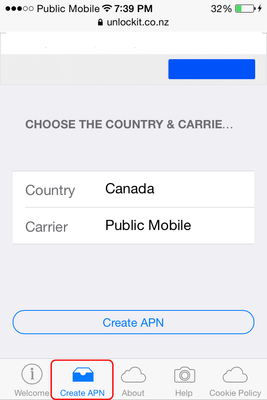
Next, ensure you're connected to a Wi-Fi hotspot and can access the internet. Launch Safari and go to the URL http://unlockit.co.nz, and click on the "Create APN" option (icon looks like a file box, circled in red below) at the bottom, then select "Canada" for Country, and "Public Mobile" for Carrier. Then click on the "Create APN" button:
This will open a new tab/browsing page, similar to the one below (Received date will be the current date). Click on the "Install" button:
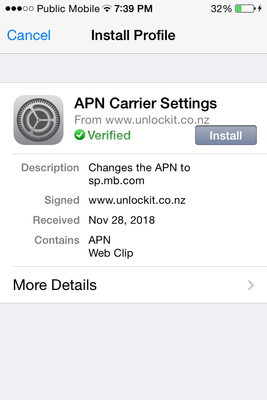
You'll be prompted to confirm installation of the profile. Click on "Install Now". You'll then see the caption "Profile Installed", and you can then click on Done.
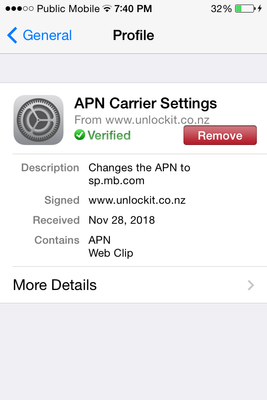
You shouldn't need to restart your phone for the settings to take effect, but doing so wouldn't hurt. Check to ensure the new profile has been installed, by going into Settings --> General, and scrolling to the bottom and selecting Profile. You should see something resembling the following:
Turn off your WiFi and ensure that you see "3G" at the top of the screen, near "Public Mobile". In Safari or another browser, ensure you can access the internet to confirm that the APN has been properly set.
Hope this helps!


Options
- Mark as New
- Subscribe
- Mute
- Subscribe to RSS Feed
- Permalink
- Report Inappropriate Content
12-15-2018 07:21 PM
@LibM iPhone 3/4 APN settings cannot be updated manually. You will need to connect to wifi, access http://www.unlockit.co.nz/mobilesettings/ with Safari, then follow the directions there.
Good luck.
>>> ALERT: I am not a CSA. Je ne suis pas un Agent du soutien à la clientèle.

Options
- Mark as New
- Subscribe
- Mute
- Subscribe to RSS Feed
- Permalink
- Report Inappropriate Content
12-15-2018 06:59 PM
@LibM iPhones older than and including the 4S need a special proceedure to configure the APN settings. @CalgaryBen or @Luddite can you please point @LibM in the directon of the unlockit instructions?
>>> ALERT: I am not a moderator. For account or activation assistance, please click here.

Options
- Mark as New
- Subscribe
- Mute
- Subscribe to RSS Feed
- Permalink
- Report Inappropriate Content
12-14-2018 09:50 PM
What PM plan did you subscribe to ? Did that plan include data ?

Options
- Mark as New
- Subscribe
- Mute
- Subscribe to RSS Feed
- Permalink
- Report Inappropriate Content
12-14-2018 09:09 PM - edited 12-14-2018 09:19 PM
@LibM wrote:It is a 3 g iPhone. How do I configure that?
@LibMHi Libm look at this internet website it will explain where to find the apn menu in the iphone https://support.apple.com/en-us/HT201699
- Settings > Cellular > Cellular Data Options > Cellular Network
- Settings > Mobile Data > Mobile Data Options > Mobile Data Network.
What plan did you register with? There are a few that demand separate purchase for Data. Can you confirm your plan has data allocated in my account?
Options
- Mark as New
- Subscribe
- Mute
- Subscribe to RSS Feed
- Permalink
- Report Inappropriate Content
12-14-2018 08:46 PM
It is a 3 g iPhone. How do I configure that?

Options
- Mark as New
- Subscribe
- Mute
- Subscribe to RSS Feed
- Permalink
- Report Inappropriate Content
12-14-2018 08:40 PM - edited 12-14-2018 08:42 PM
@LibM wrote:I have had my plan for two days and went to use data and it is not activated. How do I get it on? Thank you
@LibMIs everything else working SMS/Calls? Does MMS work? (Not SMS) MMS uses data (picture / video / audio messages) Turn air plane mode ON then OFF. Reboot your phone. Do you have another phone to try your sim card in to see if data is working? Have you tried data on more than 1 app, have you confirmed you have no local data restrictions / firewall settings? Go into mobile data usage under settings and make sure you have not used your local "data limit" and there are no network restrictions
Go into network search and try reconnecting to the network and make sure LTE is set to preferred (even if you have 3g)
The most likely cause is the APN. You need to configure your APN settings to be able to send pictures (MMS) and navigate on internet (DATA). Your "Mobile Data" needs to be activated.
Android
Settings > More / More Networks / Wireless & Networks > Mobile Networks > Access Point Names > New APN setting (or a plus sign)
Name: Public Mobile / Mobile Internet
APN: sp.mb.com
Proxy: Leave blank
Port: Leave blank
Username: Leave blank
Password: Leave blank
Server: Leave blank
MMSC: http://aliasredirect.net/proxy/mb/mmsc
MMSC proxy: 74.49.0.18
MMS port: 80
MCC: 302
MNC: 220
Authentication type: Leave blank
APN type: default,mms,agps,supl,fota,hipri
APN protocol: IPv4
APN roaming protocol: IPv4
APN enable/disable: APN enabled
Bearer: Unspecified
MVNO type: GID
MVNO value: 4D4F
Select Save/Done. Select Public Mobile to connect to the Public Mobile network.
APN Tethering Settings:
Name: Tethered Mobile Internet
APN: isp.mb.com
Proxy: Not set
Port: Not set
Username: Not set
Password: Not set
Server: Not set
MMSC: Not set
MMS proxy: Not set
MMS port: Not set
MCC: 302
MNC: 220
Authentication type: Not set
APN type: dun
APN protocol: IPv4
APN roaming protocol: IPv4
APN enable/disable: APN enabled
Bearer: Unspecified
MVNO type: GID
MVNO value: 4D4F

Related Content

