Turn on suggestions
Auto-suggest helps you quickly narrow down your search results by suggesting possible matches as you type.
Showing results for
- Community Home
- Get Support
- Re: ADDRESS
Options
- Subscribe to RSS Feed
- Mark Topic as New
- Mark Topic as Read
- Float this Topic for Current User
- Subscribe
- Mute
- Printer Friendly Page
ADDRESS

Options
- Mark as New
- Subscribe
- Mute
- Subscribe to RSS Feed
- Permalink
- Report Inappropriate Content
01-28-2025 08:11 AM
6 REPLIES 6
Moved:


Options
- Mark as New
- Subscribe
- Mute
- Subscribe to RSS Feed
- Permalink
- Report Inappropriate Content
01-28-2025 11:47 AM
unnecessary repetition

Options
- Mark as New
- Subscribe
- Mute
- Subscribe to RSS Feed
- Permalink
- Report Inappropriate Content
01-28-2025 10:06 AM
Open the public mobile App—Login in—go to my account— manage profile- address, you can type in your new address then save.


Options
- Mark as New
- Subscribe
- Mute
- Subscribe to RSS Feed
- Permalink
- Report Inappropriate Content
01-28-2025 08:17 AM
if it is a address for new area, it might have such problem. You can ask CS Agent to update it for you from the backend instead
Please open ticket with PM support:
1. Open ticket via Chatbot (need access to My Account): At https://widget.telus.tiia.ai/publicmobile/publicmobile.html
Start by typing "Submit a ticket", then click "Contact Us", then "Other", then "Log In", finally click "Click here to submit a ticket ↗"
2. If you have trouble with Chatbot or you don't have access to My Account: Private message CS Agent at:
https://productioncommunity.publicmobile.ca/t5/notes/composepage/note-to-user-id/22437
**Monitor your Community inbox (envelope icon on the top right) after ticket submitted, CS Agent will reply to you there
Start by typing "Submit a ticket", then click "Contact Us", then "Other", then "Log In", finally click "Click here to submit a ticket ↗"
2. If you have trouble with Chatbot or you don't have access to My Account: Private message CS Agent at:
https://productioncommunity.publicmobile.ca/t5/notes/composepage/note-to-user-id/22437
**Monitor your Community inbox (envelope icon on the top right) after ticket submitted, CS Agent will reply to you there
Options
- Mark as New
- Subscribe
- Mute
- Subscribe to RSS Feed
- Permalink
- Report Inappropriate Content
01-28-2025 08:17 AM
Plese help me.
Options
- Mark as New
- Subscribe
- Mute
- Subscribe to RSS Feed
- Permalink
- Report Inappropriate Content
01-28-2025 08:16 AM
Did all that but it keep saying "invalid address". I know my new address geezzz
Options
- Mark as New
- Subscribe
- Mute
- Subscribe to RSS Feed
- Permalink
- Report Inappropriate Content
01-28-2025 08:13 AM - edited 01-28-2025 08:14 AM
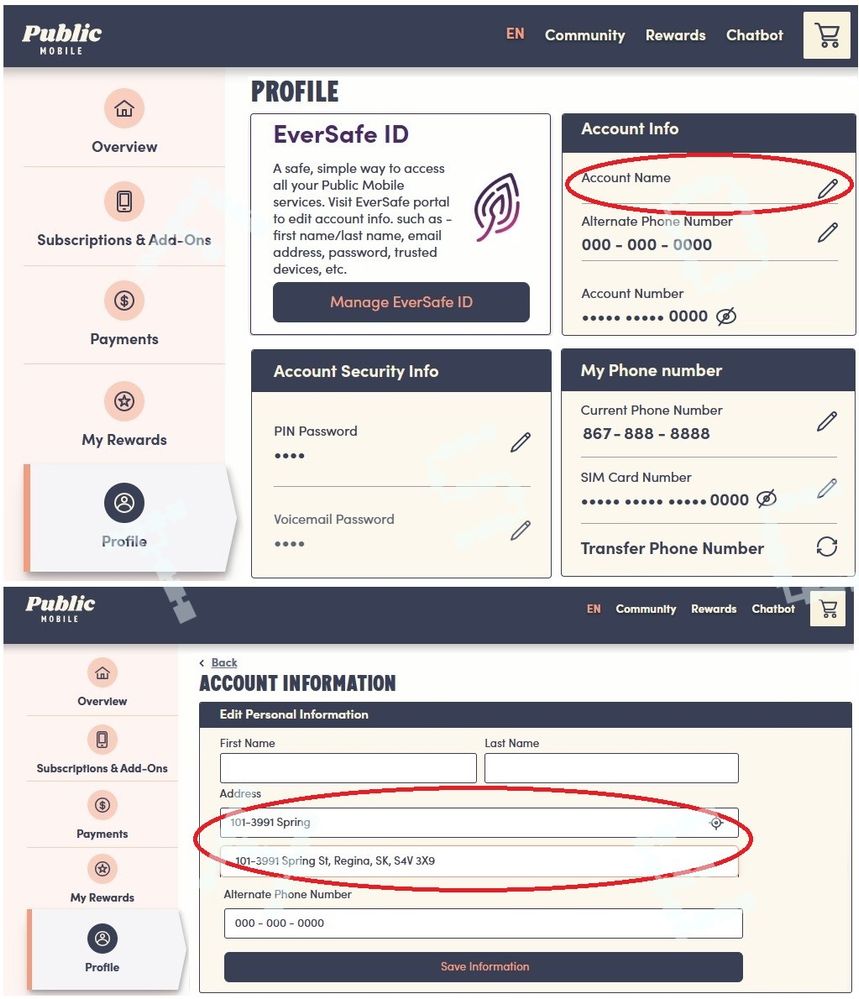
login to My Account and go to Profile page, or use this directly link: https://myaccount.publicmobile.ca/en/account/edit/account-info .
Or on the App, go to Account page, and you can do the same
(look like site just back from maintenance is loading slow at this time, you might want to try after an hour instead)

Related Content
- eSim showing original number even though I changed my number within Public mobile app in Get Support
- data usage in Get Support
- Re: Recent Telus Data Breach in Get Support
- Service Cancellation due to closed email and credit card - is it automatic? in Get Support
- Recovering my account to update my email,payment at recover my pin in Get Support
