Turn on suggestions
Auto-suggest helps you quickly narrow down your search results by suggesting possible matches as you type.
Showing results for
- Community Home
- Get Support
- Re: 2FA text verification is being sent to the wro...
Options
- Subscribe to RSS Feed
- Mark Topic as New
- Mark Topic as Read
- Float this Topic for Current User
- Subscribe
- Mute
- Printer Friendly Page

Options
- Mark as New
- Subscribe
- Mute
- Subscribe to RSS Feed
- Permalink
- Report Inappropriate Content
12-17-2023 11:44 AM
2FA text verification is being sent to a previous phone number I had with PM instead of my current number. My contact information is correct in my account profile, so how can this contact number be updated?
Solved! Go to Solution.
Labels:
- Labels:
-
My Account
5 REPLIES 5

Options
- Mark as New
- Subscribe
- Mute
- Subscribe to RSS Feed
- Permalink
- Report Inappropriate Content
09-21-2025 09:46 AM
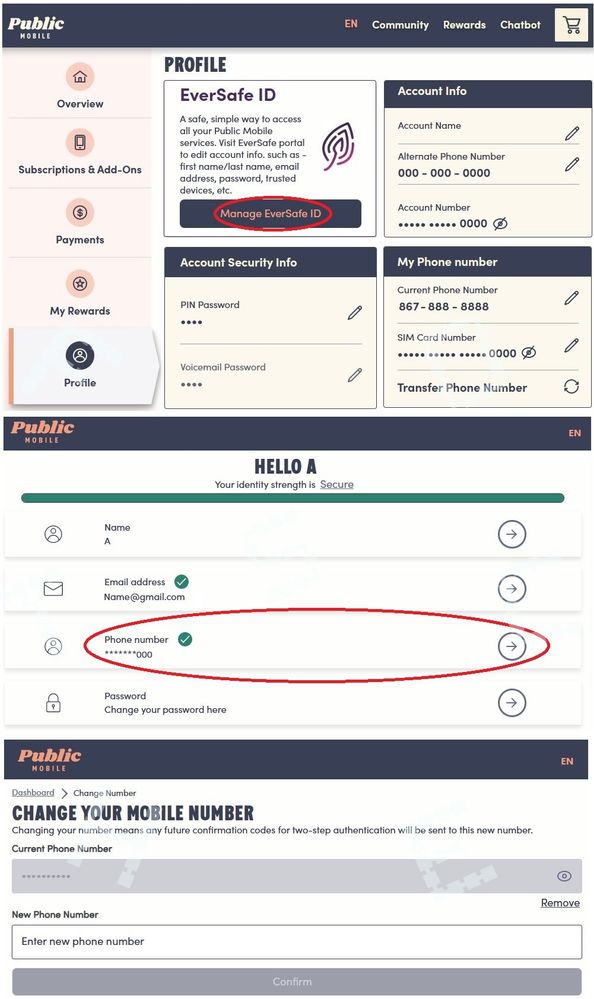
Thank you! Changing my phone number associated my Eversafe ID did the trick. To change the phone number associated with my Eversafe id, I logged into PM (via a web browser on my pc), went to "My Profile", and then on the right side of the page, I clicked on the "Manage Eversafe ID" button (see screenshot below). Again, thank you for pointing me in the right direction, I appreciate you.


Options
- Mark as New
- Subscribe
- Mute
- Subscribe to RSS Feed
- Permalink
- Report Inappropriate Content
12-23-2023 06:36 PM
Found the solution. You have to update both your profile AND your eversafe Identity, deleting the old number. Two separate entries required.
Options
- Mark as New
- Subscribe
- Mute
- Subscribe to RSS Feed
- Permalink
- Report Inappropriate Content
12-17-2023 12:06 PM
Thanks...that's what I was looking for!

Options
- Mark as New
- Subscribe
- Mute
- Subscribe to RSS Feed
- Permalink
- Report Inappropriate Content
12-17-2023 11:49 AM
If you did not receive or cannot receive your 2FA code by SMS - Click on: ‘Didn’t get a code’ and you will get more options. Chose email.


Options
- Mark as New
- Subscribe
- Mute
- Subscribe to RSS Feed
- Permalink
- Report Inappropriate Content
12-17-2023 11:48 AM - edited 12-17-2023 11:50 AM
@JoeTourist first, you can use "Didn't receive code " and then use "Send email" option to get the 2FA code
once you logged in, to to Profile page, click Manage EverSafe id and you can update the phone number there