Turn on suggestions
Auto-suggest helps you quickly narrow down your search results by suggesting possible matches as you type.
Showing results for
- Community Home
- Get Support
- Re: esim not work with my phone, but I already pur...
Options
- Subscribe to RSS Feed
- Mark Topic as New
- Mark Topic as Read
- Float this Topic for Current User
- Subscribe
- Mute
- Printer Friendly Page

Options
- Mark as New
- Subscribe
- Mute
- Subscribe to RSS Feed
- Permalink
- Report Inappropriate Content
06-28-2023 09:02 PM
Finally it said esim is not working with my Samsung S20Fe, but I had already finished the payment of "$39 plan with esim".
Can I get the refund first and then purchase again?
Or how can I do now?
Thanks!
Solved! Go to Solution.
Labels:
- Labels:
-
Payment
9 REPLIES 9


Options
- Mark as New
- Subscribe
- Mute
- Subscribe to RSS Feed
- Permalink
- Report Inappropriate Content
06-28-2023 10:02 PM
you will need to open ticket with PM support and have them to change the sim card for you then.
please message support here:
**Monitor your Community inbox (envelope icon on top right) after the ticket is opened. CS Agent will reply to you there
Options
- Mark as New
- Subscribe
- Mute
- Subscribe to RSS Feed
- Permalink
- Report Inappropriate Content
06-28-2023 10:01 PM
My problem is: Iam now trapping in the page of "lets complete your activation" page, "resume activation" or "go to login page" these 2 options only
even after i bought the PM sim card, i still dunno how to go to my Account
Options
- Mark as New
- Subscribe
- Mute
- Subscribe to RSS Feed
- Permalink
- Report Inappropriate Content
06-28-2023 09:44 PM
you can change it back from eSIM to Physical sim card
Get a PM sim card from:
- local Telus/Koodo/Mobile Klinik stores: https://www.publicmobile.ca/en/bc/pick-up-SIM (call ahead to confirm availability )
- Amazon.ca: https://www.amazon.ca/dp/B07R6P5KBB/ (Free Prime Shipping)
- PM online: https://www.publicmobile.ca/sim-card (Delivery could take anywhere from 5 days to 3 weeks)
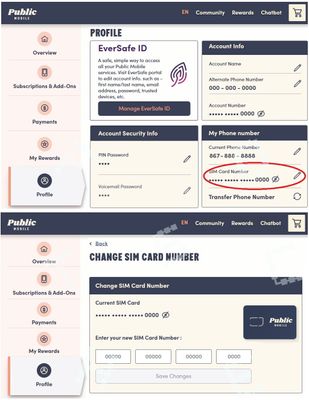
Once you got the sim card, go to My Account from ONLY a desktop or laptop computer to request Change Sim card (please note that due to some glitches, accessing change sim care from mobile phone or tablet won't work)
Then go to Profile page, click on the Pencil besides the sim card number, follow the steps to enter the new sim card number and complete the change sim card request
(or direct link: https://myaccount.publicmobile.ca/en/account/profile/change-sim-number )
Options
- Mark as New
- Subscribe
- Mute
- Subscribe to RSS Feed
- Permalink
- Report Inappropriate Content
06-28-2023 09:41 PM
Do u mean the physical sim from Koodo already with a new phone number, right?
Sorry for my silly question
Options
- Mark as New
- Subscribe
- Mute
- Subscribe to RSS Feed
- Permalink
- Report Inappropriate Content
06-28-2023 09:35 PM
Thanks for let me know
Options
- Mark as New
- Subscribe
- Mute
- Subscribe to RSS Feed
- Permalink
- Report Inappropriate Content
06-28-2023 09:27 PM - edited 06-28-2023 09:29 PM
no worry, support can provide you the QR code . Please message them here;
thanks @will13am for confirming
@honeypizza in such case, you will need to get a physical sim from local Telus/Koodo store. Then login My Account and go to Profile page to change sim and change to the physical sim you got

Options
- Mark as New
- Subscribe
- Mute
- Subscribe to RSS Feed
- Permalink
- Report Inappropriate Content
06-28-2023 09:26 PM
@honeypizza , the Samsung S20FE is not e-sim compatible.
Options
- Mark as New
- Subscribe
- Mute
- Subscribe to RSS Feed
- Permalink
- Report Inappropriate Content
06-28-2023 09:25 PM
I didnt find any QR code in the Welcome email. The app showed "Phone is not ESIM compatible".
I checked from google it said Samsung S20Fe is ok with esim, but now you said its not. Im confused.
Can I just cancel the order or can u charge me the normal card and mail to me?
Options
- Mark as New
- Subscribe
- Mute
- Subscribe to RSS Feed
- Permalink
- Report Inappropriate Content
06-28-2023 09:09 PM - edited 07-07-2024 09:31 AM
@honeypizza don't give up yet, probably just one more step
Did you get to the eSIM installation step? Either the app will ask for your permission to do it for you, or you can get the QR code to install yourself.
If you missed the step to install by the app, there is a QR code in your Welcome email. Open it from a computer, or another device, then use your phone to scan it to install the eSIM profile on your phone.
Once you installed the eSIM profile, (or If you got passed that step eSIM installation step), try to reboot your phone once.
If it still does not connect and if you have another active sim on the phone, disable those non PM sim (eSIM/Physical sim) using the SIM Manager on the phone or simply remove the physical sim.
And make sure the one associated with PM sim and your phone number is enabled.
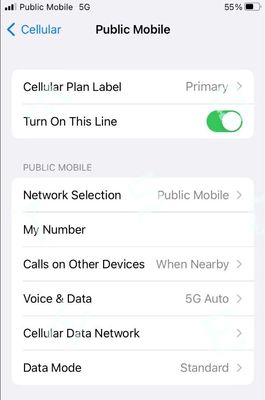
(On iPhone: Settings->Cellular , make sure the PM eSIM is set as Primary on "Cellular Plan Label" and "Turn on This Line" is toggled on)
Then click Reset All Networks on your phone and it will work. (Please note that Reset all Networks will also erase your saved Wifi and Bluetooth connections, but you just need to add them back after). Also, it is possible you have to reset it multiple times for it to work.
if it still does not work, Please open ticket with PM support by private message:
https://productioncommunity.publicmobile.ca/t5/notes/composepage/note-to-user-id/22437
**Monitor your Community inbox (envelope icon on the top right) after ticket submitted, CS Agent will reply to you there
**Monitor your Community inbox (envelope icon on the top right) after ticket submitted, CS Agent will reply to you there