Turn on suggestions
Auto-suggest helps you quickly narrow down your search results by suggesting possible matches as you type.
Showing results for
- Community Home
- Get Support
- Re: account number
Options
- Subscribe to RSS Feed
- Mark Topic as New
- Mark Topic as Read
- Float this Topic for Current User
- Subscribe
- Mute
- Printer Friendly Page
account number

Options
- Mark as New
- Subscribe
- Mute
- Subscribe to RSS Feed
- Permalink
- Report Inappropriate Content
06-19-2025 04:02 PM
2 REPLIES 2

Options
- Mark as New
- Subscribe
- Mute
- Subscribe to RSS Feed
- Permalink
- Report Inappropriate Content
06-19-2025 04:06 PM
The account number is shown on the My Account. After you login, go to Profile page. Click on the "eye" icon to show or click on the "copy" icon to copy and you can paste elsewhere


Options
- Mark as New
- Subscribe
- Mute
- Subscribe to RSS Feed
- Permalink
- Report Inappropriate Content
06-19-2025 04:04 PM - edited 06-19-2025 04:05 PM
@lizhiqin32 you can get your account number by logging into My Account, go to Profile page and there you are
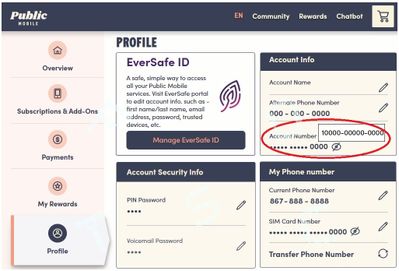
if you are using App, it will be in the Account page


