Turn on suggestions
Auto-suggest helps you quickly narrow down your search results by suggesting possible matches as you type.
Showing results for
- Community Home
- Get Support
- Re: Sim card
Options
- Subscribe to RSS Feed
- Mark Topic as New
- Mark Topic as Read
- Float this Topic for Current User
- Subscribe
- Mute
- Printer Friendly Page
Sim card

Options
- Mark as New
- Subscribe
- Mute
- Subscribe to RSS Feed
- Permalink
- Report Inappropriate Content
07-15-2023
01:30 PM
- last edited on
07-16-2023
06:35 PM
by
Dunkman

Hi my wife lost her public mobile sim card. She can’t open her account because they will ask for the verification number which is sent to her sim. What should she do?
Labels:
- Labels:
-
My Account
7 REPLIES 7
Options
- Mark as New
- Subscribe
- Mute
- Subscribe to RSS Feed
- Permalink
- Report Inappropriate Content
07-15-2023 03:56 PM
We went to Florida for a vacation. So we need to change sim card to a cheaper roaming services. Can’t find it in our luggage.
Options
- Mark as New
- Subscribe
- Mute
- Subscribe to RSS Feed
- Permalink
- Report Inappropriate Content
07-15-2023 03:50 PM
Thank you. I will do this.

Options
- Mark as New
- Subscribe
- Mute
- Subscribe to RSS Feed
- Permalink
- Report Inappropriate Content
07-15-2023 02:19 PM
I am only curious - how One can lose SIM card??? It is always in the phone; it cannot fall off from the phone by itself.
Unless you are switching it all the time between devices I cannot imagine how one can lose it.
When you do SIM swap phone number stays the same.

Options
- Mark as New
- Subscribe
- Mute
- Subscribe to RSS Feed
- Permalink
- Report Inappropriate Content
07-15-2023 01:45 PM
Try to get back into My Account first
At the same time, get a Public Mobile sim card from
- local Telus/Koodo/Mobile Klinik stores: https://www.publicmobile.ca/en/bc/pick-up-SIM (call ahead to confirm availability )
- Amazon.ca: https://www.amazon.ca/gp/product/B06X9ZGDWG/ (Free Prime next day shipping)
https://www.amazon.ca/dp/B07R6P5KBB/ (Free Non-Prime 7 days Shipping w/Amazon Tracking) - PM online: https://www.publicmobile.ca/sim-card (Delivery could take anywhere from 5 days to 3 weeks)
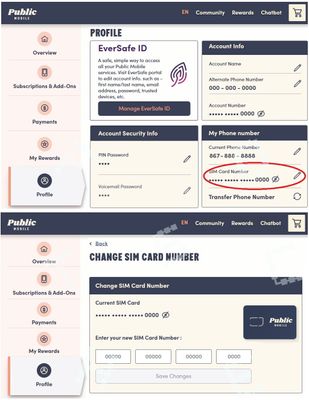
Once you got the sim card, go to My Account from ONLY a desktop or laptop computer to request Change Sim card (please note that due to some glitches, accessing change sim care from mobile phone or tablet won't work)
(if you still getting get into My Account for the 2FA issue, you can messge support to help for the part below)
Then go to Profile page, click on the Pencil besides the sim card number, follow the steps to enter the new sim card number and complete the change sim card request
(or direct link: https://myaccount.publicmobile.ca/en/account/profile/change-sim-number )

Options
- Mark as New
- Subscribe
- Mute
- Subscribe to RSS Feed
- Permalink
- Report Inappropriate Content
07-15-2023 01:42 PM
You get the new sim, you finally get logged in using the email option if you can, you use the change sim function in the account.
Options
- Mark as New
- Subscribe
- Mute
- Subscribe to RSS Feed
- Permalink
- Report Inappropriate Content
07-15-2023 01:39 PM
Thank you. But how will i get my old phone number?
Options
- Mark as New
- Subscribe
- Mute
- Subscribe to RSS Feed
- Permalink
- Report Inappropriate Content
07-15-2023 01:31 PM
PM just changed to a new EverSafe login system and you need to complete the setup on this new system.
Have you login to My Account since EverSafe was introduced?
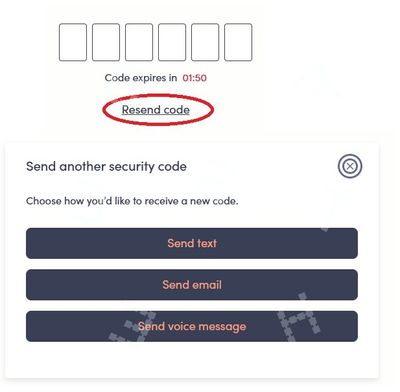
If you have already created an EverSafe id, you can ask the code to send to email instead
On the screen it is expecting you to enter the code, click Resend code and then choose Send email
If you have not created an EverSafe id yet, you won't be able complete the part to link your My Account with the EverSafe ID, that needs a working phone with a working PM sim using SMS. (Sending the code to email would not be a choice until EverSafe id is fully setup)
Try these workarounds, it could bypass the SMS in linking My Account with EverSafe ID
- Reset your password to self service account. Once reset, sign in again with new password. Might be able to receive 2FA via email instead to gain access.
(!!!You will need to click Resend Code and then Send email to trigger the 2FA to email) - Potential workaround (for some): If you don't have access to SMS OTP, try entering an incorrect OTP code 4 times. For some individuals, this is giving the option of an email instead.
If none of those workarounds helps, please open ticket with support by direct message here:
**Monitor your Community inbox (envelope icon on top right) after the ticket is opened. CS Agent will reply to you there


