Turn on suggestions
Auto-suggest helps you quickly narrow down your search results by suggesting possible matches as you type.
Showing results for
Options
- Subscribe to RSS Feed
- Mark Topic as New
- Mark Topic as Read
- Float this Topic for Current User
- Subscribe
- Mute
- Printer Friendly Page

Options
- Mark as New
- Subscribe
- Mute
- Subscribe to RSS Feed
- Permalink
- Report Inappropriate Content
11-25-2022 02:16 PM
10 REPLIES 10
Options
- Mark as New
- Subscribe
- Mute
- Subscribe to RSS Feed
- Permalink
- Report Inappropriate Content
11-25-2022 06:18 PM
Yes I have done those exact steps. And each time I go to save changes, it zeros out the number and nothing is saved.

Options
- Mark as New
- Subscribe
- Mute
- Subscribe to RSS Feed
- Permalink
- Report Inappropriate Content
11-25-2022 03:31 PM - edited 11-26-2022 12:08 AM
you need to contact customer support. I think PM disabled it. I'm pretty sure there is some sort of security breach happening with the Telus family
https://productioncommunity.publicmobile.ca/t5/notes/composepage/note-to-user-id/22437
*customer support doesn't always respond promptly. please be patient and check your inbox every few hours to see if there is a response
CSA are available from
- Monday to Friday: 6AM- 10PM EST
- Saturday and Sunday: 6AM- 10PM EST


Options
- Mark as New
- Subscribe
- Mute
- Subscribe to RSS Feed
- Permalink
- Report Inappropriate Content
11-25-2022 02:41 PM
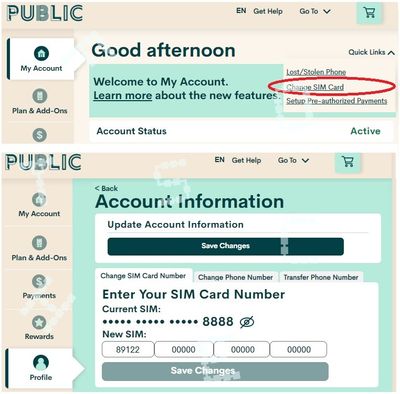
@Joshua007 what did you do to attach this new sim to your account? did you do this?
Login to My Account, click Change Sim card from Quick menu on the top right and then follow the prompt to complete the change sim card processs

Options
- Mark as New
- Subscribe
- Mute
- Subscribe to RSS Feed
- Permalink
- Report Inappropriate Content
11-25-2022 02:21 PM - edited 11-25-2022 02:21 PM
@Joshua007 That’s absolutely possible.. what is happening that doesn’t let you change the sim number?

Options
- Mark as New
- Subscribe
- Mute
- Subscribe to RSS Feed
- Permalink
- Report Inappropriate Content
11-25-2022 02:20 PM

Options
- Mark as New
- Subscribe
- Mute
- Subscribe to RSS Feed
- Permalink
- Report Inappropriate Content
11-25-2022 02:20 PM
@Joshua007 You can do a sim card change from in your account, you just can't have more than one on an account.
Options
- Mark as New
- Subscribe
- Mute
- Subscribe to RSS Feed
- Permalink
- Report Inappropriate Content
11-25-2022 02:19 PM
I had lost my phone, got a new phone and SIM card and wanted to continue using my same account. But it won’t allow me to put the new SIM card number in?
Options
- Mark as New
- Subscribe
- Mute
- Subscribe to RSS Feed
- Permalink
- Report Inappropriate Content
11-25-2022 02:18 PM
If you are trying to swap SIM cards clear your browser cache and history first and then open a new window in incognito.
If you are trying to open a new account you must open it with a separate email account.

Options
- Mark as New
- Subscribe
- Mute
- Subscribe to RSS Feed
- Permalink
- Report Inappropriate Content
11-25-2022 02:18 PM
Options
- Mark as New
- Subscribe
- Mute
- Subscribe to RSS Feed
- Permalink
- Report Inappropriate Content
11-25-2022 02:17 PM
@Joshua007 Depending what you are trying to actually do.. one sim per account

Related Content
