Turn on suggestions
Auto-suggest helps you quickly narrow down your search results by suggesting possible matches as you type.
Showing results for
- Community Home
- Get Support
- Please help - Lost SIM
Options
- Subscribe to RSS Feed
- Mark Topic as New
- Mark Topic as Read
- Float this Topic for Current User
- Subscribe
- Mute
- Printer Friendly Page

Options
- Mark as New
- Subscribe
- Mute
- Subscribe to RSS Feed
- Permalink
- Report Inappropriate Content
07-14-2023 11:06 PM
Hi there, friend lost SIM in a phone and wants to replace it - however the solution to replace SIM is to log into account. Can't log into account without SIM.
How can my friend log into their account/replace SIM if the phone is not working?
Thanks
Solved! Go to Solution.
Labels:
- Labels:
-
My Account
4 REPLIES 4
Options
- Mark as New
- Subscribe
- Mute
- Subscribe to RSS Feed
- Permalink
- Report Inappropriate Content
07-15-2023 12:20 AM
Thanks for reaching out. The following workaround worked. Appreciate you responding.
Try these workarounds, it could bypass the SMS in linking My Account with EverSafe ID
- Reset your password to self service account. Once reset, sign in again with new password. Might be able to receive 2FA via email instead to gain access.
(!!!You will need to click Resend Code and then Send email to trigger the 2FA to email) - Potential workaround (for some): If you don't have access to SMS OTP, try entering an incorrect OTP code 4 times. For some individuals, this is giving the option of an email instead.
Options
- Mark as New
- Subscribe
- Mute
- Subscribe to RSS Feed
- Permalink
- Report Inappropriate Content
07-15-2023 12:16 AM
Thanks very much - work around worked. Dave

Options
- Mark as New
- Subscribe
- Mute
- Subscribe to RSS Feed
- Permalink
- Report Inappropriate Content
07-14-2023 11:09 PM
Have them tap resend a few times and you should get option to send to email instead . If that doesn’t work please submit ticket with support to help
message support directly
while your already here and logged in the community you can send a private message To CS_Agents click
VVVVV Link below VVVVV
https://productioncommunity.publicmobile.ca/t5/notes/composepage/note-to-user-id/22437


Options
- Mark as New
- Subscribe
- Mute
- Subscribe to RSS Feed
- Permalink
- Report Inappropriate Content
07-14-2023 11:08 PM
PM just changed to a new EverSafe login system and you need to complete the setup on this new system.
Have you login to My Account since EverSafe was introduced?
If you have already created an EverSafe id, you can ask the code to send to email instead
On the screen it is expecting you to enter the code, click Resend code and then choose Send email
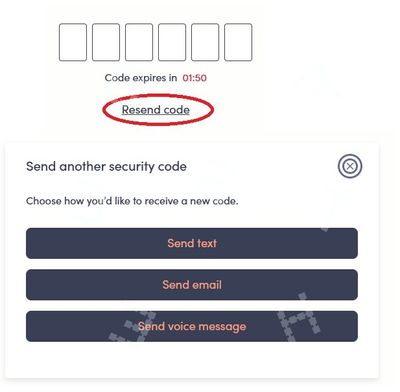
If you have not created an EverSafe id yet, you won't be able complete the part to link your My Account with the EverSafe ID, that needs a working phone with a working PM sim using SMS. (Sending the code to email would not be a choice until EverSafe id is fully setup)
Try these workarounds, it could bypass the SMS in linking My Account with EverSafe ID
- Reset your password to self service account. Once reset, sign in again with new password. Might be able to receive 2FA via email instead to gain access.
(!!!You will need to click Resend Code and then Send email to trigger the 2FA to email) - Potential workaround (for some): If you don't have access to SMS OTP, try entering an incorrect OTP code 4 times. For some individuals, this is giving the option of an email instead.
If none of those workarounds helps, please open ticket with support by direct message here:
**Monitor your Community inbox (envelope icon on top right) after the ticket is opened. CS Agent will reply to you there

