Turn on suggestions
Auto-suggest helps you quickly narrow down your search results by suggesting possible matches as you type.
Showing results for
- Community Home
- Get Support
- LinkedIn Verify
Options
- Subscribe to RSS Feed
- Mark Topic as New
- Mark Topic as Read
- Float this Topic for Current User
- Subscribe
- Mute
- Printer Friendly Page
LinkedIn Verify

Options
- Mark as New
- Subscribe
- Mute
- Subscribe to RSS Feed
- Permalink
- Report Inappropriate Content
01-28-2024 08:44 PM
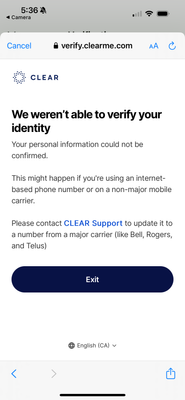
Hello, when will you work with https://clearme.com/ so that we can verify ourselves on LinkedIn? It says it's because PublicMobile is not a major carrier. That's not cool.
Labels:
- Labels:
-
Other
6 REPLIES 6

Options
- Mark as New
- Subscribe
- Mute
- Subscribe to RSS Feed
- Permalink
- Report Inappropriate Content
07-25-2025 10:36 AM
i can use LinkedIn verification without problem.
but you can check with PM and see if anything they can do, but I doubt
Just open ticket with PM using the Orange Chatbot icon on the lower right. (For 2FA when login, you might need to use email to receive if you cannot receive the text on the phone.) Type the question Submit ticket and select Contact Us to get to ticket open screen
But if you have trouble using Chatbot to open ticket, then message PM using this link:
https://productioncommunity.publicmobile.ca/t5/notes/composepage/note-to-user-id/22437
CS_Agent will reply to your community inbox between 9AM-10PM EST (Mon-Sun), check here:
https://productioncommunity.publicmobile.ca/t5/notes/privatenotespage

Options
- Mark as New
- Subscribe
- Mute
- Subscribe to RSS Feed
- Permalink
- Report Inappropriate Content
07-25-2025 10:33 AM
Has anyone had any luck with this?
This is the response I received from clearme.com:
Thank you for contacting CLEAR. We apologize for the trouble you experienced completing your LinkedIn verification.
We apologize, but we couldn't verify your information in our database. This situation may occur if you're using an internet-based phone number or a non-major mobile carrier. To obtain the best results, kindly ensure that you enter the correct phone number, the number is registered in your name, and you're using a major phone carrier.
With identity theft on the rise CLEAR and LinkedIn use a 2 step verification process. this process also verifies your identity via your telephone number. If your caller ID on your phone does not match what is on your state ID/License exactly it will fail. You want to ensure the Caller ID is enabled on your device. All cell phones have the options to turn this off so when calling out it displays unknown caller, not allowing us to verify your identity. If you are on a family plan your Caller ID may be reflecting the main account holders name and not yours. The main account holder of the mobile family plan can assign caller ID to each number. They can sign in online to the carriers portal and update your caller ID. At the current time CLEAR is not compatible with prepaid, GoogleFi, Skype or VOIP. Please also confirm with your cell phone provide your Caller ID is enable as many members are not aware but smaller service like Mint Mobile and Lyca mobile are consider prepaid service and do not have the Caller ID functionality. There Caller ID will only display their telephone number and say " wireless caller" as there is no commitment. If you are trying to verify with a work device please try a personal phone as this may display your business name and not yours. Please also make sure all information on LinkedIn and CLEAR match exactly.
The error message we are receiving is related to your mobile carrier. Please reach out to them to get this resolved. You may also want to try adding your middle name to Linkedin and then trying to verify. There is no direct spot for the middle name but it can be added to the first name field. Please also make sure this is being complete from your cell phone and not a PC. Please also note some Mobile carriers like T-Mobile have the option to use wi-fi calling instead of the mobile network in areas with minimum coverage. Which can calls problems if an E911 address is not set up. It suggested work with your mobile provide to get this resolved. We will not be able to verify you with just an ID.
If you're still unable to complete the verification process using these suggestions, we regret to inform you that our support team is unable to provide further assistance at this time. We kindly recommend that you try again later.
We appreciate your understanding and patience as we work diligently to improve your experience in collaboration with LinkedIn.

Options
- Mark as New
- Subscribe
- Mute
- Subscribe to RSS Feed
- Permalink
- Report Inappropriate Content
02-26-2024 07:10 AM

Moved:


Options
- Mark as New
- Subscribe
- Mute
- Subscribe to RSS Feed
- Permalink
- Report Inappropriate Content
01-28-2024 09:15 PM

Options
- Mark as New
- Subscribe
- Mute
- Subscribe to RSS Feed
- Permalink
- Report Inappropriate Content
01-28-2024 09:10 PM
there has been some complains about this issue for months. Another subscriber has similar issue with the same response from Clearme:
I think you should contact your phone carrier to see if you're able to fully port your information to LinkedIn at all. Phone carriers under bigger companies such as Telus, AT&T, etc., it is recommended that LinkedIn users
it is strictly a decision by Clearme. But it might help if you open a ticket with PM support and ask them to escalate and work with Clearme for a solution
**Monitor your Community inbox (envelope icon on top right) after the ticket is opened. CS Agent will reply to you there

Options
- Mark as New
- Subscribe
- Mute
- Subscribe to RSS Feed
- Permalink
- Report Inappropriate Content
01-28-2024 08:48 PM
I would reach out to them and tell them that Public Mobile is a 3rd tier provider of Telus. And if they don't like the fact you're saving money over the big 3, tell them too bad! LOL

