Turn on suggestions
Auto-suggest helps you quickly narrow down your search results by suggesting possible matches as you type.
Showing results for
- Community Home
- Get Support
- Re: I would like to Change my base plan
Options
- Subscribe to RSS Feed
- Mark Topic as New
- Mark Topic as Read
- Float this Topic for Current User
- Subscribe
- Mute
- Printer Friendly Page

Options
- Mark as New
- Subscribe
- Mute
- Subscribe to RSS Feed
- Permalink
- Report Inappropriate Content
12-23-2021 02:03 PM - edited 01-04-2022 04:50 AM
My plan has expired and I have a $50 payment voucher in my hand and I would like to upgrade to the $50 plan. I keep going in circles and am getting tired of the runaround
Solved! Go to Solution.
9 REPLIES 9

Options
- Mark as New
- Subscribe
- Mute
- Subscribe to RSS Feed
- Permalink
- Report Inappropriate Content
12-23-2021 04:47 PM - edited 12-23-2021 04:50 PM
For future reference....in your situation if your plan/service has been suspended for non payment then you would not want to load the voucher onto your account first as mentioned by @AE_Collector this would automatically reactivate your current plan that you wish to change.
Instead you would go to the plans page first. Scroll down and choose the new $50 plan (or whatever plan you want to change to) then scroll down to the bottom and choose "change plan immediately".
You will then be redirected to the payment page where you would then enter the 12 digit PIN # from the voucher and submit the payment. Once accepted your service will automatically renew on the new plan that you have chosen.


Options
- Mark as New
- Subscribe
- Mute
- Subscribe to RSS Feed
- Permalink
- Report Inappropriate Content
12-23-2021 03:45 PM
@Tim13 which retailer is that? you are lucky. Many retailer are just keen on activation to earn commission and ignore other support request 🙂
Options
- Mark as New
- Subscribe
- Mute
- Subscribe to RSS Feed
- Permalink
- Report Inappropriate Content
12-23-2021 03:41 PM
@Tim13 wrote:I went to a public mobile retailer and talked to a human and he did everything I asked for over the phone. Much easier than trying to navigate through this website. Thank you for your input.
Glad you found that easier @Tim13
For others, a quick question here, a few options to fix/remedy an issue, and presto, they're done. Mostly within a few minutes.
All from the comfort of one's own favorite chair.
Glad it all worked out for you!!!
Options
- Mark as New
- Subscribe
- Mute
- Subscribe to RSS Feed
- Permalink
- Report Inappropriate Content
12-23-2021 03:34 PM
I went to a public mobile retailer and talked to a human and he did everything I asked for over the phone. Much easier than trying to navigate through this website. Thank you for your input.
Options
- Mark as New
- Subscribe
- Mute
- Subscribe to RSS Feed
- Permalink
- Report Inappropriate Content
12-23-2021 03:19 PM
First question I would pose is how long have you been without service?
If it has been less than 90 days then your account can still be reactivated.
Try clearing your cache and cookies, open an incognito tab, then log into your self-serve and try entering the payment voucher again.
You can also dial * 611 from your device to manually add the payment voucher.
Some payment vouchers take a few hours to become active after purchase; if you bought it very recently that might be what's happening.

Options
- Mark as New
- Subscribe
- Mute
- Subscribe to RSS Feed
- Permalink
- Report Inappropriate Content
12-23-2021 03:04 PM - edited 12-23-2021 03:11 PM
@Tim13 wrote:My plan has expired and I have a $50 payment voucher in my hand and I would like to upgrade to the $50 plan. I keep going in circles and am getting tired of the runaround
1) Load the voucher to your account (via 611 or self-serve)
2) Check the $50 show up in Available funds.
3) Click on Change Plan > Select your plan and click on Change Now or Change at Next Renewal date.
Edit: If your service is already suspended, then do the Plan selection first before loading funds to your account.

Options
- Mark as New
- Subscribe
- Mute
- Subscribe to RSS Feed
- Permalink
- Report Inappropriate Content
12-23-2021 03:01 PM - edited 12-23-2021 06:16 PM
But @Tim13 says plan IS expired now. Isn’t the potential problem with adding the funds from voucher first as the current plan might automatically renew rather than the new $50 plan? A long time ago the suggestion was to contact CSA to change default plan and then top up? Not sure, just wanting to ensure that @Tim13 doesn't land on the wrong plan for another 30 days.
AE_Collector

Anonymous
Not applicable
Options
- Mark as New
- Subscribe
- Mute
- Subscribe to RSS Feed
- Permalink
- Report Inappropriate Content
12-23-2021 02:11 PM
i suggest you close all Browser and do clear cache and cookies for any Browser,
and try open one Browser incognito mode,
or try it for a different Browser and open incognito mode,
how to open Browser incognito mode visit Here link,
how to clear cache and cookies and History visit Here link,
and use a Browser from your computer,is better
use Browser microsoft edge or chrome latest version
and just make sure your Browser is up to date update
sometime is the Browser is not update is give a issue.
how to update your Browser visit Here link,
and Restart your computer, is will help a lot,
and if you use a home internet take your power internet off for about
a 1 minute and put it back on,to refreshing your network,
and click Here link to you know how to Change Your Plan online,
you can choose at your next plan renewal date. To change your plan.
or if you can't fix it you need to Contact Customer Support Agent by CS_Agent, and Explain your issue to them can solve your issue, they are nice service Team the will help you 100%.
Here’s How To Contact Customer Support Agent by Submit a Ticket,
Spoiler
- Get help with your account the easy way by starting a conversation with our virtual assistant, SIMon. It’ll take you to relevant help articles, or if it’s something more urgent, it can help you submit a ticket to Customer Support Agent by CS_Agent, Click Here link,to get started. Type,, Ticket ,, Click ,, Contact Us ,, Select your issue ,,
Click here to submit a ticket↗↗.
- or you can send a private message to Customer Support Agent by Click Here link,
- please include in your message,
- phone number,
- Email address,
- Customer Support Agent by CS_Agent, will Response to your inbox by private message
- During business hours, we strive to answer customer messages swiftly. You will often get an answer within an hour. During peak periods, you may need to wait up to 48 hours.Customer Support Agents are available:
- Monday to Sunday: 6 AM to 10 PM EST
- Note: Public Mobile No Support by phone call or Email.. only by CS_Agent, private message..
Check your private message inbox (click on the envelope top right of your screen)
Good Luck..
Options
- Mark as New
- Subscribe
- Mute
- Subscribe to RSS Feed
- Permalink
- Report Inappropriate Content
12-23-2021 02:06 PM - edited 12-23-2021 03:20 PM
@Tim13 wrote:My plan has expired and I have a $50 payment voucher in my hand and I would like to upgrade to the $50 plan. I keep going in circles and am getting tired of the runaround
@Tim13 how far you have done? did you click Change Plan from the Overview tab, here:
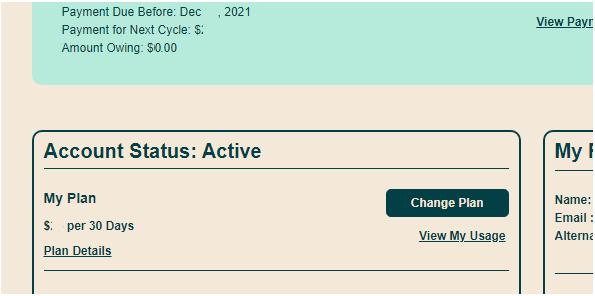
(you can also go directly here: https://selfserve.publicmobile.ca/Overview/plan-and-Add-ons/ChangePlanLandingPage/?PageRedirect=Redi...)
Or you got any error while trying to access the page? Was it some browser error? Or not all plans show up? If so, try to use another browser, or use Incognito mode or clear cache then close all browser windows and relaunch


