Turn on suggestions
Auto-suggest helps you quickly narrow down your search results by suggesting possible matches as you type.
Showing results for
- Community Home
- Get Support
- E-Sim Mistake
Options
- Subscribe to RSS Feed
- Mark Topic as New
- Mark Topic as Read
- Float this Topic for Current User
- Subscribe
- Mute
- Printer Friendly Page
E-Sim Mistake

Options
- Mark as New
- Subscribe
- Mute
- Subscribe to RSS Feed
- Permalink
- Report Inappropriate Content
08-09-2023 07:44 PM
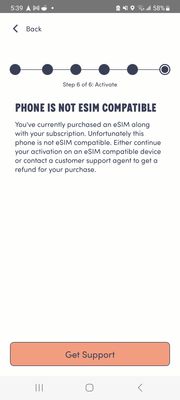
Good Afternoon. I purchased an E-Sim with the lowest Tier of plan. I paid $15 & $1.65 in tax & checked the IEMI before purchase. I have a The Public Mobile Website told me my phone was compatible & when I got the app I was told that it was incompatible. This is Okay. I'll stay with Lüm Mobile for now. I just need to know how to reverse the charge for $16.65 to my debit card. Any help would be greatly appreciated. Thank You @CS_Agent
Labels:
- Labels:
-
Payment
5 REPLIES 5

Options
- Mark as New
- Subscribe
- Mute
- Subscribe to RSS Feed
- Permalink
- Report Inappropriate Content
08-09-2023 09:35 PM
What happens if you press back in the top left hand corner? Are you able to go back to the SIM Option and set your Plan up with a Physical SIM Card instead?
$4.99 on Amazon right now directly from Public Mobile, delivered with Amazon Prime.
Public Mobile Prepaid SIM Prepaid Phone - (Universal/SmartPhones), Packaging May Vary https://a.co/d/esAhRNf
Options
- Mark as New
- Subscribe
- Mute
- Subscribe to RSS Feed
- Permalink
- Report Inappropriate Content
08-09-2023 09:34 PM
Public Mobile runs off the Sasktel towers in Saskatchewan, I recently asked someone who I switched from Sasktel to Public if they've noticed any difference in reception and it's been the same for them.

Options
- Mark as New
- Subscribe
- Mute
- Subscribe to RSS Feed
- Permalink
- Report Inappropriate Content
08-09-2023 08:02 PM
@SpookyHalloween - we are not CS_Agents that normally post here in the Community. We are customers and members like you here.
That doesn't seem right that you received conflicting information. I would submit a ticket with Public customer support and try and get the account/esim working. Not likely refunds to be given here, fyi. Maybe credits to account, but hopefully in this case you get the plan working.
Ways to contact Public Mobile Customer Support (CSA) below:
1-Normally Faster - use this link to: Get Help With Public Mobile Chatbot], also found in various places in Public webpages, and bottom right corner of the page (See the Chat Bubble),
2-OR, go to your ENVELOPE at the top right of your Community Account which is where your Inbox and Sent messages are. Select the orange/peach color box with the pencil inside it to start a new message. Type CS_Agent in the SEND TO box. This will create a private message to Public Mobile Customer Support.


Options
- Mark as New
- Subscribe
- Mute
- Subscribe to RSS Feed
- Permalink
- Report Inappropriate Content
08-09-2023 07:48 PM
what phone do you have?
don't give up yet, it could still be compatible and just need to manually install the eSIM. There is a QR code in your Welcome email. Open it from a computer, or another device, then use your phone to scan it to install the eSIM profile on your phone
Once you installed the eSIM profile, (or If you got passed that step), try to reboot your phone once.
If it still does not connect and if you have any active sim on the phone , disable them (eSIM/Physica sim) or remove the physical sim. Then click Reset All Networks on your phone and it will work. (Please note that Reset all Networks will also erase your saved Wifi and Bluetoosh connections, but you just need to add them back after). Also, it is possible you have to reset it multiple times for it to work.
if it still does not work, please open ticket with PM support
**Monitor your Community inbox (envelope icon on top right) after the ticket is opened. CS Agent will reply to you there

Options
- Mark as New
- Subscribe
- Mute
- Subscribe to RSS Feed
- Permalink
- Report Inappropriate Content
08-09-2023 07:46 PM

