Turn on suggestions
Auto-suggest helps you quickly narrow down your search results by suggesting possible matches as you type.
Showing results for
- Community Home
- Get Support
- Data not working - internal service error?
Options
- Subscribe to RSS Feed
- Mark Topic as New
- Mark Topic as Read
- Float this Topic for Current User
- Subscribe
- Mute
- Printer Friendly Page

Options
- Mark as New
- Subscribe
- Mute
- Subscribe to RSS Feed
- Permalink
- Report Inappropriate Content
06-09-2022 04:24 AM - edited 06-09-2022 04:42 AM
I started experiencing an issue the other day that has never happened before and I don't know what is causing it because I don't think I have used all my data for this month. 🤔
The past few days, every time I try to use mobile data, I get a notification to sign into the Public Mobile Network and when I tap the notification, I get directed to a public mobile page that says "internal service error" and I can't sign into the network. This has never happened before and my husband is also with Public Mobile on the same plan and isn't experiencing this issue.
Things I have already tried to fix it that didn't work:
- re-add the APN settings
- restart my phone
- turn off my phone completely and turn back on
- removed my sim card and reinserted it
- changed network modes, tried all of them, none work.
- reset my network settings
- Put my sim card in my husband's phone. He gets the same error with my sim card. He doesn't get the error with his own sim card, only mine.
Any moderators that might be able to give further insight? Is it something to do with my account? I am not having problems with texting or calling, the issue is only when using data.
Thanks
Solved! Go to Solution.
6 REPLIES 6

Options
- Mark as New
- Subscribe
- Mute
- Subscribe to RSS Feed
- Permalink
- Report Inappropriate Content
06-09-2022 09:45 AM
The texts seem to be hit and miss these days unfortunately. Hopefully you are close to your renewal date and this is a one off 🙂
Options
- Mark as New
- Subscribe
- Mute
- Subscribe to RSS Feed
- Permalink
- Report Inappropriate Content
06-09-2022 05:12 AM
Just found the section that shows my data usage, it says amount used. I wasn't expecting that because usually Public Mobile texts me when I am getting close to using up all my data and I didn't get a notification of it at all this time. But it looks like that was the issue after all. Thank you everyone for helping me find it!

Options
- Mark as New
- Subscribe
- Mute
- Subscribe to RSS Feed
- Permalink
- Report Inappropriate Content
06-09-2022 05:08 AM
@emilienguyen wrote:When I go to Data & Add-On Usage it doesn't show anything about my mobile data usage, only my calling usage and how many minutes I've used.
@emilienguyen That confirms your data are used up
How many days into your current cycle? and Maybe you somehow used more data than you think?
Options
- Mark as New
- Subscribe
- Mute
- Subscribe to RSS Feed
- Permalink
- Report Inappropriate Content
06-09-2022 05:07 AM
When I go to Data & Add-On Usage it doesn't show anything about my mobile data usage, only my calling usage and how many minutes I've used.

Options
- Mark as New
- Subscribe
- Mute
- Subscribe to RSS Feed
- Permalink
- Report Inappropriate Content
06-09-2022 05:02 AM
@emilienguyen wrote:I don't think I have used all my data for this month. 🤔
@emilienguyen Check My Account to confirm if you still have data.
In fact, the error message you got " sign into the Public Mobile Network" is an indication that you data are all used up. Check My Account, Overview page, there should be a line about data under My Data & Add-ons. Something like this:
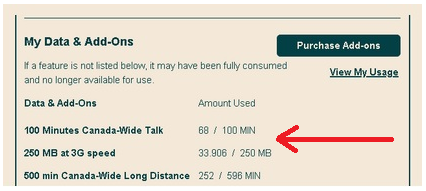
If you don't see such a line, that means your data are all used up
Just a reminder, PM uses 30 day cycle and the cycle start date keeps changing. You could be close to the end of the cycle and hence your data are used up and you are not aware.

Options
- Mark as New
- Subscribe
- Mute
- Subscribe to RSS Feed
- Permalink
- Report Inappropriate Content
06-09-2022 04:56 AM - edited 06-09-2022 05:01 AM
When you signin to your account and states an internal service error, it means that the website is under going maintenance so signin after 6:00am EST.
Once you are login to your account and check if you used up all your data for the month. Go to My Data & Add-ons section and see how much data you have left. Eg. 500MB + 500MB at 3G Speed - 800MB/1024MB means you used up 0.800gb out of 1.0gb. But if you used up all your data, this note will disappear then go to View My Usage and it will show when and how much data was used.
If this is the case, you have an option to purchase more data. Any unused data will roll over to the next month. Or you can connect to home wifi or free wifi like Shaw Go WiFi or #Telus or any other free wifi.
If there is remaining data showing in your account, there might be an backend issue with your SIM and you will need help from a CS_Agent (Moderator) to correct for you.

Related Content
- ESIM wouldn’t setup in Get Support
- Unable to Access my Account - Trying to change the Email but Public mobile have a weird process in Get Support
- Drop Calls in Get Support
- Does a payment voucher need to be redeemed? in Get Support
- Public Mobile locked me out of ALL self-service features for ONE YEAR!! in Get Support
