Turn on suggestions
Auto-suggest helps you quickly narrow down your search results by suggesting possible matches as you type.
Showing results for
- Community Home
- Get Support
- Changing Sim card
Options
- Subscribe to RSS Feed
- Mark Topic as New
- Mark Topic as Read
- Float this Topic for Current User
- Subscribe
- Mute
- Printer Friendly Page
Changing Sim card

Options
- Mark as New
- Subscribe
- Mute
- Subscribe to RSS Feed
- Permalink
- Report Inappropriate Content
05-04-2023 04:28 AM
Lost card got new one want to change email and keep number how that work I lost my Sim card got new one want same number
Labels:
- Labels:
-
Service
2 REPLIES 2


Options
- Mark as New
- Subscribe
- Mute
- Subscribe to RSS Feed
- Permalink
- Report Inappropriate Content
05-04-2023 08:40 AM - edited 05-04-2023 08:42 AM
for changing email used for My Account login only support can help. Please open ticket with them.
1. Open ticket with Chatbot for faster response (2-48 hours), using direct link: https://publicmobile.ca/chatbot.
Start by typing "Forgot Login Information", then click "Contact Us",, then click "Click here to submit a ticket ↗"
2. if you have problem with Chatbot: Private message CS Agent at:
https://productioncommunity.publicmobile.ca/t5/notes/composepage/note-to-user-id/22437
**Monitor your Community inbox (envelope icon on the top right) after the ticket is opened. CS Agent will reply to you there
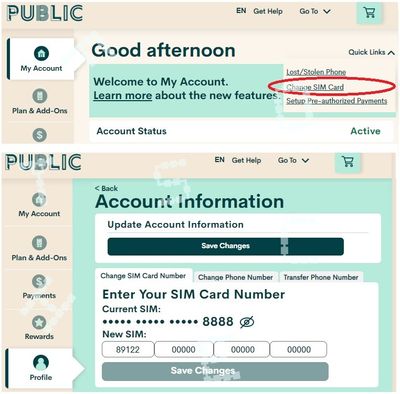
Once email changed and you can login, go to My Account from ONLY a desktop or laptop computer to request Change Sim card (please note that due to some glitches, accessing change sim care from mobile phone or tablet won't work)
After you logged in, unsuspend first if you have suspended your service earlier.
Then click Quick Links on the top right and select Change Sim card and follow the steps:

Options
- Mark as New
- Subscribe
- Mute
- Subscribe to RSS Feed
- Permalink
- Report Inappropriate Content
05-04-2023 05:38 AM - edited 05-04-2023 05:40 AM
@Burgess93 You need to do this on computer only not a mobile device and to a SIM card swap
Do not activate the new sim just swap it under the profile tab quick link
My account
Legend and features
Change plan / update cc /auto pay

Account #/ change # port /swap SIM
adding also if you want to change your email you need supports help to do that and ask them to swap SIM card for you at same time also
Getting support / submit ticket
- Get support by starting a conversation with virtual Chat box /SIMon. Click here
Or while your already here and logged in the community
- you can send a private message To CS_Agents by clicking here.
Watch for reply top of page to the
Right ( envelope image )

