Turn on suggestions
Auto-suggest helps you quickly narrow down your search results by suggesting possible matches as you type.
Showing results for
- Community Home
- Get Support
- Canceling changes done to subscription
Options
- Subscribe to RSS Feed
- Mark Topic as New
- Mark Topic as Read
- Float this Topic for Current User
- Subscribe
- Mute
- Printer Friendly Page

Options
- Mark as New
- Subscribe
- Mute
- Subscribe to RSS Feed
- Permalink
- Report Inappropriate Content
03-04-2024 07:18 PM
2 days ago l opted to change my current plan to a different plan starting on my current plan renew date of March 16. I have changed my mind and want to keep my current plan. How do l cancel the changes?
Solved! Go to Solution.
Labels:
- Labels:
-
Plans
9 REPLIES 9


Options
- Mark as New
- Subscribe
- Mute
- Subscribe to RSS Feed
- Permalink
- Report Inappropriate Content
07-03-2025 10:05 PM - edited 07-03-2025 10:07 PM
@Chalupa_Batman wrote:To cancel your plan, log into your account and turn off Subscribe. Another way to cancel your account is to port your number to another service provider.
That isn't what was being discused in this thread. Please see that a customer wished to undo a scheduled plan change.

Options
- Mark as New
- Subscribe
- Mute
- Subscribe to RSS Feed
- Permalink
- Report Inappropriate Content
07-03-2025 09:25 PM - edited 07-03-2025 09:26 PM
@Rachel24 wrote:Thank you, but I tried many times today, it doesn't let me cancel.
To cancel your plan, log into your account and turn off Subscribe. Another way to cancel your account is to port your number to another service provider. If you can't log into your account, contact a CS Agent this way.
The Public Mobile chatbot is currently unable to create trackable tickets for members who are unable to log in. So for this reason, please use the following link to contact customer service.
https://productioncommunity.publicmobile.ca/t5/notes/composepage/note-to-user-id/22437
A Customer Service Agent will reply to your community inbox here:
https://productioncommunity.publicmobile.ca/t5/notes/privatenotespage
During business hours (9 AM-10 PM EST) you can expect a response within 30 minutes, but it may be longer depending on current volumes.
Side note, any chance we an get an Oracle to move the "Rachel24" conversation to it's own thread? Thanks.

Options
- Mark as New
- Subscribe
- Mute
- Subscribe to RSS Feed
- Permalink
- Report Inappropriate Content
07-03-2025 04:32 PM
Thank you, but I tried many times today, it doesn't let me cancel.
Options
- Mark as New
- Subscribe
- Mute
- Subscribe to RSS Feed
- Permalink
- Report Inappropriate Content
07-03-2025 04:28 PM - edited 07-03-2025 10:08 PM
@Rachel24 wrote:Can I do the cancellation on the same day? or I have to wait till tomorrow?
A scheduled plan change can be undone any time you wish.
Options
- Mark as New
- Subscribe
- Mute
- Subscribe to RSS Feed
- Permalink
- Report Inappropriate Content
07-03-2025 04:18 PM
Can I do the cancellation on the same day? or I have to wait till tomorrow?
Options
- Mark as New
- Subscribe
- Mute
- Subscribe to RSS Feed
- Permalink
- Report Inappropriate Content
03-04-2024 07:36 PM
That worked. Thank you very much for your help.

Options
- Mark as New
- Subscribe
- Mute
- Subscribe to RSS Feed
- Permalink
- Report Inappropriate Content
03-04-2024 07:23 PM - edited 03-04-2024 07:23 PM
@Cestmoe - Go to My Account > Subscriptions & add-ons > scroll down till you find this:
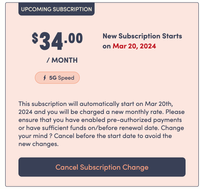
Press 'Cancel Subscription Change' and you are finished with the change! You will now keep your same plan!

Options
- Mark as New
- Subscribe
- Mute
- Subscribe to RSS Feed
- Permalink
- Report Inappropriate Content
03-04-2024 07:22 PM
Once you sign in to your My Account, you should show you your current subscription and it shows you what will happen on March 16th. You can click on cancel upcoming changes.

Options
- Mark as New
- Subscribe
- Mute
- Subscribe to RSS Feed
- Permalink
- Report Inappropriate Content
03-04-2024 07:21 PM - edited 03-04-2024 07:21 PM
@Cestmoe In your account go to subscriptions add on page you will see your current plan and upcoming plan with option to cancel the upcoming plan change
Cancel plan change


