Turn on suggestions
Auto-suggest helps you quickly narrow down your search results by suggesting possible matches as you type.
Showing results for
- Community Home
- Get Support
- Re: eSIM activated but no calls, sms or data on iP...
Options
- Subscribe to RSS Feed
- Mark Topic as New
- Mark Topic as Read
- Float this Topic for Current User
- Subscribe
- Mute
- Printer Friendly Page
eSIM activated but no calls, sms or data on iPhone 16 Pro

Options
- Mark as New
- Subscribe
- Mute
- Subscribe to RSS Feed
- Permalink
- Report Inappropriate Content
03-05-2025
11:10 PM
- last edited on
03-06-2025
12:06 AM
by
computergeek541

Hi - Just ported over from Telus.
Confirmed "Yes" with Telus and activated the Public Mobile eSIM.
Received message that Telus was turned off on the phone (Telus email confirmed that account was ported "We're sorry to see you go".
Received Public Mobile text to restart the phone, which I did and have done several times now.
Getting full bars but the 3G/4G/5G/5G+ icon comes and goes and cycles like that. My husband ported over 15 minutes before me and no issues.
Again can't make/receive calls or sms and there's no data. Stuck a bit here.
Is there a porting assistance team I can contact to get this sorted?
-Anh
Labels:
- Labels:
-
Joining Public
-
Service
4 REPLIES 4
Options
- Mark as New
- Subscribe
- Mute
- Subscribe to RSS Feed
- Permalink
- Report Inappropriate Content
03-06-2025 08:47 PM
CS_Agent responded a few times this morning (MST) and by noon they said to resolve the issue I'd have to go to a Telus/Koodo store to get a PM SIM card to fix the issue.
Get to the Telus Store at Chinook Centre in Calgary > Get a PM SIM > But Telus employees were unable to assist. They said they have no access to PM tools.
I've responded back to CS_Agent and it looks like another day of no service after porting to PM.
Options
- Mark as New
- Subscribe
- Mute
- Subscribe to RSS Feed
- Permalink
- Report Inappropriate Content
03-06-2025 10:55 AM
@softech How long does it take a PM CS_Agent to respond?
Options
- Mark as New
- Subscribe
- Mute
- Subscribe to RSS Feed
- Permalink
- Report Inappropriate Content
03-05-2025 11:36 PM
@softech Thank you for the response. The eSIM was installed/activated with the Public Mobile app.
I have removed my previous Telus SIM card from the iPhone as it was no longer activate after the port.
Just tried removing the PM eSIM and activate it again by scanning the QR code in the Welcome email but that did not work.
I will send a message to PM Support and hope they respond in the morning. Thank you again.
-Anh

Options
- Mark as New
- Subscribe
- Mute
- Subscribe to RSS Feed
- Permalink
- Report Inappropriate Content
03-05-2025 11:12 PM
your issue is not with porting but with the esim setup on your phone itself. Let's try to see if we can get it working first
Did you get to the eSIM installation step? Either the app will ask for your permission to do it for you, or you can get the QR code to install yourself.
If you missed the step to install by the app, there is a QR code in your Welcome email. Open it from a computer, or another device, then use your phone to scan it to install the eSIM profile on your phone.
Once you installed the eSIM profile, (or If you got passed that step eSIM installation step), try to reboot your phone once.
If it still does not connect and if you have another active sim on the phone, disable those non PM sim (eSIM/Physical sim) using the SIM Manager on the phone or simply remove the physical sim.
And make sure the one associated with PM sim and your phone number is enabled.
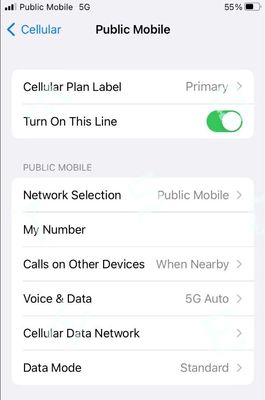
(On iPhone: Settings->Cellular , make sure the PM eSIM is set as Primary on "Cellular Plan Label" and "Turn on This Line" is toggled on)
Then click Reset All Networks on your phone and it will work. (Please note that Reset all Networks will also erase your saved Wifi and Bluetooth connections, but you just need to add them back after). Also, it is possible you have to reset it multiple times for it to work.
if it still does not work, Please open ticket with PM support by private message:
https://productioncommunity.publicmobile.ca/t5/notes/composepage/note-to-user-id/22437
**Monitor your Community inbox (envelope icon on the top right) after ticket submitted, CS Agent will reply to you there
**Monitor your Community inbox (envelope icon on the top right) after ticket submitted, CS Agent will reply to you there