Turn on suggestions
Auto-suggest helps you quickly narrow down your search results by suggesting possible matches as you type.
Showing results for
- Community Home
- Get Support
- Re: Suspended Account
Options
- Subscribe to RSS Feed
- Mark Topic as New
- Mark Topic as Read
- Float this Topic for Current User
- Subscribe
- Mute
- Printer Friendly Page
Suspended Account

Options
- Mark as New
- Subscribe
- Mute
- Subscribe to RSS Feed
- Permalink
- Report Inappropriate Content
07-17-2020 02:03 PM - edited 01-05-2022 12:29 PM
My account has been suspended because of insufficient funds but I’m on Autopay and I received a text saying my payment went through already for the month. What can be done to fix this? I have been two days without my phone working already!
Labels:
- Labels:
-
Payment
5 REPLIES 5

Options
- Mark as New
- Subscribe
- Mute
- Subscribe to RSS Feed
- Permalink
- Report Inappropriate Content
07-17-2020 04:16 PM

Options
- Mark as New
- Subscribe
- Mute
- Subscribe to RSS Feed
- Permalink
- Report Inappropriate Content
07-17-2020 02:21 PM
@themomma try the lost/ stolen trick to reset your service. From your self service account enable the lost/ stolen feature log out, wait 5 minutes, log in and take it off. Log out and restart your phone.
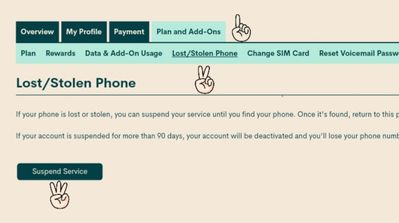
If it fails, contat the moderators and ask them to reset your service for you. There are 2 ways to contact the Moderator Team:
- Faster response- Get help with your account the easy way by starting a conversation with our virtual assistant, SIMon. It’ll take you to relevant help articles, or if it’s something more urgent, it can help you submit a ticket to the Moderator Team. Click here to get started.
- Slower- Alternatively, you can send a private message to the Moderators by clicking here. You’ll need to be logged in to your Community account for the link to work.
Once connected to Simon, you will be asked to log in again with your community user name and password. Please do, this allows you to continue and send your message.
- Check your private message sent box (click on the envelope top right of your screen) to make sure the message was sent.
- Keep an eye on the envelope top right of your screen. The mods answer will show up there. When it does, you will be asked to verify your self service account, with your password and login. Doing so allows the process to continue. Stay safe.

Options
- Mark as New
- Subscribe
- Mute
- Subscribe to RSS Feed
- Permalink
- Report Inappropriate Content
07-17-2020 02:13 PM
Try making a manual payment of a $1. Also try rebooting your phone.

Options
- Mark as New
- Subscribe
- Mute
- Subscribe to RSS Feed
- Permalink
- Report Inappropriate Content
07-17-2020 02:12 PM
@themomma wrote:My account has been suspended because of insufficient funds but I’m on Autopay and I received a text saying my payment went through already for the month. What can be done to fix this? I have been two days without my phone working already!
Try cycling on Airplane mode for a minute...then turn it off again.
Anything ?
Options
- Mark as New
- Subscribe
- Mute
- Subscribe to RSS Feed
- Permalink
- Report Inappropriate Content
07-17-2020 02:08 PM - edited 07-17-2020 02:09 PM
@themomma your autopay may have failed. Log into your self service account or call 611 what does it say? If its suspended and there is a reactivate account button. You may reactivate a suspended account online or by calling 611.
Via your account online
1. If you have already registered, or will first register, a credit card, go to step 2. OR deposit a voucher for at least your plan cost and go to step 3.
2. Go to the payment tab, select single payment and amount due.
3. Select the reactivate account button.
4. Restart your phone.
or Using 611 to make your payment: ( you need your 4 digit pin to buy an add on)
1. press 1 to make payment
2. press 2 credit card ( or 1 voucher)
3. press 1 amount due.
4. Restart your phone.You may reactivate a suspended account online or by calling 611.
Via your account online
1. If you have already registered, or will first register, a credit card, go to step 2. OR deposit a voucher for at least your plan cost and go to step 3.
2. Go to the payment tab, select single payment and amount due.
3. Select the reactivate account button.
4. Restart your phone.
or Using 611 to make your payment: ( you need your 4 digit pin to buy an add on)
1. press 1 to make payment
2. press 2 credit card ( or 1 voucher)
3. press 1 amount due.
4. Restart your phone.
If this fails contact the moderators and ask them to apply payment and reactivate your service for you.
There are 2 ways to contact the Moderator Team:
- Faster response- Get help with your account the easy way by starting a conversation with our virtual assistant, SIMon. It’ll take you to relevant help articles, or if it’s something more urgent, it can help you submit a ticket to the Moderator Team. Click here to get started.
- Slower- Alternatively, you can send a private message to the Moderators by clicking here. You’ll need to be logged in to your Community account for the link to work.
Once connected to Simon, you will be asked to log in again with your community user name and password. Please do, this allows you to continue and send your message.
- Check your private message sent box (click on the envelope top right of your screen) to make sure the message was sent.
- Keep an eye on the envelope top right of your screen. The mods answer will show up there. When it does, you will be asked to verify your self service account, with your password and login. Doing so allows the process to continue. Stay safe.

Related Content
- Public Mobile possibly letting through scam texts without an attached phone number in Get Support
- Need help connecting with CS_Agent for account access issue in Get Support
- data use includes... in Get Support
- No internet connection, no cellular calls in Get Support
- can't reach a 1-800 number in Get Support
