Turn on suggestions
Auto-suggest helps you quickly narrow down your search results by suggesting possible matches as you type.
Showing results for
- Community Home
- Get Support
- SIM card
Options
- Subscribe to RSS Feed
- Mark Topic as New
- Mark Topic as Read
- Float this Topic for Current User
- Subscribe
- Mute
- Printer Friendly Page

Options
- Mark as New
- Subscribe
- Mute
- Subscribe to RSS Feed
- Permalink
- Report Inappropriate Content
07-26-2023
09:05 PM
- last edited on
07-26-2023
11:01 PM
by
computergeek541

My grandson lost his phone in the water . He’s can’t log into his account because they are sending the 4 digit code to his lost phone. Therefore he can’t activate his new SIM card. He has had no access to his phone number for 3 weeks now and we can’t talk to a service agent. Very frustrated!
Solved! Go to Solution.
Labels:
- Labels:
-
My Account
3 REPLIES 3

Options
- Mark as New
- Subscribe
- Mute
- Subscribe to RSS Feed
- Permalink
- Report Inappropriate Content
07-26-2023 10:05 PM - edited 07-26-2023 10:06 PM
@Lindsay77 why can't you connect with an agent? We are all members and customers like you (your son grandson) here in the Community. Ways to contact Public Mobile Customer Support (CSA) below, did you do either or both of these?
1-Normally Faster - use this link to: Get Help With Public Mobile Chatbot], also found in various places in Public webpages, OR
2-go to your envelope at the top right of your Community Account which is where your Inbox and Sent messages are. Select the orange/peach color box with the pencil inside it to start a new message. Type CS_Agent in the SEND TO box. This will create a private message to Public Mobile Customer Support.
If you can get the code via email, than you should be able to log in; see "How To Change Your SIM Number" through My Account in this Help Article: https://www.publicmobile.ca/en/on/get-help/articles/change-sim-number
If the account is currently in suspended / lost status, 'find' your phone before the SIM-swap.
edit

Options
- Mark as New
- Subscribe
- Mute
- Subscribe to RSS Feed
- Permalink
- Report Inappropriate Content
07-26-2023 09:08 PM - edited 07-26-2023 09:09 PM
@Lindsay77 wrote:My grandson lost his phone in the water . He’s can’t log into his account because they are sending the 4 digit code to his lost phone. Therefore he can’t activate his new SIM card. He has had no access to his phone number for 3 weeks now and we can’t talk to a service agent. Very frustrated!
Was he ever able to login to My Account since EverSafe was introduced?
If he has already created an EverSafe id, he can ask the code to send to email instead
On the screen it is expecting to enter the code, click Resend code and then choose Send email
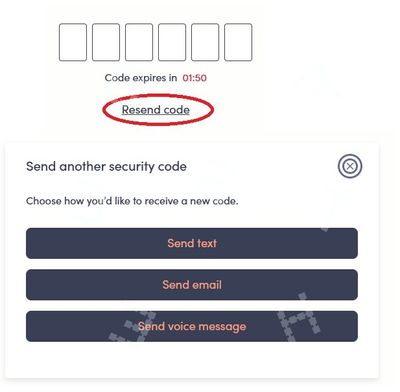
If he has not created an EverSafe id yet, he won't be able complete the part to link My Account with the EverSafe ID, that needs a working phone with a working PM sim using SMS. (Sending the code to email would not be a choice until EverSafe id is fully setup)
Try these workarounds, it could bypass the SMS in linking My Account with EverSafe ID
- Reset password to self service account. Once reset, sign in again with new password. Might be able to receive 2FA via email instead to gain access.
(!!!He will need to click Resend Code and then Send email to trigger the 2FA to email) - Potential workaround (for some): If he doesn't have access to SMS OTP, try entering an incorrect OTP code 4 times. For some individuals, this is giving the option of an email instead.
If none of those workarounds helps, please open ticket with support by direct message here:
**Monitor the Community inbox (envelope icon on top right) after the ticket is opened. CS Agent will reply there

Options
- Mark as New
- Subscribe
- Mute
- Subscribe to RSS Feed
- Permalink
- Report Inappropriate Content
07-26-2023 09:08 PM
Did the account ever get set up on the new login system? If so then click on the resend code link and use the email option.

