Turn on suggestions
Auto-suggest helps you quickly narrow down your search results by suggesting possible matches as you type.
Showing results for
- Community Home
- Get Support
- How to change plans
Options
- Subscribe to RSS Feed
- Mark Topic as New
- Mark Topic as Read
- Float this Topic for Current User
- Subscribe
- Mute
- Printer Friendly Page

Options
- Mark as New
- Subscribe
- Mute
- Subscribe to RSS Feed
- Permalink
- Report Inappropriate Content
07-22-2022 10:37 AM
2 REPLIES 2

Options
- Mark as New
- Subscribe
- Mute
- Subscribe to RSS Feed
- Permalink
- Report Inappropriate Content
07-22-2022 12:18 PM
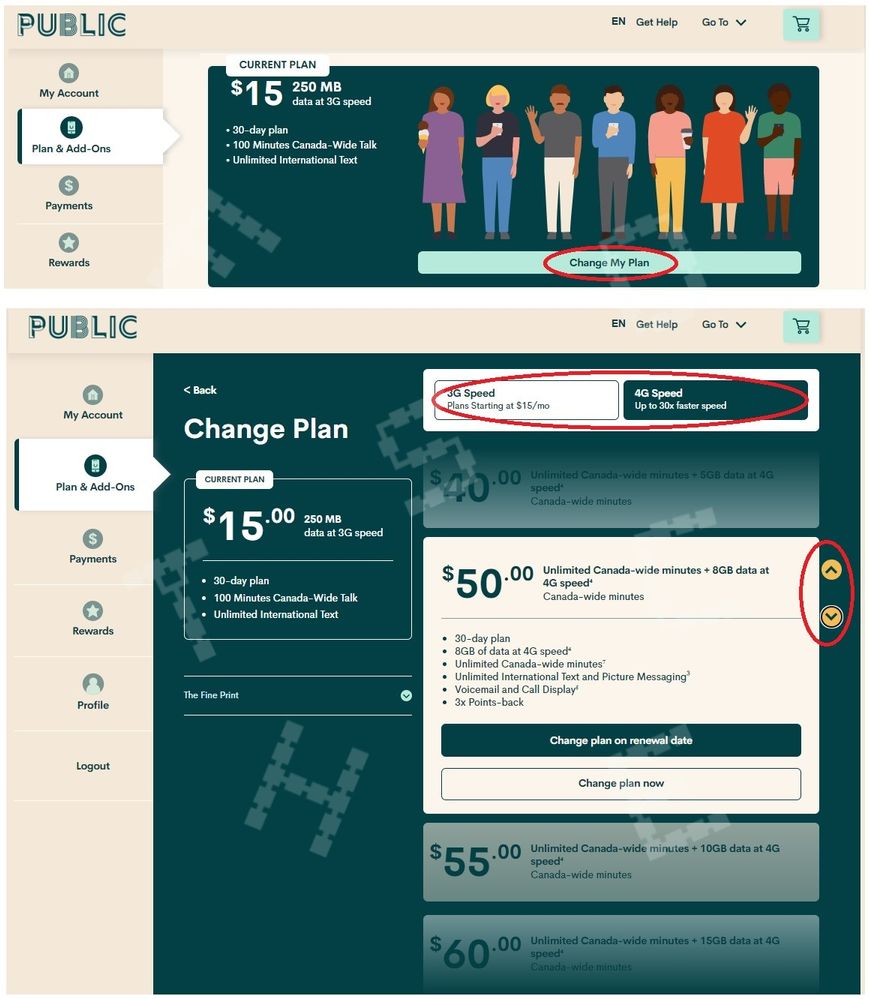
Log into your account. On the left hand side of the screen select "Plans & Add ons" then click "Change My Plan". You can scroll through available plans and select 'change plan now' or 'change plan on renewal date' from the preselected available plans.


Options
- Mark as New
- Subscribe
- Mute
- Subscribe to RSS Feed
- Permalink
- Report Inappropriate Content
07-22-2022 10:39 AM - edited 10-20-2022 02:21 PM
Just login to My Account , go to Plan & Add-ons page, click Change My Plan
It will then give you the list of different plans you can change to (there are 2 arrows on the far right to scroll up and down) Pick the one you want there
Just make sure you know the difference between Change plan now and Change in the next renewal date.
People usually select Change in the next renewal date to avoid waste money if you don't need the extra data or minutes urgently.