Turn on suggestions
Auto-suggest helps you quickly narrow down your search results by suggesting possible matches as you type.
Showing results for
- Community Home
- Get Support
- Data problem
Options
- Subscribe to RSS Feed
- Mark Topic as New
- Mark Topic as Read
- Float this Topic for Current User
- Subscribe
- Mute
- Printer Friendly Page
Data problem

Options
- Mark as New
- Subscribe
- Mute
- Subscribe to RSS Feed
- Permalink
- Report Inappropriate Content
05-31-2020 01:55 PM - edited 01-05-2022 10:58 AM
7 REPLIES 7

Options
- Mark as New
- Subscribe
- Mute
- Subscribe to RSS Feed
- Permalink
- Report Inappropriate Content
05-31-2020 02:05 PM

Options
- Mark as New
- Subscribe
- Mute
- Subscribe to RSS Feed
- Permalink
- Report Inappropriate Content
05-31-2020 02:03 PM
@Vickyloo So you don't have data since start? Did you check your self-service account and APN settings on your phone? Can you send MMS?

Options
- Mark as New
- Subscribe
- Mute
- Subscribe to RSS Feed
- Permalink
- Report Inappropriate Content
05-31-2020 02:02 PM
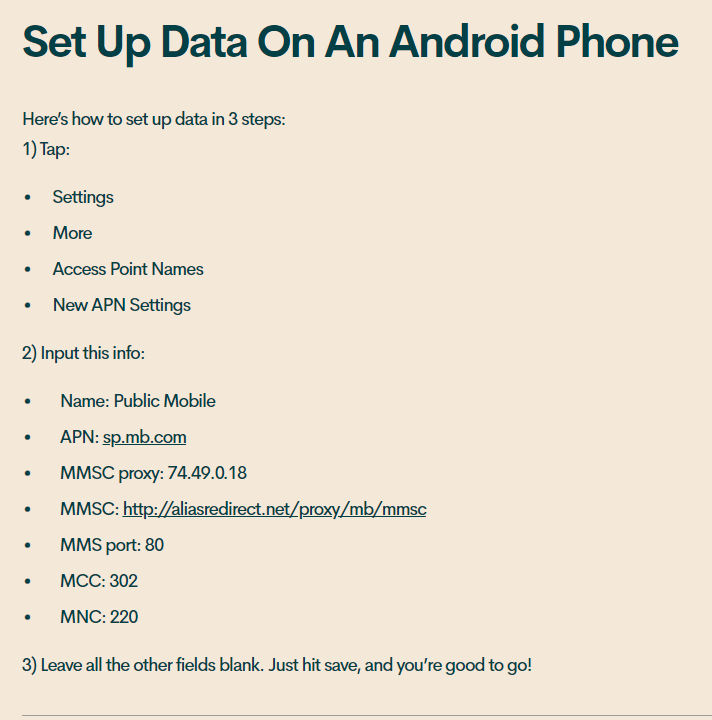
@VickylooIf you are using an android phone, you might have to set up the APN settings.
Here's the link for all the compatible public mobile phones that require specific APN settings.
Good luck!! If you need anything do not hesitate to ask us!

Options
- Mark as New
- Subscribe
- Mute
- Subscribe to RSS Feed
- Permalink
- Report Inappropriate Content
05-31-2020 01:59 PM - edited 05-31-2020 02:05 PM
Check your self serve account to see under data and add-ons to see if any amount is listed. If no amount is showing then you have used up your data. You can purchase an add-on if 1GB for $15. Try rebooting your phone. Also check your APN settings.
Name: Public Mobile
APN: sp.mb.com
Proxy: Leave blank
Port: Leave blank
Username: Leave blank
Password: Leave blank
Server: Leave blank
MMSC: http://aliasredirect.net/proxy/mb/mmsc
MMSC proxy: 74.49.0.18
MMS port: 80
MCC: 302
MNC: 220
Authentication type: Leave blank
APN type: default,mms,agps,supl,fota,hipri
APN protocol: IPv4
APN roaming protocol: IPv4
Bearer: Unspecified
MVNO type: GID
MVNO value: 4D4F
Don't forget to save these setting.

Options
- Mark as New
- Subscribe
- Mute
- Subscribe to RSS Feed
- Permalink
- Report Inappropriate Content
05-31-2020 01:58 PM
@Vickyloo wrote:I cannot seem to access my data since signing up 2 weeks ago
Is your cellular data turned on in settings?
Options
- Mark as New
- Subscribe
- Mute
- Subscribe to RSS Feed
- Permalink
- Report Inappropriate Content
05-31-2020 01:58 PM - edited 05-31-2020 02:05 PM
@Vickyloo wrote:I cannot seem to access my data since signing up 2 weeks ago
Which phone are you using?
If you have a LG phone, you need to do a network reset after changing provider before data working again.
Restart your phone and let PM SIM card to configure your phone automatically.


Options
- Mark as New
- Subscribe
- Mute
- Subscribe to RSS Feed
- Permalink
- Report Inappropriate Content
05-31-2020 01:58 PM
More details would be helpful.
Does talk and text work?
Which model phone?
Which plan did you sign up?
A few things to try:
Reboot phone
Network reset
Toggle airplane mode on, then off.

Related Content
