Turn on suggestions
Auto-suggest helps you quickly narrow down your search results by suggesting possible matches as you type.
Showing results for
- Community Home
- Get Support
- Data Usage Texts vs. Data Usage History Not Equal
Options
- Subscribe to RSS Feed
- Mark Topic as New
- Mark Topic as Read
- Float this Topic for Current User
- Subscribe
- Mute
- Printer Friendly Page
Data Usage Texts vs. Data Usage History Not Equal

Options
- Mark as New
- Subscribe
- Mute
- Subscribe to RSS Feed
- Permalink
- Report Inappropriate Content
07-05-2021 08:09 PM - edited 01-06-2022 02:42 AM
Hello, I received all three of my 75/95/100% usage texts within roughly 1 hour of each other today. I then went and checked both my wife's and my own (shared data) usage history and keyed in the dates that correspond with our billing cycle. We have the 5GB plan, and adding up all the values on each of the page/tabs going back to the start of our billing date shows only around 1GB used so far. How can I confirm that my data usage history is correct and that I have not used all my data? How do I get this resolved and my ability to use data reinstated?
Thanks for the help!
44 REPLIES 44


Options
- Mark as New
- Subscribe
- Mute
- Subscribe to RSS Feed
- Permalink
- Report Inappropriate Content
07-06-2021 12:44 PM - edited 07-06-2021 12:46 PM
.. yes, interesting.. look like there is no way for iPhone to track backward.
For my Android.. I can change the date to like last Sunday and the data usage would show how much since Sunday.
the 4GB was then from yesterday or the day before... 4GB is not small and it might be easy to track if it is really used from your phone.
- Any chance there is an OS update downloaded during the time? (as @darlicious said, the latest update is 2.7Gb... )
- Any chance you have watched a movie during the time? or launched a game ?
- Any chance there is a App store update for a big number of apps?
- Do you ever setup hotspot on your iphone? any chance it was triggered and you weren't aware?
- You have setup any cloud backup? maybe it got triggered and a large load of data got moved onto cloud (likely involving video if that is the case)
if you are certain you did nothing of the above. I really can't think of much that would take 4Gb in such a short time. I guess you can reply to mod and see if they can do anything.

Options
- Mark as New
- Subscribe
- Mute
- Subscribe to RSS Feed
- Permalink
- Report Inappropriate Content
07-06-2021 12:39 PM
I am not that familiar with iPhones do they have both a data warning and a data limiter?;If so set your warning at 25% and limiter at 50% of plan data. Or less since you have 5gb in your plan.
Options
- Mark as New
- Subscribe
- Mute
- Subscribe to RSS Feed
- Permalink
- Report Inappropriate Content
07-06-2021 12:32 PM
As previously mentioned data is updated in twice daily 12 hour blocks. You know what time you got your 611 usage texts so it occurred before then and after probably noon eastern (or 9 am pacific).

Options
- Mark as New
- Subscribe
- Mute
- Subscribe to RSS Feed
- Permalink
- Report Inappropriate Content
07-06-2021 12:28 PM - edited 07-06-2021 12:34 PM
@BCsurfer wrote:So as of this morning a 4GB usage showed up on my history. The time stamp for it was 12:31pm yesterday but mods are saying that it could be an accumulation from a set number of previous hours before that...not sure exactly how many.
Long story short, this has never happened to me before but the system is showing that I downloaded that amount. I've installed a data manger on my phone to track it going forward but there does not appear to be a way for me to figure out which app or website was the culprit. I hadn't reset my built-in iphone app usage statistics since 2013 so the numbers there were useless.
I've resigned that I probably won't figure out how this happened. Frustrating nonetheless.
Hello @BCsurfer ,
In cases like this, you really wish there was a glitch somewhere and the data amount can be given back to you. Sorry to hear it. 😞
That, near, 24 hour delay of data usage history in our detail info. (that does not match live info on our Overview tab) is not great when you want to see where it all went in that short amount of time.
A separate way to track your data is the best way to go. And it sounds like you are now on top of that. Hopefully, with limit warnings this can be prevented from happening again.
Good luck!
Options
- Mark as New
- Subscribe
- Mute
- Subscribe to RSS Feed
- Permalink
- Report Inappropriate Content
07-06-2021 12:27 PM
Did you accidently install iPhone's latest update on mobile data? Just the software update alone is 2.76GB this time around.
Options
- Mark as New
- Subscribe
- Mute
- Subscribe to RSS Feed
- Permalink
- Report Inappropriate Content
07-06-2021 12:20 PM
So as of this morning a 4GB usage showed up on my history. The time stamp for it was 12:31pm yesterday but mods are saying that it could be an accumulation from a set number of previous hours before that...not sure exactly how many.
Long story short, this has never happened to me before but the system is showing that I downloaded that amount. I've installed a data manger on my phone to track it going forward but there does not appear to be a way for me to figure out which app or website was the culprit. I hadn't reset my built-in iphone app usage statistics since 2013 so the numbers there were useless.
I've resigned that I probably won't figure out how this happened. Frustrating nonetheless.

Options
- Mark as New
- Subscribe
- Mute
- Subscribe to RSS Feed
- Permalink
- Report Inappropriate Content
07-06-2021 11:47 AM
I have done that....copy and paste but so many pages...I stopped doing it.
Options
- Mark as New
- Subscribe
- Mute
- Subscribe to RSS Feed
- Permalink
- Report Inappropriate Content
07-06-2021 11:46 AM
.. adding to the wishlist.. would be better if it has export to Excel option!!!
Options
- Mark as New
- Subscribe
- Mute
- Subscribe to RSS Feed
- Permalink
- Report Inappropriate Content
07-06-2021 11:45 AM
Would be better if you could see 100 lines at a time. Some sites have that option.
Options
- Mark as New
- Subscribe
- Mute
- Subscribe to RSS Feed
- Permalink
- Report Inappropriate Content
07-06-2021 11:43 AM - edited 07-06-2021 11:45 AM
Sorting is weird.. and so does moving around pages .. it works sometimes.. it doesn't work sometimes.
I just click on the Call Type..
but it is wired... most the time it sorted. However, sometimes.. i see it sorted.. go thought the list.. thought I got to the end of that particular type.. like Web.. but if i go couple pages further... i see Web again!!!
this is just not very reliable..
Options
- Mark as New
- Subscribe
- Mute
- Subscribe to RSS Feed
- Permalink
- Report Inappropriate Content
07-06-2021 11:18 AM
Shhhh!!!! I'm still mostly winging it when it comes to computer stuff!😉
Options
- Mark as New
- Subscribe
- Mute
- Subscribe to RSS Feed
- Permalink
- Report Inappropriate Content
07-06-2021 11:16 AM
How do you sort it? I've never been able to figure that out....lol!🤔
Options
- Mark as New
- Subscribe
- Mute
- Subscribe to RSS Feed
- Permalink
- Report Inappropriate Content
07-06-2021 10:29 AM - edited 07-27-2021 05:24 PM
Usage history could go back 90 days.. just use the date range selector
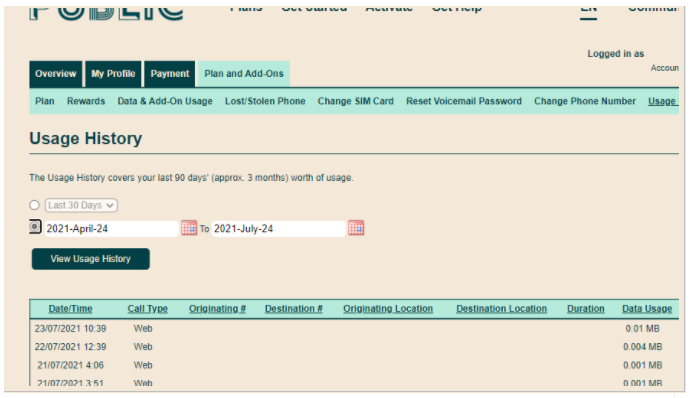
I just wonder what is it showing on the phone side.. does phone also confirm the usage that OP mentioned
Options
- Mark as New
- Subscribe
- Mute
- Subscribe to RSS Feed
- Permalink
- Report Inappropriate Content
07-06-2021 10:16 AM
Not 90 days? And trigger the sort as well?
Options
- Mark as New
- Subscribe
- Mute
- Subscribe to RSS Feed
- Permalink
- Report Inappropriate Content
07-06-2021 01:01 AM
Data events as shown are MMS messages that go thru a separate server somexclude them as they don't count against plan data. Only add up the twice daily data usage updates that are in 12 hour blocks of time. Essentially midnite eastern to noon. And noon eastern to midnite. Adding up data using the usage pages be off by about 12 hours at renewal since its a little behind. Your phone will be a a little off as data renews at 9pm pacific but your data tracker resets at midnite pacific.
Since your usage pages only go back 30 days you cannot add up your entire previous 30 day cycle but since it seeks you use about 1gb a week you could add up your last 30 days and it would probably be about 4gb. Anyhow the moderators will reset your data and in 3 weeks you can start taking before and after screenshots of your renewal to save yourself the headache of spreadsheets and calculators.
Options
- Mark as New
- Subscribe
- Mute
- Subscribe to RSS Feed
- Permalink
- Report Inappropriate Content
07-05-2021 10:43 PM
@BCsurfer look like what you added was correct. and contact Mod is the correct move at the moment
but did you check your phone? did you change the Data usage cycle start date to the same date and see what your phone shows how much you used?
Options
- Mark as New
- Subscribe
- Mute
- Subscribe to RSS Feed
- Permalink
- Report Inappropriate Content
07-05-2021 10:42 PM
Haven't read the whole thread....have you looked at your usage.....on your My Account?
Options
- Mark as New
- Subscribe
- Mute
- Subscribe to RSS Feed
- Permalink
- Report Inappropriate Content
07-05-2021 10:40 PM
Thanks for all the help.
@og2 - I posted earlier that saying my account was linked to my wife was incorrect. The issue remains though on my account.
I've been contacted by a moderator and they are looking into it. I will post a follow up once we determine what has happened.

Options
- Mark as New
- Subscribe
- Mute
- Subscribe to RSS Feed
- Permalink
- Report Inappropriate Content
07-05-2021 10:36 PM - edited 07-05-2021 10:39 PM
Seeing as you live in BC
Take a screenshot on the day before your accounts renewal date. There is a high possibility you accidentally used all the data thinking your plans renew at midnight PT.

Options
- Mark as New
- Subscribe
- Mute
- Subscribe to RSS Feed
- Permalink
- Report Inappropriate Content
07-05-2021 10:19 PM
@BCsurfer wrote:Here is the link....
https://docs.google.com/spreadsheets/d/1Hxfycf1wjkXcr-B5MphrcWxQU89-Z5sN32y6T2rXgVk/edit?usp=sharing
I don't think the 1 refers to 1 MB of data usage for every Data Event. With that said, there is no way to determine how much data each data event used. May be the moderator team can see more details.
____________________________________________
I am not a mod. Do not send me private message with your personal info.
If you need to contact PM Customer Support Agent, Start a Chat to Create a Ticket OR visit the Get Help page.
Options
- Mark as New
- Subscribe
- Mute
- Subscribe to RSS Feed
- Permalink
- Report Inappropriate Content
07-05-2021 10:18 PM
I use an Iphone.
Options
- Mark as New
- Subscribe
- Mute
- Subscribe to RSS Feed
- Permalink
- Report Inappropriate Content
07-05-2021 10:17 PM
@BCsurfer checking your spreadsheet, you don't need to add up the Data Event/MMS
btw, what plan do you have with PM?
Options
- Mark as New
- Subscribe
- Mute
- Subscribe to RSS Feed
- Permalink
- Report Inappropriate Content
07-05-2021 10:15 PM
Options
- Mark as New
- Subscribe
- Mute
- Subscribe to RSS Feed
- Permalink
- Report Inappropriate Content
07-05-2021 10:07 PM
Options
- Mark as New
- Subscribe
- Mute
- Subscribe to RSS Feed
- Permalink
- Report Inappropriate Content
07-05-2021 09:48 PM - edited 07-05-2021 09:56 PM
@BCsurfer wrote:Yep, I just posted the first page as an example. I could share a link to the google doc...wasn't sure if they want us linking things here.
Sure, as long as no personal data is there for us to see, I say it's ok to share the link.
____________________________________________
I am not a mod. Do not send me private message with your personal info.
If you need to contact PM Customer Support Agent, Start a Chat to Create a Ticket OR visit the Get Help page.
Options
- Mark as New
- Subscribe
- Mute
- Subscribe to RSS Feed
- Permalink
- Report Inappropriate Content
07-05-2021 09:45 PM
Yep, I just posted the first page as an example. I could share a link to the google doc...wasn't sure if they want us linking things here.
Options
- Mark as New
- Subscribe
- Mute
- Subscribe to RSS Feed
- Permalink
- Report Inappropriate Content
07-05-2021 09:43 PM - edited 07-05-2021 09:46 PM
@BCsurfer wrote:I'm including everything thats listed on the data usage history page. Just a straight copy/paste into a google sheet. Here's a part of it, I've removed the personal info in the middle columns but you get the idea.

That is from July 3 to 5. What about the usage prior to these two days? There are multiple pages to go through and it's not so easy as only a handful or usage load on the 1st page.
____________________________________________
I am not a mod. Do not send me private message with your personal info.
If you need to contact PM Customer Support Agent, Start a Chat to Create a Ticket OR visit the Get Help page.
Options
- Mark as New
- Subscribe
- Mute
- Subscribe to RSS Feed
- Permalink
- Report Inappropriate Content
07-05-2021 09:32 PM
This is not an uncommon problem however it highlights the prudence of taking screenshots of your payment and overview page before and after renewal.
Options
- Mark as New
- Subscribe
- Mute
- Subscribe to RSS Feed
- Permalink
- Report Inappropriate Content
07-05-2021 09:29 PM
Options
- Mark as New
- Subscribe
- Mute
- Subscribe to RSS Feed
- Permalink
- Report Inappropriate Content
07-05-2021 09:27 PM
@BCsurfer wrote:I'm including everything thats listed on the data usage history page. Just a straight copy/paste into a google sheet. Here's a part of it, I've removed the personal info in the middle columns but you get the idea.
Welcome to the Community!
I'm impressed! You sound like a data scientist or auditor... am I close? 🙂
Seeing that you've gone in and checked your detailed usage, if it's really off, then I would push this up the food chain. May I recommend you do yourself a favour and double-check the start/end dates for your cycle? Once you've agreed the cycle with your data, I'd push this over to the Moderators (staff) here since we're just users helping users.
You can open a ticket with the Moderators via the SIMon chatbot (chat bubble, lower-right corner) and authenticate yourself to attach your account to the ticket. Alternatively, you can message them directly here, but they'll still need to authenticate you separately. I'm really curious now what's going on! 🙂

