Turn on suggestions
Auto-suggest helps you quickly narrow down your search results by suggesting possible matches as you type.
Showing results for
- Community Home
- Get Support
- Re: lost phone
Options
- Subscribe to RSS Feed
- Mark Topic as New
- Mark Topic as Read
- Float this Topic for Current User
- Subscribe
- Mute
- Printer Friendly Page
lost phone

Options
- Mark as New
- Subscribe
- Mute
- Subscribe to RSS Feed
- Permalink
- Report Inappropriate Content
03-09-2025 02:28 PM
i have lost my phone and would like to move my account to a new phone. how do i do this?
Labels:
- Labels:
-
My Account
10 REPLIES 10

Options
- Mark as New
- Subscribe
- Mute
- Subscribe to RSS Feed
- Permalink
- Report Inappropriate Content
03-09-2025 03:20 PM
@Gillamchips58 wrote:i do not have a new phone yet. in mexico and have one coming by FEDX this week
If you can log into your account, click on this direct link.
https://myaccount.publicmobile.ca/en/account/profile/lost-or-stolen-phone
Options
- Mark as New
- Subscribe
- Mute
- Subscribe to RSS Feed
- Permalink
- Report Inappropriate Content
03-09-2025 03:09 PM
i do not have a new phone yet. in mexico and have one coming by FEDX this week

Options
- Mark as New
- Subscribe
- Mute
- Subscribe to RSS Feed
- Permalink
- Report Inappropriate Content
03-09-2025 02:59 PM
@Gillamchips58 wrote:i can not find a way to report my phone lost. when i get my new phone i will get a E sim and then how do i move my account and phone number over?
On the new phone, download the PM app. Login into your account. Then you can purchase another eSIM and then it will install on your new phone.
If you do the above, you probably don't need to report your phone stolen. It should be under your profile section in your self service account.
Options
- Mark as New
- Subscribe
- Mute
- Subscribe to RSS Feed
- Permalink
- Report Inappropriate Content
03-09-2025 02:51 PM
the lost/stolen option does not come up in my account?

Options
- Mark as New
- Subscribe
- Mute
- Subscribe to RSS Feed
- Permalink
- Report Inappropriate Content
03-09-2025 02:45 PM
Yes but make sure your new phone is eSIM compatible before switching to eSIM.
Options
- Mark as New
- Subscribe
- Mute
- Subscribe to RSS Feed
- Permalink
- Report Inappropriate Content
03-09-2025 02:44 PM
i am going to buy an ESIM. how do i move my account and phone number to the new phone?
Options
- Mark as New
- Subscribe
- Mute
- Subscribe to RSS Feed
- Permalink
- Report Inappropriate Content
03-09-2025 02:41 PM
i can not find a way to report my phone lost. when i get my new phone i will get a E sim and then how do i move my account and phone number over?
Options
- Mark as New
- Subscribe
- Mute
- Subscribe to RSS Feed
- Permalink
- Report Inappropriate Content
03-09-2025 02:34 PM - edited 03-09-2025 02:35 PM
Download the PM app on the new phone then login your account. Have the 2FA sent to your email and go to the Account tab>Change Your SIM Card.
You should be good to go. Everything in your account will be transferred to the new SIM.


Options
- Mark as New
- Subscribe
- Mute
- Subscribe to RSS Feed
- Permalink
- Report Inappropriate Content
03-09-2025 02:32 PM
Did you report your old phone lost/stolen?
https://www.publicmobile.ca/en/get-help/articles/lost-or-stolen-phone
Does your new phone support eSIM? If not, you will need to purchase a new physical SIM card.
If eSIM, you can download the PM app on the new phone and purchase a new eSIM and then it should install on new phone.
If physical SIM card, you will need to login into your account and change the SIM card number to new SIM card.
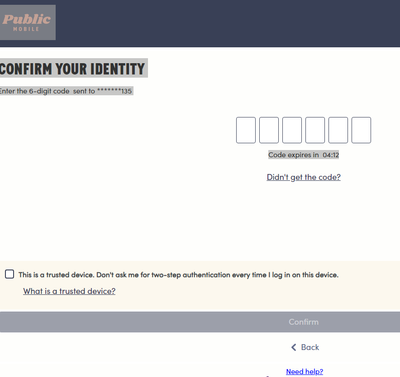
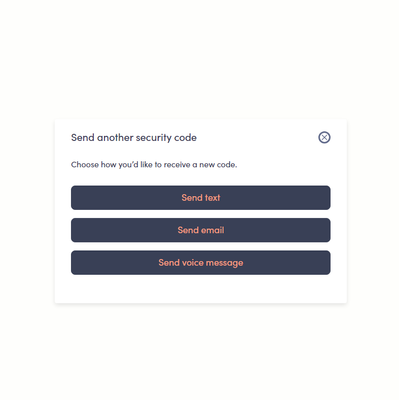
You can usually login into your account via 2FA email (instead of text)
Click on "didn't receive code" link and then should be offered email:
https://www.publicmobile.ca/en/get-help/articles/resume-service
Options
- Mark as New
- Subscribe
- Mute
- Subscribe to RSS Feed
- Permalink
- Report Inappropriate Content
03-09-2025 02:31 PM - edited 03-09-2025 02:33 PM
@Gillamchips58 wrote:i have lost my phone and would like to move my account to a new phone. how do i do this?
Hello @Gillamchips58
Do you have a new phone already? Do you have a new SIM card already? You can log into your account, I'd suggest changing your email address and password on your account right away if you still have access. Then go into your profile and change SIM cards to the new one and place it in your phone and reboot. It's that simple.
https://myaccount.publicmobile.ca/en/account/profile/change-sim-number

Related Content
- Lost phone and login in Get Support
- Wrong cell phone number linked to my account in Get Support
- Public Mobile possibly letting through scam texts without an attached phone number in Get Support
- iMessage still not activated after PM tells me I'm ready to go in Get Support
- Activation not completed in Get Support
