Turn on suggestions
Auto-suggest helps you quickly narrow down your search results by suggesting possible matches as you type.
Showing results for
- Community Home
- Get Support
- Re: xxxxxxxxxxx
Options
- Subscribe to RSS Feed
- Mark Topic as New
- Mark Topic as Read
- Float this Topic for Current User
- Subscribe
- Mute
- Printer Friendly Page
Xxxxx

Options
- Mark as New
- Subscribe
- Mute
- Subscribe to RSS Feed
- Permalink
- Report Inappropriate Content
09-16-2020 09:55 AM - edited 01-05-2022 03:54 PM
Please i needcregestre new credit cart for payment
Edit by mimmo removed personal info
Labels:
- Labels:
-
Payment
6 REPLIES 6


Options
- Mark as New
- Subscribe
- Mute
- Subscribe to RSS Feed
- Permalink
- Report Inappropriate Content
09-16-2020 12:28 PM - edited 09-16-2020 12:36 PM
@darlicious I can't change message tags. I'll move it.
@Rawanabdulkadim As for changing plans, you can do that from within your self serve account. It would be wise to set the change to automaticallyboccur during the next renewal.

Options
- Mark as New
- Subscribe
- Mute
- Subscribe to RSS Feed
- Permalink
- Report Inappropriate Content
09-16-2020 10:00 AM - last edited on 09-16-2020 10:19 AM by mimmo
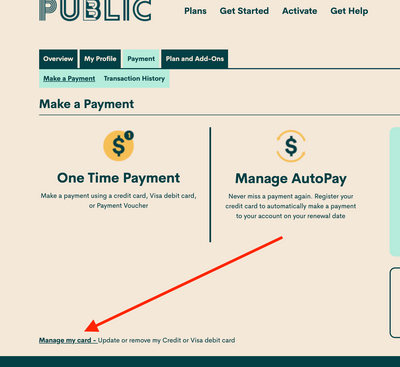
If you didn’t register a card at activation, you can do so by signing in to Self-Serve. Once signed in, click on the ‘Payment’ tab, then scroll to the bottom of the page and select ‘Register my Credit or Visa Debit Card’. Accepted credit cards (Visa, MasterCard, American Express) and Visa Debit cards that have been issued by Canadian or American financial institutions and are associated with addresses in Canada or the U.S. If you are using a payment card, leave the apartment/suite number in the payment information section blank.

Options
- Mark as New
- Subscribe
- Mute
- Subscribe to RSS Feed
- Permalink
- Report Inappropriate Content
09-16-2020 09:57 AM - edited 09-16-2020 09:57 AM
@Rawanabdulkadim You need to remove your phone number from your posts. Click the 3 dots top right and select edit. As for the credit card, go into your self serve account. Click payment tab at the top. Click Manage my card at the bottom.

Options
- Mark as New
- Subscribe
- Mute
- Subscribe to RSS Feed
- Permalink
- Report Inappropriate Content
09-16-2020 09:20 AM - edited 09-16-2020 09:21 AM
You can do this yourself within your account. Log in to your self serve account with your email as the username and the password you chose at activation. Click on plans and add ons. Choose the plan you want to change to. Scroll to the bottom of the page and choose "change at next renewal" and you can finish out your current cycle before it changes plans for your next cycle. If you choose change now you will lose the rest of your current plan. It's best to top up your account with enough funds to pay for your new plan to avoid any glitches when it switches over.
@computergeek541 Can you do some editing and moving? Thx.
Options
- Mark as New
- Subscribe
- Mute
- Subscribe to RSS Feed
- Permalink
- Report Inappropriate Content
09-16-2020 09:08 AM - edited 09-16-2020 09:08 AM
@Ana_H @Carlos_T It might be a good idea for someone to edit the post by @Rawanabdulkadim as it includes their phone number.
I just added the first 2 mods I saw on line lol.
Options
- Mark as New
- Subscribe
- Mute
- Subscribe to RSS Feed
- Permalink
- Report Inappropriate Content
09-16-2020 08:53 AM - edited 09-16-2020 08:56 AM
@Rawanabdulkadim Firstly, remove your phone number from your post. Click the 3 dots top right of post and select edit. Secondly, it's a bad idea to use your full name on a public forum (assuming that is your name), thirdly instead of piggy backing on a thread that has nothing to do with your issue, I suggest you start a new thread. Include a few details too. If you don't want to do that, try contacting a moderator with your problem. They will want a few more details from you too as well as proof that you own the account.
You can contact the mods one of 2 ways. Click the question mark bottom right of the browser as shown in the picture and open a ticket through the automated ticketing system;
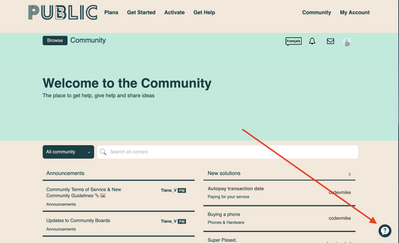
or you can contact them through direct messaging at the following link (note this way may take longer for a response);
https://productioncommunity.publicmobile.ca/t5/notes/composepage/note-to-user-id/22437
In either case you should receive a reply within 48 hours though typically they are much faster. Watch the envelope icon top right for a reply.

Related Content

