Turn on suggestions
Auto-suggest helps you quickly narrow down your search results by suggesting possible matches as you type.
Showing results for
- Community Home
- Get Support
- How/Why my phone plan switched without my request.
Options
- Subscribe to RSS Feed
- Mark Topic as New
- Mark Topic as Read
- Float this Topic for Current User
- Subscribe
- Mute
- Printer Friendly Page

Options
- Mark as New
- Subscribe
- Mute
- Subscribe to RSS Feed
- Permalink
- Report Inappropriate Content
03-06-2023 11:37 AM
I had a basic $15 plan for a year and a half,
Then I noticed a 40 dollar charge and then found my plan was set at 40 dollars unlimited talk/text.
How is it that the plan could change on its own?
I have not logged into the website in half a year.
I switched back to the $15 plan easily, but want to know what happened here.
I cannot afford the random extra charges.
Solved! Go to Solution.
Labels:
- Labels:
-
Plans
3 REPLIES 3

Options
- Mark as New
- Subscribe
- Mute
- Subscribe to RSS Feed
- Permalink
- Report Inappropriate Content
03-06-2023 11:48 AM
HI @aronwest Check your text history and try to find if PM has sent you promotional offers. You might have replied YES 😞
You can change it back to the $15 plan starting from next cycle. Just login to My Account and go to Plan & add-ons and change it back to $15. Remember to schedule the change using Change on next renewal

Options
- Mark as New
- Subscribe
- Mute
- Subscribe to RSS Feed
- Permalink
- Report Inappropriate Content
03-06-2023 11:41 AM - edited 03-06-2023 11:42 AM
There was a couple promotional offers via text that you only needed to reply yes to. Along with the more is merrier freebies where you would reply with yes2 to.
Maybe you replied to them all.


Options
- Mark as New
- Subscribe
- Mute
- Subscribe to RSS Feed
- Permalink
- Report Inappropriate Content
03-06-2023 11:40 AM
@aronwest there was a promotion text about the $40 plan before. All you need to do is to reply YES to opt in for the plan change.
There is a chance you replied by mistake 😞
It might be too late to change for this month. But you can change the plan back to $15 for next cycle
Please login to My Account, go to Plan & addon page and click Change My plan and change it back to $15 using the option Change plan on renewal date (DO NOT USE Change plan now option)
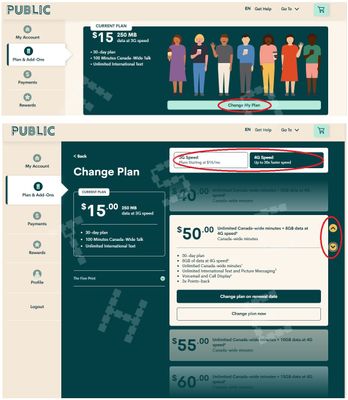
And if it is Day 1 of the new $40 plan cycle, maybe it worth to open ticket with PM support to see if they can help to roll back. But if it has been much longer than 1 days, I doubt they can do anything
Please open ticket with PM support using Chatbot:
1. Please open ticket via Chatbot (need access to My Account): At https://publicmobile.ca/chatbot.
Start by typing "Submit a ticket", then click "Contact Us", Then click "Other", then click "Click here to submit a ticket ↗"
2. If you have trouble with Chatbot or you don't have access to My Account: Private message CS Agent at:
https://productioncommunity.publicmobile.ca/t5/notes/composepage/note-to-user-id/22437
**Monitor your Community inbox (envelope icon on the top right) after the ticket is opened. CS Agent will reply to you there


