Turn on suggestions
Auto-suggest helps you quickly narrow down your search results by suggesting possible matches as you type.
Showing results for
- Community Home
- Get Support
- Going crazy
Options
- Subscribe to RSS Feed
- Mark Topic as New
- Mark Topic as Read
- Float this Topic for Current User
- Subscribe
- Mute
- Printer Friendly Page
Going crazy

Options
- Mark as New
- Subscribe
- Mute
- Subscribe to RSS Feed
- Permalink
- Report Inappropriate Content
06-15-2025
09:33 AM
- last edited on
06-15-2025
02:21 PM
by
computergeek541

I'm new today and can't believe how useless their bot is.
I signed up and paid. Got my new phone number and asked for an eSIM. Couldn't download the eSIM even using the QR code. Can't get a new QR code anywhere, and can't login because they need to send a 6 digit code to the number that doesn't work.
I'm loosing my mind. This referral sucks.
Labels:
- Labels:
-
Joining Public
5 REPLIES 5

Options
- Mark as New
- Subscribe
- Mute
- Subscribe to RSS Feed
- Permalink
- Report Inappropriate Content
06-15-2025 09:48 AM
so, the esim was already there. You shouldn't have deleted the esim. eSIMs are one time install.
now, you have to contact PM to help. Please message them
https://productioncommunity.publicmobile.ca/t5/notes/composepage/note-to-user-id/22437
CS_Agent will reply to your community inbox, check here:
https://productioncommunity.publicmobile.ca/t5/notes/privatenotespage
Options
- Mark as New
- Subscribe
- Mute
- Subscribe to RSS Feed
- Permalink
- Report Inappropriate Content
06-15-2025 09:46 AM
I did all of this but even the QR code didn't work. I checked online and then deleted the Public eSIM to replace it with another but by then I couldn't get in to my account because my phone number wasn't active.
Options
- Mark as New
- Subscribe
- Mute
- Subscribe to RSS Feed
- Permalink
- Report Inappropriate Content
06-15-2025 09:40 AM
The details are simple. Fix the bot to, at the very least, answer simple questions like, "Get new eSIM card."

Options
- Mark as New
- Subscribe
- Mute
- Subscribe to RSS Feed
- Permalink
- Report Inappropriate Content
06-15-2025 09:39 AM - edited 06-15-2025 09:42 AM
You might not need to the esim QR Code after all, there is a chance that the error was there because the Public Mobile esim is already installed and just not properly enabled
On Android: Check your Sim Card Manager and see if a Public Mobile eSim is there. If so, make sure it is enabled.
On iPhone: check Settings > Celluar and see if the eSIM is there. If it is, make sure the PM eSIM is set as Primary on "Cellular Plan Label" and "Turn on This Line" is toggled on

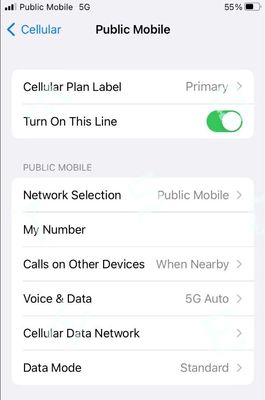
If the Public Mobile eSIM is there, disable or delete those non PM sim (eSIM/Physical sim).
If the non-PM sim is physical, remove it. If the non-PM sim is an esim, disable using the SIM Manager on the phone (or set as Secondary and turn off "Turn on this line" for this non-PM esim)
Then reboot the phone and click Reset All Networks on your phone and it will work. (Please note that Reset all Networks will also erase your saved Wifi and Bluetooth connections, but you just need to add them back after). Also, it is possible you have to reset it multiple times for it to work.
if it still does not work, open ticket with PM by private message CS Agent using this link:
https://productioncommunity.publicmobile.ca/t5/notes/composepage/note-to-user-id/22437
**Monitor your Community inbox (envelope icon on the top right) after ticket submitted, CS Agent will reply to you there will reply to you there
Options
- Mark as New
- Subscribe
- Mute
- Subscribe to RSS Feed
- Permalink
- Report Inappropriate Content
06-15-2025 09:35 AM
The app should have installed the esim for you already, check the Sim Manager or Settings ->Cellular again. If it is there, enable it and set as Primary and Reset Network Settings
If you really cannot find it, ask PM to help. Since you cannot properly login, you won't be able to open the preferred Chatbot ticket. So, you will need to message them here:
https://productioncommunity.publicmobile.ca/t5/notes/composepage/note-to-user-id/22437
CS_Agent will reply to your community inbox, check here:
https://productioncommunity.publicmobile.ca/t5/notes/privatenotespage

Related Content
- Re: Why does my data run out so fast? in Get Support
- My data usage this month is significantly higher than in previous months, and I’d like to understand in Get Support
- Lost phone , can’t log into account without to account in Get Support
- Scam callers using voIP . in Get Support
- Cannot log onto web-based account in Get Support
