Turn on suggestions
Auto-suggest helps you quickly narrow down your search results by suggesting possible matches as you type.
Showing results for
- Community Home
- Get Support
- Add-On Talk not Working
Options
- Subscribe to RSS Feed
- Mark Topic as New
- Mark Topic as Read
- Float this Topic for Current User
- Subscribe
- Mute
- Printer Friendly Page
Add-On Talk not Working

Options
- Mark as New
- Subscribe
- Mute
- Subscribe to RSS Feed
- Permalink
- Report Inappropriate Content
08-26-2020 03:57 PM - edited 01-05-2022 12:56 PM
4 REPLIES 4
Options
- Mark as New
- Subscribe
- Mute
- Subscribe to RSS Feed
- Permalink
- Report Inappropriate Content
08-26-2020 04:04 PM
@jasmineweng wrote:I purchased 5-dollar Canada wide long distance talk, the 500 min one, but its not working, i couldnt call out. I tried to re start my phone, still not working. Its charged on my bank account, but i dont see any usage details.
@jasmineweng Look in your self serve. If you see $5 in funds available you neglected to complete step 2 of the add on process. Go back, now that you have funds and purchase it.

Options
- Mark as New
- Subscribe
- Mute
- Subscribe to RSS Feed
- Permalink
- Report Inappropriate Content
08-26-2020 04:02 PM - edited 08-26-2020 04:05 PM
@jasmineweng wrote:I purchased 5-dollar Canada wide long distance talk, the 500 min one, but its not working, i couldnt call out. I tried to re start my phone, still not working. Its charged on my bank account, but i dont see any usage details.
Hi @jasmineweng ,
Is your account showing ACTIVE in your My Account?
If so, and you're done the 2 step process @gblackma and @Triguy have said, try rebooting your phone.
If it is inactive or suspended and it has been less than 90 day in that status, you will need to topup to the amount of your plan.

Options
- Mark as New
- Subscribe
- Mute
- Subscribe to RSS Feed
- Permalink
- Report Inappropriate Content
08-26-2020 04:02 PM - edited 08-26-2020 04:03 PM
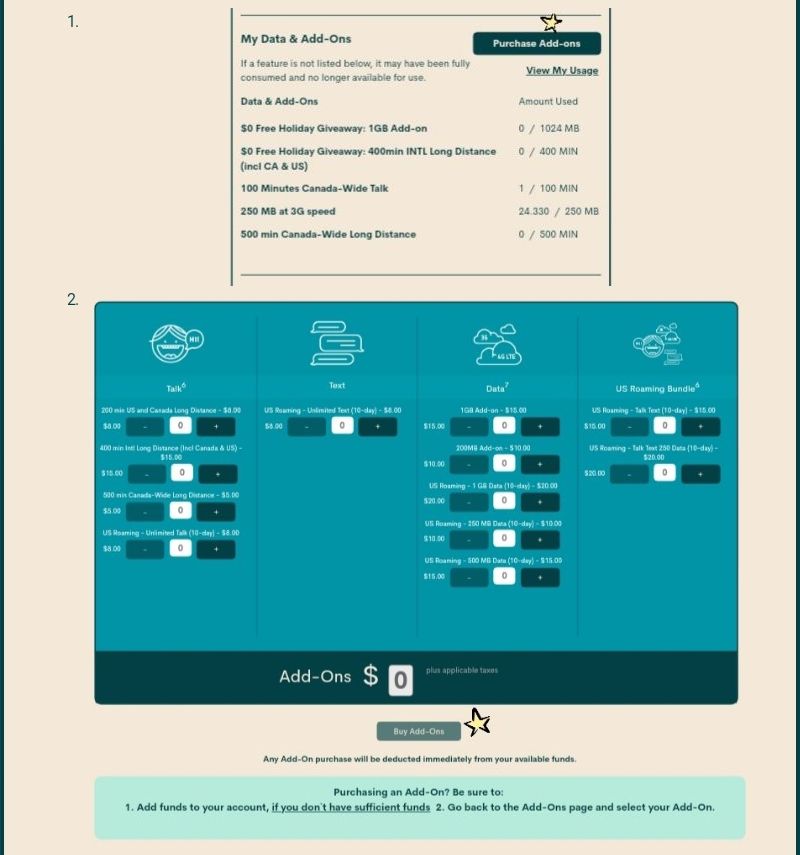
@jasmineweng it seems that you deposited the funds but failed to buy the addon. See below on where to do it. Stay safe.

Options
- Mark as New
- Subscribe
- Mute
- Subscribe to RSS Feed
- Permalink
- Report Inappropriate Content
08-26-2020 04:00 PM
Purchasing add-ons are a two step process. Make sure you add it to your account.
To purchase Add-Ons using your Self-Serve account, follow these steps:
- Click on ‘Purchase Add- Ons’ on the Overview tab and scroll down to the Add-On calculator.
- Click the plus sign (+) to add and the minus sign (-) to remove selected Add-ons.
- When you’ve added all your desired Add-Ons, click ‘Buy Add-Ons’ or ‘Make a Payment’ below the calculator:
- You will see ‘Make a Payment’ instead of ‘Buy Add-Ons’ if there are not enough funds in your account to make the purchase.
- If you don’t have sufficient funds to purchase the Add-Ons, you will be asked to make a one-time payment equal to the price of the Add-On, less your current available funds. Click ‘Submit’, then ‘Go back’: now the button below the calculator will say ‘Buy Add-Ons’.
- Select ‘Confirm my purchase’, and you’re off to the races!

