Turn on suggestions
Auto-suggest helps you quickly narrow down your search results by suggesting possible matches as you type.
Showing results for
- Community Home
- Get Support
- Account Expired
Options
- Subscribe to RSS Feed
- Mark Topic as New
- Mark Topic as Read
- Float this Topic for Current User
- Subscribe
- Mute
- Printer Friendly Page
Account Expired

Options
- Mark as New
- Subscribe
- Mute
- Subscribe to RSS Feed
- Permalink
- Report Inappropriate Content
04-25-2022 12:16 PM - edited 04-25-2022 12:18 PM
4 REPLIES 4

Options
- Mark as New
- Subscribe
- Mute
- Subscribe to RSS Feed
- Permalink
- Report Inappropriate Content
04-25-2022 02:50 PM
If your service isn't working it is most likely an autopay issue which seems to be happening more frequently especially since the chaos on April 1. One way to avoid this potential issue is to go on your account a day or 2 before and manually adding the amount needed to cover the next renewal, your autopay will still be on but they will cover it with the funds remaining in your balance first and don't have to worry about a hiccup from the autopay process

Options
- Mark as New
- Subscribe
- Mute
- Subscribe to RSS Feed
- Permalink
- Report Inappropriate Content
04-25-2022 02:20 PM
This is a standard message the day before your renewal date. The message also show that if you are on AutoPay or have sufficient funds to ignore message.
Options
- Mark as New
- Subscribe
- Mute
- Subscribe to RSS Feed
- Permalink
- Report Inappropriate Content
04-25-2022 01:21 PM - edited 04-25-2022 01:35 PM
Ignore your account status and let PM server to complete your renewal if your phone is still working and your account has enough available fund to pay for your renewal.


Options
- Mark as New
- Subscribe
- Mute
- Subscribe to RSS Feed
- Permalink
- Report Inappropriate Content
04-25-2022 12:26 PM - edited 04-30-2022 10:11 PM
@bshfxb Unfortunately, Autopay could fail for various reason, but usually a problem on the PM Side 😞
If you see your account showing Suspended and you don't have the phone service now, please make a manual payment:
1. Login to My Account, click Payment Tab and then click One Time Payment
2. Use the option "Other (Enter the desired payment amount)" and manually enter the Plan amount (this works better than using Amount Due)
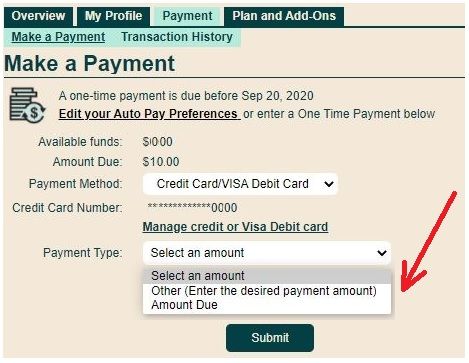
3. Once payment gone through successfully, click on the button "Reactivate current plan" if it is there
4. Then logoff from My Account and Reboot the phone and it should be good

