Turn on suggestions
Auto-suggest helps you quickly narrow down your search results by suggesting possible matches as you type.
Showing results for
- Community Home
- Get Support
- Wrong data usage
Options
- Subscribe to RSS Feed
- Mark Topic as New
- Mark Topic as Read
- Float this Topic for Current User
- Subscribe
- Mute
- Printer Friendly Page
Wrong data usage

Options
- Mark as New
- Subscribe
- Mute
- Subscribe to RSS Feed
- Permalink
- Report Inappropriate Content
06-20-2020 03:05 PM - edited 01-05-2022 11:46 AM
I haven't used my data yet, but showing in my usage as 966 MB used out of 1024 MB within two days of renewal
Labels:
- Labels:
-
Joining Public
5 REPLIES 5

Options
- Mark as New
- Subscribe
- Mute
- Subscribe to RSS Feed
- Permalink
- Report Inappropriate Content
06-20-2020 04:34 PM
@stephyannjose wrote:I haven't used my data yet, but showing in my usage as 966 MB used out of 1024 MB within two days of renewal
Check your phone to discover which (if any) apps are sucking your data.
If you don't know how, just google "check app data usage ios or android."

Options
- Mark as New
- Subscribe
- Mute
- Subscribe to RSS Feed
- Permalink
- Report Inappropriate Content
06-20-2020 03:41 PM
Make you turn off auto updates and GPS.
You can view your usage in your self serve account.
https://www.publicmobile.ca/en/on/get-help/articles/managing-your-data-usage

Options
- Mark as New
- Subscribe
- Mute
- Subscribe to RSS Feed
- Permalink
- Report Inappropriate Content
06-20-2020 03:35 PM - edited 06-20-2020 03:36 PM
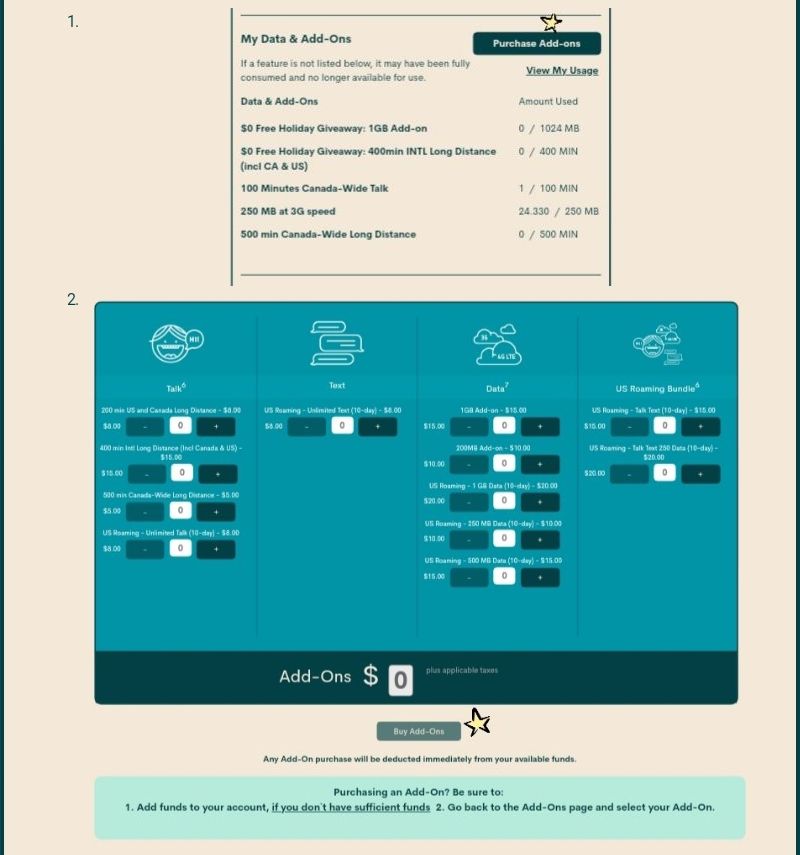
@stephyannjose if you do find that that you are out of data. You can look into buying the $15 1 gig data addon. Here's an article on buying add ons. https://www.publicmobile.ca/en/on/get-help/articles/purchase-add-ons-through-self-serve . Its a 2 step process add the funds and then buy it. See below on where to do it.

Options
- Mark as New
- Subscribe
- Mute
- Subscribe to RSS Feed
- Permalink
- Report Inappropriate Content
06-20-2020 03:30 PM - edited 06-20-2020 03:41 PM
Do you take screenshots before and after renewal? It sounds like your data did not reset after renewal. Do you know how you used last month? Have you reset your data tracker in your phone? What does it show for your previous 30 days?
Contact the moderators as suggested by @gblackma and if it's a case of it not resetting the moderators can easily do that. You can also look at your daily usage history and add up the twice daily web usage updates since renewal to see if they match what they claim is used....that will help you determine if it reset properly at renewal.
Options
- Mark as New
- Subscribe
- Mute
- Subscribe to RSS Feed
- Permalink
- Report Inappropriate Content
06-20-2020 03:12 PM - edited 06-20-2020 03:13 PM
@stephyannjose they are normally pretty good at monitering your usage. Check your usage history for the last 2 days in your self service account and your app usage on your phone to see who the major culprits are. If you still feel that an error occurred, then contact the moderators and ask them to to look into it for you. There are 2 ways to contact the Moderator Team:
- Faster response- Get help with your account the easy way by starting a conversation with our virtual assistant, SIMon. It’ll take you to relevant help articles, or if it’s something more urgent, it can help you submit a ticket to the Moderator Team. Click here to get started.
- Slower- Alternatively, you can send a private message to the Moderators by clicking here. You’ll need to be logged in to your Community account for the link to work.
Once connected to Simon, you will be asked to log in again with your community user name and password. Please do, this allows you to continue and send your message.
- Check your private message sent box (click on the envelope top right of your screen) to make sure the message was sent.
- Keep an eye on the envelope top right of your screen. The mods answer will show up there. When it does, you will be asked to verify your self service account, with your password and login. Doing so allows the process to continue.Stay safe.
Welcome to PM .

Related Content
- i purchased a wrong monthly data add ons, can u help to reverse the transaction? in Get Support
- Trying to upgrade my plan in Get Support
- How does one unblock the usage history block? in Get Support
- Data usage recorded on iPhone is very different from data usage recorded by Public Mobile in Get Support
- How to view current plan details? in Get Support
