Turn on suggestions
Auto-suggest helps you quickly narrow down your search results by suggesting possible matches as you type.
Showing results for
- Community Home
- Get Support
- Re: How to stop the emails
Options
- Subscribe to RSS Feed
- Mark Topic as New
- Mark Topic as Read
- Float this Topic for Current User
- Subscribe
- Mute
- Printer Friendly Page

Options
- Mark as New
- Subscribe
- Mute
- Subscribe to RSS Feed
- Permalink
- Report Inappropriate Content
05-27-2020 10:24 PM - edited 01-05-2022 12:03 PM
Hi just wondering if there was a way to stop emails being sent for participating in the community
Solved! Go to Solution.
Labels:
- Labels:
-
Service
8 REPLIES 8

Options
- Mark as New
- Subscribe
- Mute
- Subscribe to RSS Feed
- Permalink
- Report Inappropriate Content
05-28-2020 10:22 AM
Right on!!! Both my wife and I use 2, what I call, junk emails. I guess I could call them junk email collectors!! I have a few emails with my name in it, reserved for friends and family and the odd company such as Public Mobile. And oddly enough the two junk email collectors get a lot of spam of all types. I wonder why?? And when a store asks me for my postal code it is my old address in Calgary.
Options
- Mark as New
- Subscribe
- Mute
- Subscribe to RSS Feed
- Permalink
- Report Inappropriate Content
05-28-2020 07:42 AM
@LurganIeUk I do the same thing. Every time I give a retailer the email address they always look at me like "seriously, that's for real?" lol. It is I assure them. That account loads up with spam like it's nobodies business! I also use it when I am required to sign up for what I will call "non essential" websites or services. Very few people / businesses have my main email.
Options
- Mark as New
- Subscribe
- Mute
- Subscribe to RSS Feed
- Permalink
- Report Inappropriate Content
05-27-2020 10:42 PM
Well that was easy. Thanks everyone
Options
- Mark as New
- Subscribe
- Mute
- Subscribe to RSS Feed
- Permalink
- Report Inappropriate Content
05-27-2020 10:37 PM
Turn off being notified if you are tagged too.
If you don’t like your email cluttered....what I did was.....used the email that is associated with My Account......then forward all emails to a different email address. I have a couple of what I call junk emails.......then if a retailer or? asks me my email address.....that is the ones I give out. My name is NOT in the email.
Options
- Mark as New
- Subscribe
- Mute
- Subscribe to RSS Feed
- Permalink
- Report Inappropriate Content
05-27-2020 10:35 PM
@Carniam click on your community icon- my settings- scrol down to the middle and tick the box next to " Don't send me any community emails " - save. Stay safe
Options
- Mark as New
- Subscribe
- Mute
- Subscribe to RSS Feed
- Permalink
- Report Inappropriate Content
05-27-2020 10:33 PM
go to your community account settings
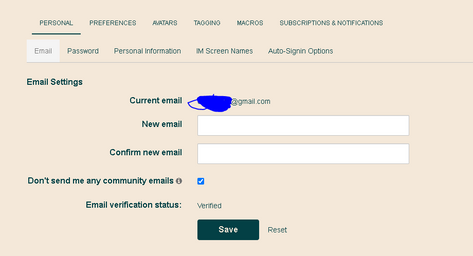
check the dont send me any community emails
Options
- Mark as New
- Subscribe
- Mute
- Subscribe to RSS Feed
- Permalink
- Report Inappropriate Content
05-27-2020 10:32 PM
Find what topics/threads you are participating in.
Unsubscribe to every topic.
Go to your profile and turn off notifications for responding to a topic.
Options
- Mark as New
- Subscribe
- Mute
- Subscribe to RSS Feed
- Permalink
- Report Inappropriate Content
05-27-2020 10:31 PM
Right. You're in Account.
Click on your little hot air balloon icon where you signed into Community and in there you'll see My Settings.

