Turn on suggestions
Auto-suggest helps you quickly narrow down your search results by suggesting possible matches as you type.
Showing results for
- Community Home
- Get Support
- Cannot use mobile data iPhone XR
Options
- Subscribe to RSS Feed
- Mark Topic as New
- Mark Topic as Read
- Float this Topic for Current User
- Subscribe
- Mute
- Printer Friendly Page
Cannot use mobile data iPhone XR

Options
- Mark as New
- Subscribe
- Mute
- Subscribe to RSS Feed
- Permalink
- Report Inappropriate Content
07-23-2019 03:10 PM - edited 01-05-2022 06:03 AM
Hi, I am a visitor from the US, and I purchased a public mobile sim a couple of days ago with a $50 unlimited text and calls between Canada and US and 8 GB data plan. I am not being able to use mobile data even though it is activated. Under the Cellular data settings, I typed in "sp.mb.com" for APN and left Username and Password blank. There no other options like MMSC/proxy. I use an iPhone XR and everything else seems to be working fine. Can someone help me activate my mobile data? Thank You, Abid
Labels:
- Labels:
-
Phones
13 REPLIES 13

Options
- Mark as New
- Subscribe
- Mute
- Subscribe to RSS Feed
- Permalink
- Report Inappropriate Content
07-25-2019 01:05 PM
make sure to also check online and go a google search. Somthimes the phone have a problem that you will find the solution to in online forums because of the 1000's of people reporting or asking questions in those places.
I had a similar problem and I found out more about the prblem and that it was a problem some other people had.
As far as I know most people with public moblie most likely have a android phone

Options
- Mark as New
- Subscribe
- Mute
- Subscribe to RSS Feed
- Permalink
- Report Inappropriate Content
07-23-2019 06:40 PM
@srlawren wrote:As for your issues @abidhq, I'm tagging @CalgaryBen to see if he has any suggestions.
@abidhq are you able to test true MMS (picture/video messaging) with a non-iMessage user? If this works (you can receive/send MMS), then it just confirms the correct APN is set, and you've acquired data connection.
I would recommend checking to see if any config/VPN profiles are installed and blocking access. See this post for details on that and how to remove them. Also see if you've blocked cell data for apps (as a measure to control cell data usage) by referring to this post. Between those two, there's a very good chance you'll get things working...

Options
- Mark as New
- Subscribe
- Mute
- Subscribe to RSS Feed
- Permalink
- Report Inappropriate Content
07-23-2019 06:14 PM
@Singh491 wrote:Right now I’m in US and it either use AT&T 3G or either T-Mobile 3G, But It you getting bad T-Mobile signal with E on top you can’t use internet while on phone call.
@Singh491 I'm not sure how this is relvant. The OP is visiting Canada and trying to use a Public Mobile (Canadian) SIM, Also: PM offers no 2G ("E") service, so unless they are still using their US-based SIM card and happen to be roaming on Rogers, they are never going to see E(dge) here.
As for your issues @abidhq, I'm tagging @CalgaryBen to see if he has any suggestions.
>>> ALERT: I am not a moderator. For account or activation assistance, please click here.

Options
- Mark as New
- Subscribe
- Mute
- Subscribe to RSS Feed
- Permalink
- Report Inappropriate Content
07-23-2019 03:58 PM
@abidhqI would suggest swapping your SIM card with another phone and see if it is a problem with your account or the phone.. if it is you would need to contact the Moderators via this link https://productioncommunity.publicmobile.ca/t5/notes/composepage/note-to-user-id/22437

Options
- Mark as New
- Subscribe
- Mute
- Subscribe to RSS Feed
- Permalink
- Report Inappropriate Content
07-23-2019 03:42 PM
Right now I’m in US and it either use AT&T 3G or either T-Mobile 3G, But It you getting bad T-Mobile signal with E on top you can’t use internet while on phone call.
Options
- Mark as New
- Subscribe
- Mute
- Subscribe to RSS Feed
- Permalink
- Report Inappropriate Content
07-23-2019 03:41 PM
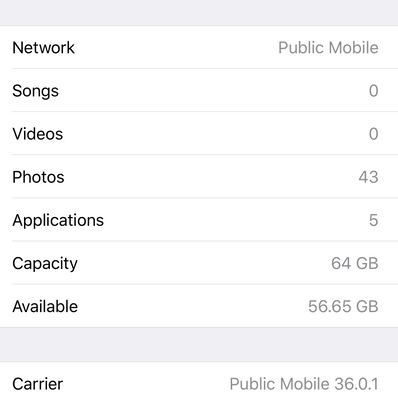
I bought the sim and plan two days ago. This is what shows up:

Options
- Mark as New
- Subscribe
- Mute
- Subscribe to RSS Feed
- Permalink
- Report Inappropriate Content
07-23-2019 03:41 PM

Options
- Mark as New
- Subscribe
- Mute
- Subscribe to RSS Feed
- Permalink
- Report Inappropriate Content
07-23-2019 03:38 PM
Carrier is listed as Public Mobile, the same as the picture.
Options
- Mark as New
- Subscribe
- Mute
- Subscribe to RSS Feed
- Permalink
- Report Inappropriate Content
07-23-2019 03:35 PM
It is unlocked. I will try that, thanks.
Options
- Mark as New
- Subscribe
- Mute
- Subscribe to RSS Feed
- Permalink
- Report Inappropriate Content
07-23-2019 03:33 PM
Here is your quick solution:
1. Goto Setting
2. Goto Celllular
3. Select Cellular data option
4. Turn on the roaming , if still not work reply here.

Options
- Mark as New
- Subscribe
- Mute
- Subscribe to RSS Feed
- Permalink
- Report Inappropriate Content
07-23-2019 03:24 PM
@abidhq wrote:
Hi, I am a visitor from the US, and I purchased a public mobile sim a couple of days ago with a $50 unlimited text and calls between Canada and US and 8 GB data plan. I am not being able to use mobile data even though it is activated. Under the Cellular data settings, I typed in "sp.mb.com" for APN and left Username and Password blank. There no other options like MMSC/proxy. I use an iPhone XR and everything else seems to be working fine. Can someone help me activate my mobile data? Thank You, Abid
@abidhq That setting you see on your phone is the hotspot setting fro PM. My understanding is that on that phone the settings get automatically populated. Some customers mentioned signing into their itunes account while on WiFi will download the latest carrier updates. If that doesn't work maybe try resetting network settings as @will13am suggested.
Options
- Mark as New
- Subscribe
- Mute
- Subscribe to RSS Feed
- Permalink
- Report Inappropriate Content
07-23-2019 03:17 PM - edited 07-23-2019 03:23 PM
@abidhqYou shouldn't need to mess with APN (that's only for Android).
What is your carrier profile listed as? Under Settings -> General -> About (like below).
Swap your SIM card to another phone to see if data is working. If it is not then it requires a moderator's intervention. Also go into your selfserve account to make sure your 8Gb is listed on the front page.. if it is not there that means you have used up all the data.
I would suggest just walk into an Apple store to get it sorted out rather than us going back and forth to diagnoise and tons of ways to try to make it working.


Options
- Mark as New
- Subscribe
- Mute
- Subscribe to RSS Feed
- Permalink
- Report Inappropriate Content
07-23-2019 03:16 PM
By chance is the phone SIM locked? If not, perhaps there's a network reset that might help clear old settings and acquire new ones.

Related Content
