Turn on suggestions
Auto-suggest helps you quickly narrow down your search results by suggesting possible matches as you type.
Showing results for
- Community Home
- Get Support
- Re: Cannot get plan details or view payment option...
Options
- Subscribe to RSS Feed
- Mark Topic as New
- Mark Topic as Read
- Float this Topic for Current User
- Subscribe
- Mute
- Printer Friendly Page
Cannot get plan details or view payment options

Options
- Mark as New
- Subscribe
- Mute
- Subscribe to RSS Feed
- Permalink
- Report Inappropriate Content
11-06-2020 10:06 PM - edited 01-05-2022 04:02 PM
4 REPLIES 4


Options
- Mark as New
- Subscribe
- Mute
- Subscribe to RSS Feed
- Permalink
- Report Inappropriate Content
11-06-2020 10:48 PM
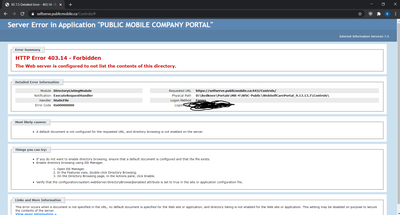
@tbendubois , that is a pretty strange looking output. I rarely have issues with the self serve but of all the errors I have encountered, I can't say I have seen anything that look like this. Anyway, clearing browser cache and trying again will quite often solve the problem. As always, make sure your browser is up to date.

Options
- Mark as New
- Subscribe
- Mute
- Subscribe to RSS Feed
- Permalink
- Report Inappropriate Content
11-06-2020 10:29 PM
@tbendubois Self-serve is working fine here. Please try using incognito/private browsing mode.
____________________________________________
I am not a mod. Do not send me private message with your personal info.
If you need to contact PM Customer Support Agent, Create a Ticket OR send a Private Message.

Anonymous
Not applicable
Options
- Mark as New
- Subscribe
- Mute
- Subscribe to RSS Feed
- Permalink
- Report Inappropriate Content
11-06-2020 10:14 PM
@tbendubois wrote:I am trying to reactivate my plan, I was able to make a payment but I cannot go to the Plan tab or click "change plan" on my profile page. Is this a website issue and will I get confirmation if my plan is active soon? I require a phone tomorrow.
When you log in, do you see a reactivate button at the top? Or is this all you get when you log in? You said you were able to make a payment. How? Does your plan now show as active? Maybe restart the phone for good measure and see if any services are working.

Options
- Mark as New
- Subscribe
- Mute
- Subscribe to RSS Feed
- Permalink
- Report Inappropriate Content
11-06-2020 10:10 PM
@tbendubois wrote:I am trying to reactivate my plan, I was able to make a payment but I cannot go to the Plan tab or click "change plan" on my profile page. Is this a website issue and will I get confirmation if my plan is active soon? I require a phone tomorrow.
This sounds to be a website issue. I would try again later. You could also try making a payment to reactivate your plan through *611 or by add a voucher to your account.

