Turn on suggestions
Auto-suggest helps you quickly narrow down your search results by suggesting possible matches as you type.
Showing results for
- Community Home
- Get Support
- Update autopay
Options
- Subscribe to RSS Feed
- Mark Topic as New
- Mark Topic as Read
- Float this Topic for Current User
- Subscribe
- Mute
- Printer Friendly Page

Options
- Mark as New
- Subscribe
- Mute
- Subscribe to RSS Feed
- Permalink
- Report Inappropriate Content
04-24-2020 08:33 PM - edited 01-05-2022 11:45 AM
9 REPLIES 9

Options
- Mark as New
- Subscribe
- Mute
- Subscribe to RSS Feed
- Permalink
- Report Inappropriate Content
04-24-2020 10:49 PM
@waynemartin1, why is there two blank posts from you? Was this done intentionally or non-intellionally.


Options
- Mark as New
- Subscribe
- Mute
- Subscribe to RSS Feed
- Permalink
- Report Inappropriate Content
04-24-2020 10:00 PM
threads merged

Options
- Mark as New
- Subscribe
- Mute
- Subscribe to RSS Feed
- Permalink
- Report Inappropriate Content
04-24-2020 09:37 PM
@waynemartin1 is your account suspended? We need some more information. What's the message when you login or call 611? Thanks. Stay safe.

Options
- Mark as New
- Subscribe
- Mute
- Subscribe to RSS Feed
- Permalink
- Report Inappropriate Content
04-24-2020 09:36 PM
Setting up AutoPay means that you earn $2 every 30 days!
To set up AutoPay, sign in to your Self-Serve account, select the ‘Payment’ tab, then ‘Register for AutoPay’. From here, you can sign up for AutoPay or remove the feature, if you no longer want payments to automatically occur. If you would like to change the card that is automatically charged, scroll to the bottom of the ‘Payment’ tab, then select ‘Manage my card’. This will allow you to update or remove your credit or Visa Debit card.
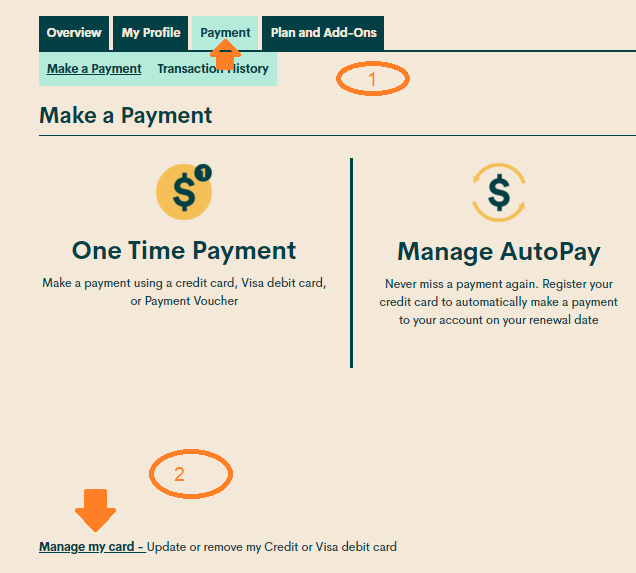
Two options are available: "Replace this credit card" and "Remove this credit card"
Use "Replace this credit card" to update the CC info
If you're having trouble registering or updating your credit card, here are a few tips you can try:
- Make sure the billing information you entered is exactly as shown on your credit card statement.
- Do not include any apartment/condo/suite numbers, and do not enter any special characters or abbreviations in the address line.
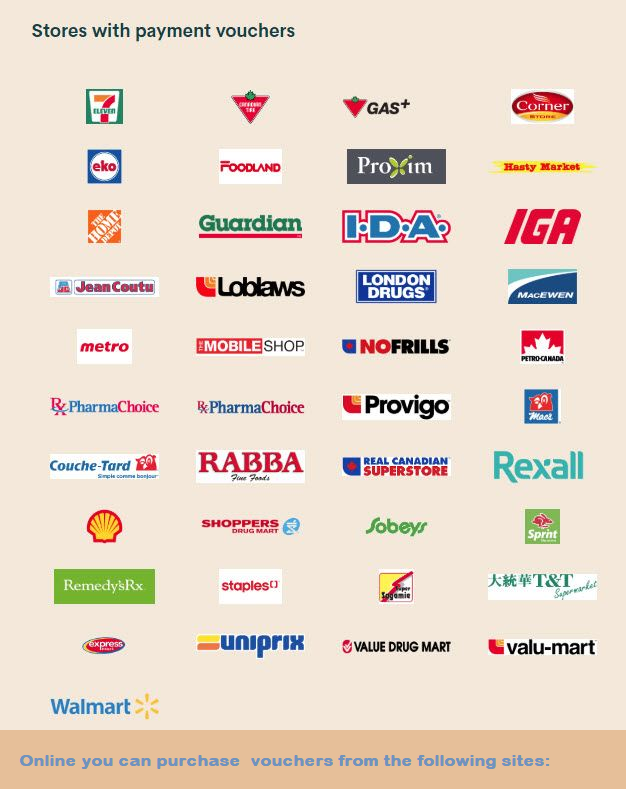
Hope this helps!
Options
- Mark as New
- Subscribe
- Mute
- Subscribe to RSS Feed
- Permalink
- Report Inappropriate Content
04-24-2020 09:31 PM
Options
- Mark as New
- Subscribe
- Mute
- Subscribe to RSS Feed
- Permalink
- Report Inappropriate Content
04-24-2020 08:41 PM
@waynemartin1 use the screenshot below to see where to go. Remove tje card currently on fil and re-enter the new one.
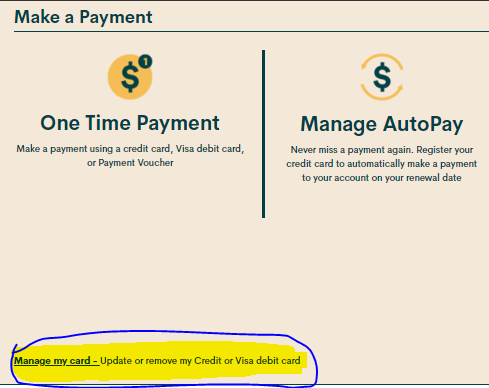
When entering your debit/ credit card information:
1. Enter the credit card address exactly as it appears on your statement ( capitalize all if necessary ).
2. Leave the apartment field blank, if applicable enter your apt in the street address field ie xxx - street address.
3. Enter your postal code without spaces ( if there is a space on the credit card statement then enter the first 5 digits only with the space).
Stay safe.
Options
- Mark as New
- Subscribe
- Mute
- Subscribe to RSS Feed
- Permalink
- Report Inappropriate Content
04-24-2020 08:39 PM

Options
- Mark as New
- Subscribe
- Mute
- Subscribe to RSS Feed
- Permalink
- Report Inappropriate Content
04-24-2020 08:37 PM
Go into aelf serve look for payment at the top, rhen click update autopay at the bottom. Some one will post this picture from a macro very soon...lol

Options
- Mark as New
- Subscribe
- Mute
- Subscribe to RSS Feed
- Permalink
- Report Inappropriate Content
04-24-2020 08:34 PM - edited 04-24-2020 08:36 PM
You can do it from your selfserve
Click on make a payment
Then in manage your cards
Than on replace this card
https://selfserve.publicmobile.ca/Overview/payment/new-oneTimeTopUp-Page/?PostbackParameter=Overview
Make sure you leave apt number blank in your address and don't make the space in your postal code

